Content Transfer Professional
Canon Inc.

1.9 stars89 reviews50,000+Free
ToolsEveryoneVersion 1.2.20.15Updated 4/13/2026, 3:19:47 AM
Open in StoreA high‑speed FTP transfer app for professional photographers working in sports, news, and other field environments.
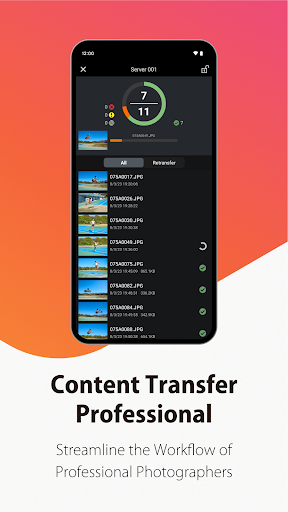
Still images and video captured with compatible cameras* can be quickly transferred to FTP servers via a mobile device.
For home or general use, Canon Camera Connect is recommended.
*For supported cameras, please refer to the [Supported Products] section.
[Key Features]
- Transfer of still images and videos shot with the camera to mobile devices
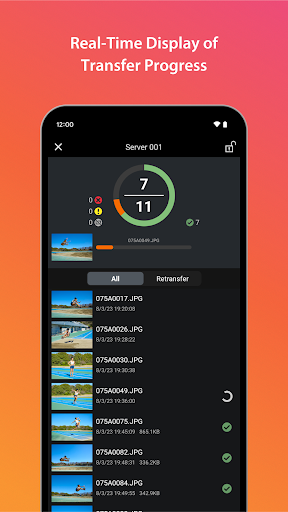
- Upload of still images and videos shot with the camera to FTP/FTPS/SFTP servers
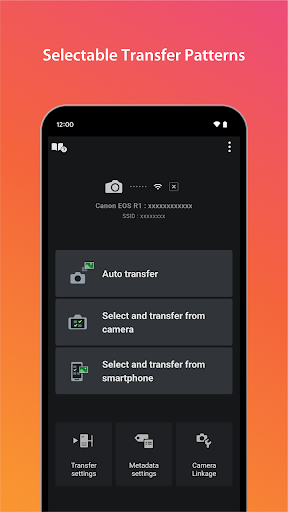
- Automatic Transfer of still images and videos shot with the camera
- Select & Transfer of still images and videos within the camera
- Select & Transfer from Mobile Device of still images and videos within the mobile device
- Filter & sort using conditions such as date and rating
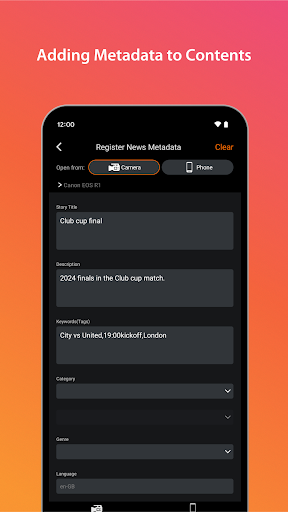
- Addition of metadata such as photographer’s name and license information and voice memos to still images and videos
- Input of metadata using pre-set templates
[Supported Products]
Supports Canon EOS R series cameras such as EOS R1, EOS R3, EOS R5, and EOS R6, as well as Canon Cinema EOS cameras including EOS C400, EOS C80, and EOS C50.
For details on other supported models, please visit the website below.
https://ssw.imaging-saas.canon/app/app.html?app=ctp
[System requirement]
Android 12/13/14/15/16
[Supported Files]
JPG,MP4,XML (Compliant with DPP002),WAV
[Important Notes]
- If application does not operate properly, try again after shutting down the application.
- Visit your local Canon Web pages for more details.
https://ssw.imaging-saas.canon/app/app.html?app=ctp
For customers using the Content Transfer Professional
Please make sure that you confirm and understand the following Cautions on Purchase and Use before installing this application.
Cautions on Purchase and Use
When connecting to the camera via USB, quit Camera Connect to ensure stable operation.
Content Transfer Professional is not available unless you purchase a subscription.
The offer will begin immediately after purchasing a subscription.
Content Transfer Professional is a subscription-based application. Upon initial registration, after your free trial period of 30 days, a fee per month will be charged to your Google account. The next date to be charged for this application can be found in Manage Subscription in your Google account. If it is during the free trial period, you will be charged on the renewal date.
Payment will be charged to your Google account at the confirmation of purchase. The subscription automatically renews unless it is canceled before the end of the current period, and you will continue to be charged. You can manage and cancel your subscriptions by going to Manage Subscription in your Google account after purchase.
*To customers who have already subscribed to a Canon Imaging App Service Plans plan, there is a difference between subscribing to a Google Play subscription and subscribing to a Canon Imaging App Service Plans plan.
If you have already subscribed to a Canon Imaging App Service Plans plan, note that you will be charged additionally when you subscribe to a Google Play subscription.
Still images and video captured with compatible cameras* can be quickly transferred to FTP servers via a mobile device.
For home or general use, Canon Camera Connect is recommended.
*For supported cameras, please refer to the [Supported Products] section.
[Key Features]
- Transfer of still images and videos shot with the camera to mobile devices
- Upload of still images and videos shot with the camera to FTP/FTPS/SFTP servers
- Automatic Transfer of still images and videos shot with the camera
- Select & Transfer of still images and videos within the camera
- Select & Transfer from Mobile Device of still images and videos within the mobile device
- Filter & sort using conditions such as date and rating
- Addition of metadata such as photographer’s name and license information and voice memos to still images and videos
- Input of metadata using pre-set templates
[Supported Products]
Supports Canon EOS R series cameras such as EOS R1, EOS R3, EOS R5, and EOS R6, as well as Canon Cinema EOS cameras including EOS C400, EOS C80, and EOS C50.
For details on other supported models, please visit the website below.
https://ssw.imaging-saas.canon/app/app.html?app=ctp
[System requirement]
Android 12/13/14/15/16
[Supported Files]
JPG,MP4,XML (Compliant with DPP002),WAV
[Important Notes]
- If application does not operate properly, try again after shutting down the application.
- Visit your local Canon Web pages for more details.
https://ssw.imaging-saas.canon/app/app.html?app=ctp
For customers using the Content Transfer Professional
Please make sure that you confirm and understand the following Cautions on Purchase and Use before installing this application.
Cautions on Purchase and Use
When connecting to the camera via USB, quit Camera Connect to ensure stable operation.
Content Transfer Professional is not available unless you purchase a subscription.
The offer will begin immediately after purchasing a subscription.
Content Transfer Professional is a subscription-based application. Upon initial registration, after your free trial period of 30 days, a fee per month will be charged to your Google account. The next date to be charged for this application can be found in Manage Subscription in your Google account. If it is during the free trial period, you will be charged on the renewal date.
Payment will be charged to your Google account at the confirmation of purchase. The subscription automatically renews unless it is canceled before the end of the current period, and you will continue to be charged. You can manage and cancel your subscriptions by going to Manage Subscription in your Google account after purchase.
*To customers who have already subscribed to a Canon Imaging App Service Plans plan, there is a difference between subscribing to a Google Play subscription and subscribing to a Canon Imaging App Service Plans plan.
If you have already subscribed to a Canon Imaging App Service Plans plan, note that you will be charged additionally when you subscribe to a Google Play subscription.
Developer email
contenttransferprofessional@mail.canon
Developer website
https://ssw.imaging-saas.canon/app/app.html?app=ctpReleased
Aug 1, 2024
Current version
1.2.20.15
Android version
12
Reviews & Ratings
1.9
out of 5
5
4
3
2
1
🚫 Very low user satisfaction
89 reviewsScreenshots