Inku: Calendar Planner AI
Inkboard, Inc.

4.5 stars45 reviews1,000+Free
ProductivityEveryoneVersion 1.3.0Updated 6/17/2026, 2:06:18 AM
Open in StoreYour Ultimate Calendar Planner & Organizer 📅
Take control of your day with the all-in-one Calendar Planner and daily schedule planner designed to help you stay focused, organized, and stress-free. Whether you’re managing work, school, personal projects, or juggling multiple responsibilities, this app is your go-to daily planner and daily organizer day planner that makes time management ⏰ simple and satisfying.
Our intuitive calendar organizer 🗓️ and daily calendar app let you see your entire day, week, or month at a glance. Combine your meetings, appointments, and daily tasks in one seamless view so nothing slips through the cracks. With a clean, easy-to-navigate interface, planning your daily agenda 📌 or building a consistent daily routine planner has never been easier or more motivating..
Stay on Top of Tasks ✅
Stay on top of your to-dos with the to do list widget 📝 and organizer to do list planner 📋. Quickly create new tasks, set deadlines, and categorize them by priority — from small errands to major projects. The built-in task tracker 📊 ensures everything stays on your radar, while the daily to do list helps you track progress one step at a time.
Get gentle nudges to keep you moving with the reminder app 🔔 and reminder widget ⏳. Set up daily reminder for meetings, workouts, or habits you want to build, and let your planner handle the rest.
Perfect for anyone seeking better focus or productivity, this app is especially helpful for those managing ADHD. The ADHD calendar 🧠 simplifies planning and minimizes overwhelm with visual timelines, color cues, and smart notifications. You’ll always know what’s next, stay on track, and reduce the stress of an unpredictable schedule.
Personalize & Sync Your Life ✨
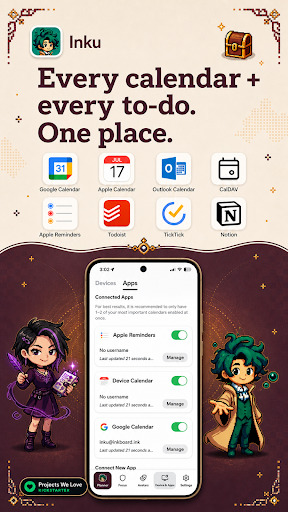
This scheduling app 📌 goes beyond simple reminders. Easily sync calendars 🔄 to bring together your personal, work, and shared events. You can personalize 🎨 your planner with custom colors, icons, and themes—turning your routine planner into something that truly reflects your lifestyle and energy.
Our advanced task tracker 📊 and time management ⏱️ features help you break big goals into smaller, actionable steps. Monitor progress, set achievable goals, and celebrate wins—no matter how small. Whether you prefer a structured daily routine planner or a flexible daily organizer, this app adapts to your workflow.
With the daily organizer day planner 🗂️, managing recurring events, daily habits, and long-term goals is effortless. The reminder widget 🔔 keeps your top priorities visible on your home screen, making your planner not just functional, but inspiring.
From mapping your daily agenda 📌 to organizing daily tasks, this app empowers you to reclaim your time, reduce stress, and enjoy more balance. Designed for clarity, flexibility, and mindfulness, it blends the best of a calendar organizer 🗓️, daily planner, and to do list planner 📝 into one elegant experience.
Start planning smarter today—your perfect day, every day, is just a tap away! 🌟
Download Inku today and take back control of your time.
Android Accessibility Service Disclosure
Inku uses the AccessibilityService API only for Focus Sessions. This helps Inku detect when you open an app that you selected to block, so it can show a blocking screen and help you stay focused.
Inku does not use Accessibility Service to read screen text, typed text, passwords, messages, photos, or other private content. The service is used only to detect foreground app changes for the app-blocking feature during focus sessions.
Take control of your day with the all-in-one Calendar Planner and daily schedule planner designed to help you stay focused, organized, and stress-free. Whether you’re managing work, school, personal projects, or juggling multiple responsibilities, this app is your go-to daily planner and daily organizer day planner that makes time management ⏰ simple and satisfying.
Our intuitive calendar organizer 🗓️ and daily calendar app let you see your entire day, week, or month at a glance. Combine your meetings, appointments, and daily tasks in one seamless view so nothing slips through the cracks. With a clean, easy-to-navigate interface, planning your daily agenda 📌 or building a consistent daily routine planner has never been easier or more motivating..
Stay on Top of Tasks ✅
Stay on top of your to-dos with the to do list widget 📝 and organizer to do list planner 📋. Quickly create new tasks, set deadlines, and categorize them by priority — from small errands to major projects. The built-in task tracker 📊 ensures everything stays on your radar, while the daily to do list helps you track progress one step at a time.
Get gentle nudges to keep you moving with the reminder app 🔔 and reminder widget ⏳. Set up daily reminder for meetings, workouts, or habits you want to build, and let your planner handle the rest.
Perfect for anyone seeking better focus or productivity, this app is especially helpful for those managing ADHD. The ADHD calendar 🧠 simplifies planning and minimizes overwhelm with visual timelines, color cues, and smart notifications. You’ll always know what’s next, stay on track, and reduce the stress of an unpredictable schedule.
Personalize & Sync Your Life ✨
This scheduling app 📌 goes beyond simple reminders. Easily sync calendars 🔄 to bring together your personal, work, and shared events. You can personalize 🎨 your planner with custom colors, icons, and themes—turning your routine planner into something that truly reflects your lifestyle and energy.
Our advanced task tracker 📊 and time management ⏱️ features help you break big goals into smaller, actionable steps. Monitor progress, set achievable goals, and celebrate wins—no matter how small. Whether you prefer a structured daily routine planner or a flexible daily organizer, this app adapts to your workflow.
With the daily organizer day planner 🗂️, managing recurring events, daily habits, and long-term goals is effortless. The reminder widget 🔔 keeps your top priorities visible on your home screen, making your planner not just functional, but inspiring.
From mapping your daily agenda 📌 to organizing daily tasks, this app empowers you to reclaim your time, reduce stress, and enjoy more balance. Designed for clarity, flexibility, and mindfulness, it blends the best of a calendar organizer 🗓️, daily planner, and to do list planner 📝 into one elegant experience.
Start planning smarter today—your perfect day, every day, is just a tap away! 🌟
Download Inku today and take back control of your time.
Android Accessibility Service Disclosure
Inku uses the AccessibilityService API only for Focus Sessions. This helps Inku detect when you open an app that you selected to block, so it can show a blocking screen and help you stay focused.
Inku does not use Accessibility Service to read screen text, typed text, passwords, messages, photos, or other private content. The service is used only to detect foreground app changes for the app-blocking feature during focus sessions.
Developer email
contact@inkboard.ink
Developer website
https://inkboard.inkReleased
May 12, 2026
Current version
1.3.0
Android version
9
Reviews & Ratings
4.5
out of 5
5
4
3
2
1
😊 Highly rated by users
45 reviewsScreenshots