Clock, Date and Weather Widget
aac

3.7 stars511 reviews100,000+Free
WeatherEveryoneVersion 1.1.1Updated 3/16/2026, 7:54:57 AM
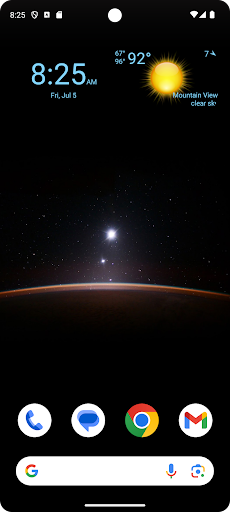
Open in StoreDisplay digital clock, date and current weather on your home screen.
Features:
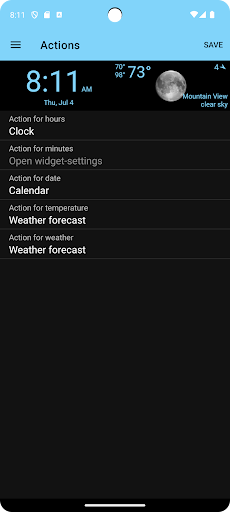
- Select widget click actions: tap on widget to show weather forecast, widget settings or pick any installed application
- Show the current weather for the device location or choose a specific location
- Show current weather, weather forecast and air quality
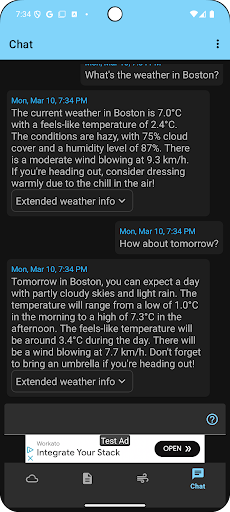
- Weather Assistant, ask questions about the weather and get weather-related recommendations for any location worldwide
- Widget preview during setup
- Material design UI
- Select widget text- and background-color from the material design color palettes.
Add the widget to your home screen:
- On a Home screen, touch and hold an empty space.
- Tap Widgets.
- Find Clock, Date and Weather Widget.
- To check the list of available widgets for the app, tap the app.
- Touch and hold a widget. You’ll get images of your Home screens.
- Slide the widget to where you want it. Lift your finger.
Tip: Touch and hold the Clock, Date and Weather Widget app and then tap Widgets.
Resize a widget:
- On your home screen, touch and hold the widget.
- Lift your finger.
- To resize, drag the dots.
- When you're done, tap outside the widget.
Features:
- Select widget click actions: tap on widget to show weather forecast, widget settings or pick any installed application
- Show the current weather for the device location or choose a specific location
- Show current weather, weather forecast and air quality
- Weather Assistant, ask questions about the weather and get weather-related recommendations for any location worldwide
- Widget preview during setup
- Material design UI
- Select widget text- and background-color from the material design color palettes.
Add the widget to your home screen:
- On a Home screen, touch and hold an empty space.
- Tap Widgets.
- Find Clock, Date and Weather Widget.
- To check the list of available widgets for the app, tap the app.
- Touch and hold a widget. You’ll get images of your Home screens.
- Slide the widget to where you want it. Lift your finger.
Tip: Touch and hold the Clock, Date and Weather Widget app and then tap Widgets.
Resize a widget:
- On your home screen, touch and hold the widget.
- Lift your finger.
- To resize, drag the dots.
- When you're done, tap outside the widget.
Developer email
kaaholst@gmail.com
Developer website
https://kaaholst.github.io/clock-widgetReleased
Apr 27, 2023
Current version
1.1.1
Android version
6.0
Reviews & Ratings
3.7
out of 5
5
4
3
2
1
😐 Reviews are mixed
511 reviewsScreenshots