Remote compatible Livebox
NiamorDev

3.1 stars11,187 reviews1,000,000+Free
ToolsEveryoneVersion 4.1.4Updated 10/8/2026, 2:38:34 PM
Open in StoreTurn your phone into a remote for your Livebox set-top box.
No more hunting for the remote or replacing dead batteries: control your box straight from your smartphone, in seconds, anywhere in your home.
✨ FEATURES
• Full remote: D-pad, volume, channels, playback, menu and more
• Set-top box or TV: drive the box, or the Orange TV app on your Samsung or LG TV, your Chromecast or your Android TV device.
• Décodeur Home Cinéma: also drive Orange's Android TV box, with zapping, voice control and keyboard.
• Macros: chain several commands into a single tap. Power on, pick the source, open your app.
• Custom layout: choose which buttons the remote shows, their size and their place.
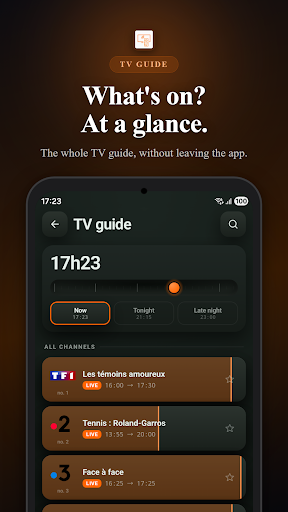
• Built-in TV guide: see what's on now, tonight or later, without leaving the app
• Your apps, one tap away: launch Netflix, Disney+, Prime Video… right from the remote
• Home screen widgets: change channels without even opening the app
• Make it yours: light or dark theme, accent colour and button shape
• Multi-box: control several devices and switch between them in one tap
📶 HOW IT WORKS
The app connects to your box over your home Wi-Fi. Make sure your phone and your box are on the same network.
⭐ PREMIUM
No ads, unlimited macros and layouts, widgets. Choose a monthly or yearly subscription, or a one-time purchase that lasts for life.
ℹ️ Independent app, not affiliated with Orange. "Livebox" is a trademark of its respective owner, mentioned for compatibility purposes only.
No more hunting for the remote or replacing dead batteries: control your box straight from your smartphone, in seconds, anywhere in your home.
✨ FEATURES
• Full remote: D-pad, volume, channels, playback, menu and more
• Set-top box or TV: drive the box, or the Orange TV app on your Samsung or LG TV, your Chromecast or your Android TV device.
• Décodeur Home Cinéma: also drive Orange's Android TV box, with zapping, voice control and keyboard.
• Macros: chain several commands into a single tap. Power on, pick the source, open your app.
• Custom layout: choose which buttons the remote shows, their size and their place.
• Built-in TV guide: see what's on now, tonight or later, without leaving the app
• Your apps, one tap away: launch Netflix, Disney+, Prime Video… right from the remote
• Home screen widgets: change channels without even opening the app
• Make it yours: light or dark theme, accent colour and button shape
• Multi-box: control several devices and switch between them in one tap
📶 HOW IT WORKS
The app connects to your box over your home Wi-Fi. Make sure your phone and your box are on the same network.
⭐ PREMIUM
No ads, unlimited macros and layouts, widgets. Choose a monthly or yearly subscription, or a one-time purchase that lasts for life.
ℹ️ Independent app, not affiliated with Orange. "Livebox" is a trademark of its respective owner, mentioned for compatibility purposes only.
Developer email
niamor.dev@gmail.com
Developer website
https://niamor.devReleased
Nov 20, 2015
Current version
4.1.4
Android version
8.0
Reviews & Ratings
3.1
out of 5
5
4
3
2
1
😕 Lower user ratings overall
11,187 reviewsScreenshots