Everything You: Adaptive Icons
NARIK DESIGN

4.4 stars200 reviews10,000+$0.99
PersonalizationEveryoneVersion 3.0.0Updated 5/3/2026, 12:48:37 PM
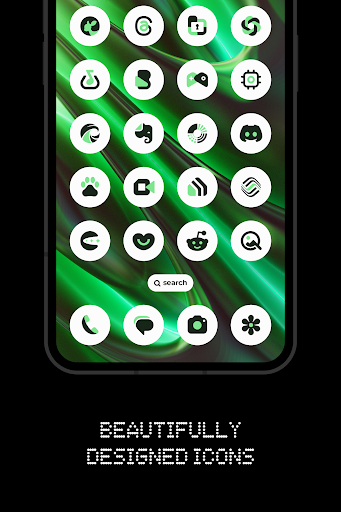
Open in StoreEverything Material You Adaptive Light/Dark Icons. These icons and Native widgets adapt to your wallpaper and system accent colors, as well as the light/dark mode of your device. Developed with the minimalist and innovative design philosophy, this app offers a clean, modern aesthetic.
.
FEATURES:
• 5800+ Adaptive Material You icons
• All-New Dashboard: A fresh, modern, fully redesigned UI
• Native Widgets: KWGT is no longer required!
• Brand New Widgets: Weather, clock, calendar, battery and music
• Icon Widgets: Add standalone app icons directly to your home screen
• Live Wallpapers: Exclusive new live wallpapers to bring your screen to life
• Premium Requests: Get missing icons themed faster with a 100% guarantee
• Cloud Wallpapers to perfect your setup
• Wallpaper effects
• Icon request tool
• Regular Updates
How to use this Icon pack?
• Install a supported Launcher
• Open Everything You Adaptive icons app, go to Apply section and Select Launcher to apply. If your launcher is not in a list make sure you apply it from your launcher settings
How do I change the colors of the icons?
• After changing wallpaper / accent system, you need to reapply icon pack (or apply another icon pack, and then immediately this one).
How do I change to light / dark mode?
• After changing device theme to light / dark, you need to reapply icon pack (or apply another icon pack, and then this one immediately).
SUPPORTED LAUNCHERS:
• Nothing Launcher
• Nova Launcher
• Lawnchair Launcher
• Niagara Launcher
• Smart Launcher 6
• Rootless Pixel Launcher
• Shade Launcher
• Lean Launcher
• Hyperion Launcher
• Posidon Launcher
• Stario Launcher
• Octopi Launcher
• Motorola Launcher
Colors Changing Automatically only with:
• Smart Launcher 6
• Lawnchair Launcher
• Hyperion
• Nova Launcher
• Niagara Launcher
• Stario Launcher
• Octopi Launcher
DISCLAIMER
• Colors change only works on Android 12 and above devices!
• You need to re-apply icon pack to change colors. Except for launchers that are marked (Change Colors Automaticaly).
• A supported launcher is required to use this icon pack!
• In Pixel Launcher (stock launcher in Pixel devices) work with app Icon Widgets.
• In Stock One UI Launcher use Theme Park.
• Motorola Launcher does not support shapeless icons, therefore this icon pack will not work with it.
• This app is not developed by NOTHING.
• Tutorials section inside the app which answers a lot of questions you may have. Please read it before you emailing your question.
CONTACT ME:
Twitter: https://twitter.com/narikdesign
Telegram: https://t.me/narikdesign
Instagram: https://www.instagram.com/narikdesign
.
FEATURES:
• 5800+ Adaptive Material You icons
• All-New Dashboard: A fresh, modern, fully redesigned UI
• Native Widgets: KWGT is no longer required!
• Brand New Widgets: Weather, clock, calendar, battery and music
• Icon Widgets: Add standalone app icons directly to your home screen
• Live Wallpapers: Exclusive new live wallpapers to bring your screen to life
• Premium Requests: Get missing icons themed faster with a 100% guarantee
• Cloud Wallpapers to perfect your setup
• Wallpaper effects
• Icon request tool
• Regular Updates
How to use this Icon pack?
• Install a supported Launcher
• Open Everything You Adaptive icons app, go to Apply section and Select Launcher to apply. If your launcher is not in a list make sure you apply it from your launcher settings
How do I change the colors of the icons?
• After changing wallpaper / accent system, you need to reapply icon pack (or apply another icon pack, and then immediately this one).
How do I change to light / dark mode?
• After changing device theme to light / dark, you need to reapply icon pack (or apply another icon pack, and then this one immediately).
SUPPORTED LAUNCHERS:
• Nothing Launcher
• Nova Launcher
• Lawnchair Launcher
• Niagara Launcher
• Smart Launcher 6
• Rootless Pixel Launcher
• Shade Launcher
• Lean Launcher
• Hyperion Launcher
• Posidon Launcher
• Stario Launcher
• Octopi Launcher
• Motorola Launcher
Colors Changing Automatically only with:
• Smart Launcher 6
• Lawnchair Launcher
• Hyperion
• Nova Launcher
• Niagara Launcher
• Stario Launcher
• Octopi Launcher
DISCLAIMER
• Colors change only works on Android 12 and above devices!
• You need to re-apply icon pack to change colors. Except for launchers that are marked (Change Colors Automaticaly).
• A supported launcher is required to use this icon pack!
• In Pixel Launcher (stock launcher in Pixel devices) work with app Icon Widgets.
• In Stock One UI Launcher use Theme Park.
• Motorola Launcher does not support shapeless icons, therefore this icon pack will not work with it.
• This app is not developed by NOTHING.
• Tutorials section inside the app which answers a lot of questions you may have. Please read it before you emailing your question.
CONTACT ME:
Twitter: https://twitter.com/narikdesign
Telegram: https://t.me/narikdesign
Instagram: https://www.instagram.com/narikdesign
Developer email
nrkdsgn@gmail.com
Developer website
https://twitter.com/NarikDesignReleased
Mar 2, 2024
Current version
3.0.0
Android version
12
Reviews & Ratings
4.4
out of 5
5
4
3
2
1
😊 Highly rated by users
200 reviewsScreenshots