Color Widgets 17 for KWGT
Geovanny Apps

0.0 stars50+$1.50
PersonalizationEveryone 10+Version v33e3k36t260330Updated 3/30/2026, 3:21:33 AM
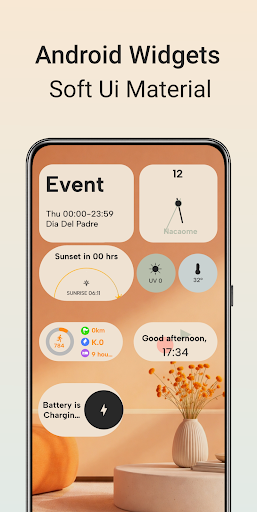
Open in StoreIf you want your home screen to stand out and be the envy of everyone, this is the app for you. Modern, premium widgets (Soft UI Material, warm colors) will make your screen look clean and organized. Widgets inspired by stock Android, plus Material Design support and dark mode. Discover special, unique widgets and enhance your phone's home screen.
Color Widgets 17 is not an independent app; it requires both KWGT Kustom Widget Maker and KWGT Kustom Widget Pro Key to function properly.
You will need 2 apps for it to work:
KWGT Kustom Widget Maker: Download here https://play.google.com/store/apps/details?id=org.kustom.widget
KWGT Pro Key: Download here https://play.google.com/store/apps/details?id=org.kustom.widget.pro
Works with any customizable launcher.
Suitable home screen boxes on phone would be: 7x4
While on tablet it would be: 4x10
How to Use:
1. Download both KWGT Kustom Widget Maker and KWGT Pro Key.
2. Press and hold on your home screen and select the KWGT widget.
3. Choose the desired widget size and drag it onto your home screen.
4. Tap the KWGT widget, then a from Color Widgets 17.
5. Done. What a beauty!
If the widget isn't the right size, you can use the scaling option in KWGT to adjust it to your liking.
If you encounter any issues or have questions, please reach out to us before leaving a low rating.
Instagram profile:
https://www.instagram.com/p/DRC4Uw1gOCk/?igsh=aTB0MHM5cnVubHBo
Privacy Policy and Terms of service.
To view our Privacy Policy and Terms of Service, please copy and open the links below in your browser.
https://docs.google.com/document/d/1iXBdFcIRzT5WGH6n3s2WYRUHpuer8nOTOe4or9CGm7Y/edit?usp=drivesdk
https://docs.google.com/document/d/1FHyqHV-VOduPuYFpxhnfpZ0JUeb6eqJDBeLWwrSI3Hw/edit?usp=drivesdk
Color Widgets 17 is not an independent app; it requires both KWGT Kustom Widget Maker and KWGT Kustom Widget Pro Key to function properly.
You will need 2 apps for it to work:
KWGT Kustom Widget Maker: Download here https://play.google.com/store/apps/details?id=org.kustom.widget
KWGT Pro Key: Download here https://play.google.com/store/apps/details?id=org.kustom.widget.pro
Works with any customizable launcher.
Suitable home screen boxes on phone would be: 7x4
While on tablet it would be: 4x10
How to Use:
1. Download both KWGT Kustom Widget Maker and KWGT Pro Key.
2. Press and hold on your home screen and select the KWGT widget.
3. Choose the desired widget size and drag it onto your home screen.
4. Tap the KWGT widget, then a from Color Widgets 17.
5. Done. What a beauty!
If the widget isn't the right size, you can use the scaling option in KWGT to adjust it to your liking.
If you encounter any issues or have questions, please reach out to us before leaving a low rating.
Instagram profile:
https://www.instagram.com/p/DRC4Uw1gOCk/?igsh=aTB0MHM5cnVubHBo
Privacy Policy and Terms of service.
To view our Privacy Policy and Terms of Service, please copy and open the links below in your browser.
https://docs.google.com/document/d/1iXBdFcIRzT5WGH6n3s2WYRUHpuer8nOTOe4or9CGm7Y/edit?usp=drivesdk
https://docs.google.com/document/d/1FHyqHV-VOduPuYFpxhnfpZ0JUeb6eqJDBeLWwrSI3Hw/edit?usp=drivesdk
Developer email
barahonageovanny520@gmail.com
Released
Jan 14, 2026
Current version
v33e3k36t260330
Android version
8.0
Screenshots