AI Video Background Remover
zwh.tec

4.1 stars3,186 reviews100,000+Free
Video Players & EditorsEveryoneVersion 1.7.5Updated 4/21/2026, 9:04:59 AM
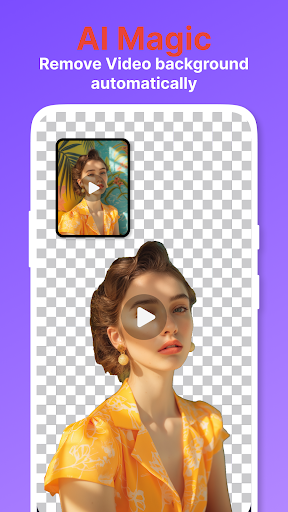
Open in StorePixelZap is an AI background remover and background changer for video, photo, and GIF. Remove backgrounds, cut out subjects, replace scenes, add outlines, and create clean content for social media, product photos, stickers, thumbnails, and memes.
Unlike cloud-based editors, PixelZap is built for private local processing. Your videos, photos, GIFs, and face or product images are processed on your device. Your media does not need to be uploaded to a cloud server for background removal.
What can PixelZap do?
PixelZap answers one simple need: remove or change backgrounds from your media quickly with AI.
Use it to:
• Remove background from video
• Change video background without a green screen
• Remove background from photo
• Create transparent PNG cutouts
• Erase background from GIFs
• Make white background product photos
• Add outline, stroke, neon border, or glow effects
• Create stickers, memes, thumbnails, ads, and social posts
AI Video Background Remover
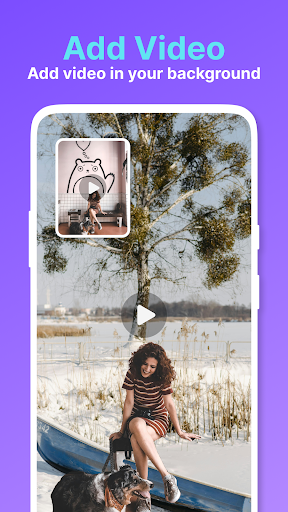
Need to remove a video background for TikTok, Instagram Reels, YouTube Shorts, ads, or stories? PixelZap detects the main subject and cuts it out automatically. Replace the background with a color, image, video, gradient, or transparent-style result.
It is useful for:
• Dance videos and creator clips
• Talking head videos and vlogs
• Product videos and demos
• Pet, car, bike, and object videos
• Green screen style effects without a real green screen
AI Photo Background Remover
PixelZap also works as an image background remover, photo background eraser, and cutout maker. Remove backgrounds from portraits, products, pets, cars, clothes, shoes, food, and objects. Make clean cutouts for online stores, profile photos, posters, and thumbnails.
Create:
• Transparent PNG images
• White background photos
• Product listing images
• Profile pictures
• Sticker-style cutouts
• Clean edges around hair, fur, and details
GIF Background Remover & Editor
Remove backgrounds from animated GIFs and create GIF stickers, reaction memes, and animated cutouts. Change GIF backgrounds, add outlines to moving subjects, and make shareable animations for chats and social media.
Background Changer & Creative Editor
After removing the background, use PixelZap to design a new look:
• Replace background with solid color, image, video, or gradient
• Add outline, stroke, glow, and border effects
• Create transparent-style video and GIF results
• Make cutout stickers from photos, videos, and GIFs
• Build thumbnails, ads, memes, posters, and branded visuals
Video Editing Toolkit
PixelZap includes simple tools to finish your edits:
• Trim and cut videos
• Crop videos for 1:1, 9:16, and 16:9
• Merge videos
• Compress video file size
• Convert common video formats
• Extract audio from video
Who is PixelZap for?
For creators: remove video backgrounds, change scenes, add outlines, and create short videos faster.
For online sellers: make white background product photos, transparent PNG product cutouts, and clean listing images.
For meme and sticker makers: remove GIF backgrounds, create animated stickers, and turn people, pets, products, or characters into fun cutouts.
For designers and marketers: make thumbnails, posters, ads, profile images, and branded content with consistent backgrounds.
Key Features
• AI background remover for video, photo, and GIF
• Video background remover without green screen
• Image background eraser and photo cutout maker
• GIF background remover and GIF editor
• Background changer with color, image, video, and gradient options
• Transparent PNG maker and sticker maker
• White background maker for product photos
• Outline, stroke, neon border, and glow effects
• Video trimmer, cropper, merger, compressor, converter, and audio extractor
• Local on-device processing for private media editing
PixelZap helps you remove backgrounds faster, change backgrounds easily, and create clean AI cutouts from videos, photos, and GIFs while keeping your media private on your device.
Unlike cloud-based editors, PixelZap is built for private local processing. Your videos, photos, GIFs, and face or product images are processed on your device. Your media does not need to be uploaded to a cloud server for background removal.
What can PixelZap do?
PixelZap answers one simple need: remove or change backgrounds from your media quickly with AI.
Use it to:
• Remove background from video
• Change video background without a green screen
• Remove background from photo
• Create transparent PNG cutouts
• Erase background from GIFs
• Make white background product photos
• Add outline, stroke, neon border, or glow effects
• Create stickers, memes, thumbnails, ads, and social posts
AI Video Background Remover
Need to remove a video background for TikTok, Instagram Reels, YouTube Shorts, ads, or stories? PixelZap detects the main subject and cuts it out automatically. Replace the background with a color, image, video, gradient, or transparent-style result.
It is useful for:
• Dance videos and creator clips
• Talking head videos and vlogs
• Product videos and demos
• Pet, car, bike, and object videos
• Green screen style effects without a real green screen
AI Photo Background Remover
PixelZap also works as an image background remover, photo background eraser, and cutout maker. Remove backgrounds from portraits, products, pets, cars, clothes, shoes, food, and objects. Make clean cutouts for online stores, profile photos, posters, and thumbnails.
Create:
• Transparent PNG images
• White background photos
• Product listing images
• Profile pictures
• Sticker-style cutouts
• Clean edges around hair, fur, and details
GIF Background Remover & Editor
Remove backgrounds from animated GIFs and create GIF stickers, reaction memes, and animated cutouts. Change GIF backgrounds, add outlines to moving subjects, and make shareable animations for chats and social media.
Background Changer & Creative Editor
After removing the background, use PixelZap to design a new look:
• Replace background with solid color, image, video, or gradient
• Add outline, stroke, glow, and border effects
• Create transparent-style video and GIF results
• Make cutout stickers from photos, videos, and GIFs
• Build thumbnails, ads, memes, posters, and branded visuals
Video Editing Toolkit
PixelZap includes simple tools to finish your edits:
• Trim and cut videos
• Crop videos for 1:1, 9:16, and 16:9
• Merge videos
• Compress video file size
• Convert common video formats
• Extract audio from video
Who is PixelZap for?
For creators: remove video backgrounds, change scenes, add outlines, and create short videos faster.
For online sellers: make white background product photos, transparent PNG product cutouts, and clean listing images.
For meme and sticker makers: remove GIF backgrounds, create animated stickers, and turn people, pets, products, or characters into fun cutouts.
For designers and marketers: make thumbnails, posters, ads, profile images, and branded content with consistent backgrounds.
Key Features
• AI background remover for video, photo, and GIF
• Video background remover without green screen
• Image background eraser and photo cutout maker
• GIF background remover and GIF editor
• Background changer with color, image, video, and gradient options
• Transparent PNG maker and sticker maker
• White background maker for product photos
• Outline, stroke, neon border, and glow effects
• Video trimmer, cropper, merger, compressor, converter, and audio extractor
• Local on-device processing for private media editing
PixelZap helps you remove backgrounds faster, change backgrounds easily, and create clean AI cutouts from videos, photos, and GIFs while keeping your media private on your device.
Developer email
zwh27816862@gmail.com
Developer website
https://v0-zhwh-website-clone.vercel.appReleased
Mar 12, 2025
Current version
1.7.5
Android version
7.0
Reviews & Ratings
4.1
out of 5
5
4
3
2
1
⚠️ Users report mixed experiences
3,186 reviewsScreenshots