Video to GIF & GIF Maker
zwh.tec

4.5 stars2,574 reviews50,000+Free
Video Players & EditorsEveryoneVersion 1.3.5Updated 10/10/2025, 8:28:47 AM
Open in StoreGIFLab is a simple GIF maker, video to GIF converter, photo to GIF creator, image to GIF tool, GIF editor, and GIF converter for Android. It helps you create animated GIFs from videos, photos, and images, edit GIFs with text, trim, crop, resize, speed, reverse, and loop tools, remove backgrounds with AI, and convert GIFs to MP4 video for easy sharing.
Make GIFs from videos
Turn video clips into smooth animated GIFs. Choose the best moment, trim the clip, adjust the output size, and create a shareable GIF for chats, memes, reactions, social posts, product previews, and short animations.
Use GIFLab to:
• Convert video to GIF
• Make GIFs from MP4 videos
• Turn short clips into looping GIFs
• Create reaction GIFs from videos
• Make meme GIFs from funny moments
• Export clear animated GIFs for sharing
Photo to GIF and image to GIF
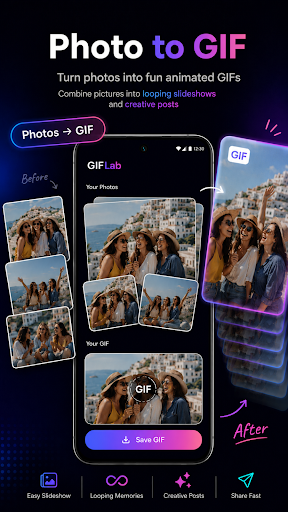
Create animated GIFs from photos, pictures, screenshots, and image sequences. Combine multiple images into a GIF slideshow for before-and-after ideas, travel memories, product demos, tutorials, profile content, and creative posts.
GIF editor for everyday creation
Edit GIFs with simple tools:
• Trim GIF and cut unwanted parts
• Crop GIF for square, vertical, or wide formats
• Resize GIF for different platforms
• Add text to GIF for captions and memes
• Change GIF speed for slow-motion or fast effects
• Reverse GIF for funny backward playback
• Loop GIF for continuous animation
• Extract frames from GIF or video
• Save frames as JPG or PNG images
AI GIF background remover
Remove backgrounds from animated GIFs with AI. Create transparent GIFs, clean GIF cutouts, GIF stickers, reaction GIFs, meme cutouts, and reusable animations for chats, posts, thumbnails, and creative projects.
AI photo background eraser
Remove photo backgrounds and save transparent PNG cutouts. Use cutout images in GIFs, stickers, memes, thumbnails, product images, profile photos, and social media content.
GIF to video converter
Convert GIF to MP4 video when you need a video file for apps, websites, or social platforms. Turn animated GIFs into easy-to-upload videos while keeping your motion content reusable.
Frame freeze and frame extractor
Capture the exact moment from a video or GIF. Extract a single frame and save it as a high-quality image for thumbnails, memes, previews, covers, tutorials, or quick sharing.
Useful for many creative needs
GIFLab can help you make:
• Video GIFs
• Photo GIFs
• Image GIFs
• Reaction GIFs
• Meme GIFs
• Looping GIFs
• Transparent GIFs
• GIF stickers
• Short animations
• Social media GIFs
• Product preview GIFs
• Tutorial GIFs
• GIF videos
Why choose GIFLab?
• One app for GIF making, GIF editing, and GIF converting
• Create GIFs from videos, photos, images, and MP4 clips
• Edit GIFs with trim, crop, resize, text, speed, reverse, loop, and frame tools
• Remove GIF and photo backgrounds with AI
• Make transparent GIFs and PNG cutouts
• Convert GIF to video
• Simple design for beginners and fast editing for creators
Common questions GIFLab helps with:
How do I convert a video to a GIF?
How do I make a GIF from photos?
How do I create a GIF from images?
How do I add text to a GIF?
How do I trim, crop, resize, or reverse a GIF?
How do I change GIF speed?
How do I remove a GIF background?
How do I make a transparent GIF?
How do I convert a GIF to MP4 video?
How do I extract a frame from a GIF or video?
GIFLab helps you create, edit, convert, and share GIFs in one place. Make animated GIFs from videos or photos, edit existing GIFs, remove backgrounds, create transparent GIFs, convert GIFs to video, and capture frames whenever you need.
Make GIFs from videos
Turn video clips into smooth animated GIFs. Choose the best moment, trim the clip, adjust the output size, and create a shareable GIF for chats, memes, reactions, social posts, product previews, and short animations.
Use GIFLab to:
• Convert video to GIF
• Make GIFs from MP4 videos
• Turn short clips into looping GIFs
• Create reaction GIFs from videos
• Make meme GIFs from funny moments
• Export clear animated GIFs for sharing
Photo to GIF and image to GIF
Create animated GIFs from photos, pictures, screenshots, and image sequences. Combine multiple images into a GIF slideshow for before-and-after ideas, travel memories, product demos, tutorials, profile content, and creative posts.
GIF editor for everyday creation
Edit GIFs with simple tools:
• Trim GIF and cut unwanted parts
• Crop GIF for square, vertical, or wide formats
• Resize GIF for different platforms
• Add text to GIF for captions and memes
• Change GIF speed for slow-motion or fast effects
• Reverse GIF for funny backward playback
• Loop GIF for continuous animation
• Extract frames from GIF or video
• Save frames as JPG or PNG images
AI GIF background remover
Remove backgrounds from animated GIFs with AI. Create transparent GIFs, clean GIF cutouts, GIF stickers, reaction GIFs, meme cutouts, and reusable animations for chats, posts, thumbnails, and creative projects.
AI photo background eraser
Remove photo backgrounds and save transparent PNG cutouts. Use cutout images in GIFs, stickers, memes, thumbnails, product images, profile photos, and social media content.
GIF to video converter
Convert GIF to MP4 video when you need a video file for apps, websites, or social platforms. Turn animated GIFs into easy-to-upload videos while keeping your motion content reusable.
Frame freeze and frame extractor
Capture the exact moment from a video or GIF. Extract a single frame and save it as a high-quality image for thumbnails, memes, previews, covers, tutorials, or quick sharing.
Useful for many creative needs
GIFLab can help you make:
• Video GIFs
• Photo GIFs
• Image GIFs
• Reaction GIFs
• Meme GIFs
• Looping GIFs
• Transparent GIFs
• GIF stickers
• Short animations
• Social media GIFs
• Product preview GIFs
• Tutorial GIFs
• GIF videos
Why choose GIFLab?
• One app for GIF making, GIF editing, and GIF converting
• Create GIFs from videos, photos, images, and MP4 clips
• Edit GIFs with trim, crop, resize, text, speed, reverse, loop, and frame tools
• Remove GIF and photo backgrounds with AI
• Make transparent GIFs and PNG cutouts
• Convert GIF to video
• Simple design for beginners and fast editing for creators
Common questions GIFLab helps with:
How do I convert a video to a GIF?
How do I make a GIF from photos?
How do I create a GIF from images?
How do I add text to a GIF?
How do I trim, crop, resize, or reverse a GIF?
How do I change GIF speed?
How do I remove a GIF background?
How do I make a transparent GIF?
How do I convert a GIF to MP4 video?
How do I extract a frame from a GIF or video?
GIFLab helps you create, edit, convert, and share GIFs in one place. Make animated GIFs from videos or photos, edit existing GIFs, remove backgrounds, create transparent GIFs, convert GIFs to video, and capture frames whenever you need.
Developer email
zwh27816862@gmail.com
Developer website
https://v0-zhwh-website-clone.vercel.appReleased
Mar 4, 2025
Current version
1.3.5
Android version
7.0
Reviews & Ratings
4.5
out of 5
5
4
3
2
1
😊 Highly rated by users
2,574 reviewsScreenshots