ヨドバシゴールドポイントカード
YODOBASHI CAMERA CO.,LTD.

Widget support.
By configuring your OS widget settings, you can access the point balance display and QR code display screen with a single touch. Please take advantage of this feature.
* You can use the app as a point card by displaying the QR code on the app screen and presenting it at the checkout counter in stores. You can earn and use Gold Points.
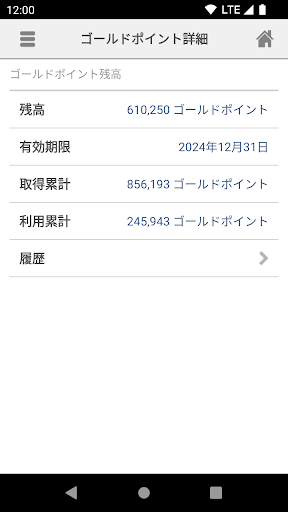
* You can also check your point balance, expiration date, and point usage history in real time.
* An internet connection is required to use the app.
① How to use the app after launching it
■ For customers who are already Yodobashi.com members
→ Please register by entering your Yodobashi.com member ID/password in the [Register Gold Point Card] section within the app.
■ For customers who are not yet Yodobashi.com members
→ After registering as a member on the Yodobashi.com website, please register by entering your Yodobashi.com member ID/password in the [Register Gold Point Card] section within the app.
(The procedure is as follows: [Register Gold Point Card] → [Yodobashi.com New Member Registration] within the app.)
◎Yodobashi.com Member Registration Site:
https://www.yodobashi.com/ec/support/member/entry/index.html
Once registration is complete in the app, a new point card number specifically for Android devices will be issued. You can then use it as a point card at the store register by displaying the QR code in the app.
② How to use as a point card in-store:
When paying, launch the app and press [Use Gold Point Card].
Present the QR code displayed on the screen to the salesperson before the bar at the bottom of the screen disappears.
Even if QR code reading is not possible (e.g., due to a privacy screen protector), you can switch the display by pressing the number display button [123], and the store clerk can enter that number into the register to use it as a point card.
③ How to check your point balance:
Launch the app and press [Point Details].
You can check your current point balance, the total points earned/used to date, and your transaction history for the last 20 transactions within the past 6 months.
④ Operating Environment
Android OS 7.1 or higher
An internet connection is required for use.
It may not work on some 64-bit devices operating in 32-bit mode.
By configuring your OS widget settings, you can access the point balance display and QR code display screen with a single touch. Please take advantage of this feature.
* You can use the app as a point card by displaying the QR code on the app screen and presenting it at the checkout counter in stores. You can earn and use Gold Points.
* You can also check your point balance, expiration date, and point usage history in real time.
* An internet connection is required to use the app.
① How to use the app after launching it
■ For customers who are already Yodobashi.com members
→ Please register by entering your Yodobashi.com member ID/password in the [Register Gold Point Card] section within the app.
■ For customers who are not yet Yodobashi.com members
→ After registering as a member on the Yodobashi.com website, please register by entering your Yodobashi.com member ID/password in the [Register Gold Point Card] section within the app.
(The procedure is as follows: [Register Gold Point Card] → [Yodobashi.com New Member Registration] within the app.)
◎Yodobashi.com Member Registration Site:
https://www.yodobashi.com/ec/support/member/entry/index.html
Once registration is complete in the app, a new point card number specifically for Android devices will be issued. You can then use it as a point card at the store register by displaying the QR code in the app.
② How to use as a point card in-store:
When paying, launch the app and press [Use Gold Point Card].
Present the QR code displayed on the screen to the salesperson before the bar at the bottom of the screen disappears.
Even if QR code reading is not possible (e.g., due to a privacy screen protector), you can switch the display by pressing the number display button [123], and the store clerk can enter that number into the register to use it as a point card.
③ How to check your point balance:
Launch the app and press [Point Details].
You can check your current point balance, the total points earned/used to date, and your transaction history for the last 20 transactions within the past 6 months.
④ Operating Environment
Android OS 7.1 or higher
An internet connection is required for use.
It may not work on some 64-bit devices operating in 32-bit mode.
Developer email
info@yodobashi.com
Developer website
http://www.yodobashi.com/ec/support/inquiry/Current version
1.5.9
Android version
7.1
Screenshots