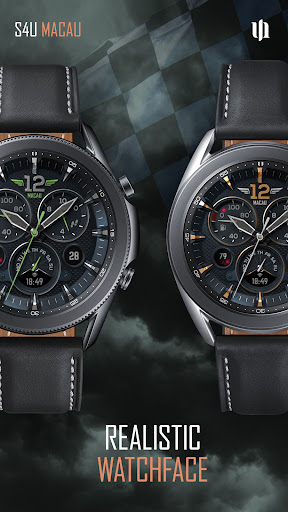
S4U Macau Pilot watch face
styles4you

5.0 stars52 reviews1,000+$1.49
PersonalizationEveryoneVersion VARYUpdated 5/21/2026, 12:53:09 PM
Open in Store⚠️ IMPORTANT: Compatibility & Installation
This app is optimized for the new Watch Face Format regarding Wear OS 5 (API 34+). Compatible devices include:
- Samsung Galaxy Watch 8, Ultra, 7, 6 , 5, 4 (Wear OS 5 update required)
- Google Pixel Watch Series
- Other Wear OS 5+ smartwatches
(Note: Only devices running Wear OS 5 or higher are supported!)
If you experience any issues with installation or downloading:
1. Ensure your watch is updated to the latest Wear OS version.
2. Open the companion app provided with your purchase.
3. Follow the steps in the Install/Issues section.
Still need help? Email me at wear@s4u-watches.com.
****
The S4U Macau is a very realistic classic analog dial. If you love analog dials, then this is a must have. The light and shadow effects give this dial a beautiful, realistic look. The watch face displays the time, your step count, your heart rate, your current battery status, weekday and day of the month. Colors are customizable. It comes with 2 custom/editable complication and 4 custom shortcuts. Check out the gallery for more information about the functionality
✨ Key Features:
- ultra realistic analog watch face
- color customization (change the colors of index, background or details)
- 2 visible display complications
- 4 individual shortcuts (reach your favorite app/widget with just one click)
- soft or hard watch face border (shadow border)
🕒 Data Displayed:
Display in the right area:
+ analog pedometer (value multiply with 1000) max: 49999
If you set a value for a user-defined complication here, the analog pedometer is hidden.
Display in the left area:
+ battery status 0-100%
Display on bottom area:
+ Weekday and a user-defined complication
Display on bottom left area:
+ heart rate
Display on bottom right area:
+ Day of the Month (click it to change the background color)
***
🌙 Always-On Display (AOD)
The S4U Macau watch face includes an Always-On Display feature for continuous timekeeping. The AOD colors automatically adapt to the design of your standard watch face with a pure black background.
2 AOD Background-Optionen:
- pitch black, shaded
Important Notes:
- Using AOD will reduce battery life, depending on your smartwatch's settings.
- Some smartwatches may automatically dim the AOD display based on ambient light conditions.
***
🎨 CUSTOMIZATION OPTIONS
Personalize your S4U Macau in just a few steps:
1. Press and hold the center of the watch display.
2. Tap the customize button.
3. Swipe left or right to navigate through the customizable elements.
4. Swipe up or down to change colors or options for each item.
Customize the Background color (6 colors), Index colors (10), Ring colors (10), Details (10), Border Shadow (3), AOD Background (2), weekday languages (7), Hand Styles (2)
***
⚙️ COMPLICATIONS & SHORTCUTS
This watch face supports 6 complication areas: 2 visible display complications and 4 invisible shortcut complications for quick access to Wear OS widgets and apps
How to Set Up Shortcuts and Complications:
1. Press and hold the watch display.
2. Push the customize button.
3. Swipe from right to left until you reach the "complications".
4. 4 app shortcuts and 2 custom complication are highlighted. Click on them to make the desired settings.
****
📬 Stay Connected
Enjoying the design? Check out my other creations! I’m constantly crafting new watch faces for Wear OS.
🌐 https://www.s4u-watches.com
Feedback & Support
I’d love to hear your thoughts! Suggestions and feedback help me improve.
📧 Email: wear@s4u-watches.com
💬 Please leave a review on the Play Store!
Follow Me
📸 Instagram: https://www.instagram.com/matze_styles4you/
👍 Facebook: https://www.facebook.com/styles4you
▶️ YouTube: https://www.youtube.com/c/styles4you-watches
🐦 X: https://x.com/MStyles4you
This app is optimized for the new Watch Face Format regarding Wear OS 5 (API 34+). Compatible devices include:
- Samsung Galaxy Watch 8, Ultra, 7, 6 , 5, 4 (Wear OS 5 update required)
- Google Pixel Watch Series
- Other Wear OS 5+ smartwatches
(Note: Only devices running Wear OS 5 or higher are supported!)
If you experience any issues with installation or downloading:
1. Ensure your watch is updated to the latest Wear OS version.
2. Open the companion app provided with your purchase.
3. Follow the steps in the Install/Issues section.
Still need help? Email me at wear@s4u-watches.com.
****
The S4U Macau is a very realistic classic analog dial. If you love analog dials, then this is a must have. The light and shadow effects give this dial a beautiful, realistic look. The watch face displays the time, your step count, your heart rate, your current battery status, weekday and day of the month. Colors are customizable. It comes with 2 custom/editable complication and 4 custom shortcuts. Check out the gallery for more information about the functionality
✨ Key Features:
- ultra realistic analog watch face
- color customization (change the colors of index, background or details)
- 2 visible display complications
- 4 individual shortcuts (reach your favorite app/widget with just one click)
- soft or hard watch face border (shadow border)
🕒 Data Displayed:
Display in the right area:
+ analog pedometer (value multiply with 1000) max: 49999
If you set a value for a user-defined complication here, the analog pedometer is hidden.
Display in the left area:
+ battery status 0-100%
Display on bottom area:
+ Weekday and a user-defined complication
Display on bottom left area:
+ heart rate
Display on bottom right area:
+ Day of the Month (click it to change the background color)
***
🌙 Always-On Display (AOD)
The S4U Macau watch face includes an Always-On Display feature for continuous timekeeping. The AOD colors automatically adapt to the design of your standard watch face with a pure black background.
2 AOD Background-Optionen:
- pitch black, shaded
Important Notes:
- Using AOD will reduce battery life, depending on your smartwatch's settings.
- Some smartwatches may automatically dim the AOD display based on ambient light conditions.
***
🎨 CUSTOMIZATION OPTIONS
Personalize your S4U Macau in just a few steps:
1. Press and hold the center of the watch display.
2. Tap the customize button.
3. Swipe left or right to navigate through the customizable elements.
4. Swipe up or down to change colors or options for each item.
Customize the Background color (6 colors), Index colors (10), Ring colors (10), Details (10), Border Shadow (3), AOD Background (2), weekday languages (7), Hand Styles (2)
***
⚙️ COMPLICATIONS & SHORTCUTS
This watch face supports 6 complication areas: 2 visible display complications and 4 invisible shortcut complications for quick access to Wear OS widgets and apps
How to Set Up Shortcuts and Complications:
1. Press and hold the watch display.
2. Push the customize button.
3. Swipe from right to left until you reach the "complications".
4. 4 app shortcuts and 2 custom complication are highlighted. Click on them to make the desired settings.
****
📬 Stay Connected
Enjoying the design? Check out my other creations! I’m constantly crafting new watch faces for Wear OS.
🌐 https://www.s4u-watches.com
Feedback & Support
I’d love to hear your thoughts! Suggestions and feedback help me improve.
📧 Email: wear@s4u-watches.com
💬 Please leave a review on the Play Store!
Follow Me
📸 Instagram: https://www.instagram.com/matze_styles4you/
👍 Facebook: https://www.facebook.com/styles4you
▶️ YouTube: https://www.youtube.com/c/styles4you-watches
🐦 X: https://x.com/MStyles4you
Developer email
support@s4u-watches.com
Developer website
https://www.s4u-watches.comReleased
Oct 8, 2021
Current version
VARY
Android version
VARY
Reviews & Ratings
5.0
out of 5
5
4
3
2
1
🌟 Loved by users
52 reviewsScreenshots