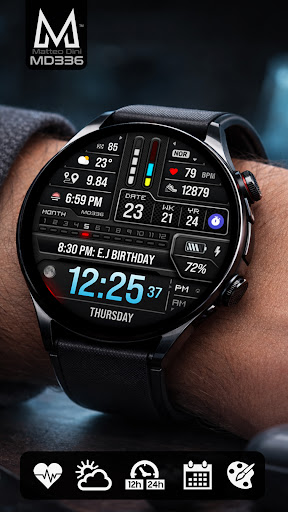
MD336 Digital watch face
Matteo Dini MD ® Watch Faces

4.6 stars155 reviews1,000+$2.49
PersonalizationEveryoneVersion VARYUpdated 7/25/2025, 4:29:14 PM
Open in StoreNew Watch Face Format.
Designed with the latest Watch Face Format required by Google Play, this premium digital watch face combines a modern futuristic dashboard with advanced customization, health data integration, and elegant LCD-inspired visuals.
Key Features:
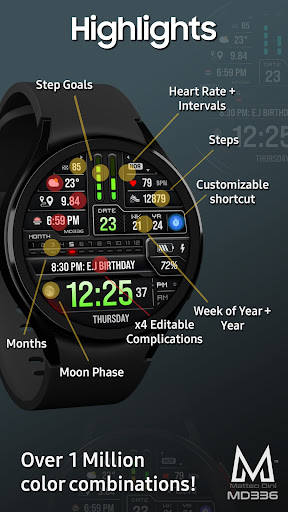
- Premium futuristic digital dashboard design
- 4 Preset App Shortcuts + 1 Customizable Shortcut
- 4 Customizable Complications
- Full color customization
- Customizable LCD and UI colors
- Minimal & Full Always On Display modes
- Moon Phase
- Week of Year
Compatibility:
Supports all Wear OS devices with API Level 33+ (Wear OS 4 and later), including Samsung Galaxy Watch 4-8, Ultra, Pixel Watch and other Wear OS smartwatches.
Features at a Glance:
- 12/24hr Format (syncs with phone settings)
- Date
- Day
- Month
- Year
- Week of Year
- Moon Phase
- Heart Rate Monitoring + Intervals
- Steps + Daily Goals
- Battery Meter
Included App Shortcuts:
- Calendar
- Battery
- Heart Rate
- Alarm
Customization:
1. Touch and hold the display on your watch.
2. Tap “Customize”.
Customize independently:
- Time colors
- Date colors
- LCD colors
- UI colors
- Seconds colors
- Goal bars colors
- Heart interval colors
Complications:
Customize up to 4 complications with data such as:
- Weather
- Distance walked
- Calories burned
- UV index
- Chance of rain
- Barometer
- World clock
- And more
Some complication providers may require additional third-party apps installed on your watch.
Important Notes:
The Samsung Wearable app may occasionally fail to load complex watch faces during customization. This is a known Samsung companion app limitation and not a problem with the watch face itself.
For the best experience, customize the watch face directly on your watch:
Touch & Hold Screen → Customize
Installation & Troubleshooting:
https://www.matteodinimd.com/watchface-installation/
Support:
For support or installation help:
support@mdwatchfaces.com
Some features may not be available on all devices.
Stay Connected:
Newsletter:
http://eepurl.com/hlRcvf
FACEBOOK:
https://www.facebook.com/matteodiniwatchfaces
INSTAGRAM:
https://www.instagram.com/mdwatchfaces/
TELEGRAM:
https://t.me/mdwatchfaces
WEB:
https://www.matteodinimd.com
Thank you for supporting MD Watch Faces!
Designed with the latest Watch Face Format required by Google Play, this premium digital watch face combines a modern futuristic dashboard with advanced customization, health data integration, and elegant LCD-inspired visuals.
Key Features:
- Premium futuristic digital dashboard design
- 4 Preset App Shortcuts + 1 Customizable Shortcut
- 4 Customizable Complications
- Full color customization
- Customizable LCD and UI colors
- Minimal & Full Always On Display modes
- Moon Phase
- Week of Year
Compatibility:
Supports all Wear OS devices with API Level 33+ (Wear OS 4 and later), including Samsung Galaxy Watch 4-8, Ultra, Pixel Watch and other Wear OS smartwatches.
Features at a Glance:
- 12/24hr Format (syncs with phone settings)
- Date
- Day
- Month
- Year
- Week of Year
- Moon Phase
- Heart Rate Monitoring + Intervals
- Steps + Daily Goals
- Battery Meter
Included App Shortcuts:
- Calendar
- Battery
- Heart Rate
- Alarm
Customization:
1. Touch and hold the display on your watch.
2. Tap “Customize”.
Customize independently:
- Time colors
- Date colors
- LCD colors
- UI colors
- Seconds colors
- Goal bars colors
- Heart interval colors
Complications:
Customize up to 4 complications with data such as:
- Weather
- Distance walked
- Calories burned
- UV index
- Chance of rain
- Barometer
- World clock
- And more
Some complication providers may require additional third-party apps installed on your watch.
Important Notes:
The Samsung Wearable app may occasionally fail to load complex watch faces during customization. This is a known Samsung companion app limitation and not a problem with the watch face itself.
For the best experience, customize the watch face directly on your watch:
Touch & Hold Screen → Customize
Installation & Troubleshooting:
https://www.matteodinimd.com/watchface-installation/
Support:
For support or installation help:
support@mdwatchfaces.com
Some features may not be available on all devices.
Stay Connected:
Newsletter:
http://eepurl.com/hlRcvf
FACEBOOK:
https://www.facebook.com/matteodiniwatchfaces
INSTAGRAM:
https://www.instagram.com/mdwatchfaces/
TELEGRAM:
https://t.me/mdwatchfaces
WEB:
https://www.matteodinimd.com
Thank you for supporting MD Watch Faces!
Developer email
support@mdwatchfaces.com
Developer website
https://www.matteodinimd.comReleased
Apr 16, 2024
Current version
VARY
Android version
VARY
Reviews & Ratings
4.6
out of 5
5
4
3
2
1
🌟 Loved by users
155 reviewsScreenshots