MD206 Analog watch face
Matteo Dini MD ® Watch Faces

4.6 stars51 reviews1,000+$0.49
PersonalizationEveryoneVersion VARYUpdated 7/22/2025, 11:36:34 AM
Open in StoreNew watch face format.
The MD206 is a Hybrid Watch Face for Wear OS by Matteo Dini MD.
It contains 4 preset shortcuts, 3 customizable shortcuts, steps, Customizable field (sunset / sunrise as default), Moon phase, Daily Goals, Week and Day of Year, Heart Rate, Date, changeable colors and more.
INSTALLATION NOTES:
Please check this link for installation and troubleshooting guide:
https://www.matteodinimd.com/watchface-installation/
This watch face supports all Wear OS devices with API Level 33+ (Wear OS 4 and later versions) like Samsung Galaxy Watch 4-8, Ultra, Pixel Watch etc.
Watch face features:
- 12/24hr Digital Time based on phone settings
- Analog
- Day of year
- Step Count
- Daily goals
- Week of year
- BPM Heart Rate + Interval
- Battery %
- Customizable field with Sunset / Sunrise as default
- Moon Phase
- 3 Customizable App Shortcuts
- 4 Preset App Shortcuts
- Always ON Display supported with changeable colors.
Preset APP Shortcuts:
- Calendar
- Set Alarms
- Measure Heart Rate
- Battery status
Watch face customization:
1 - Touch and hold display
2 - Tap on customize option
Customizable complications:
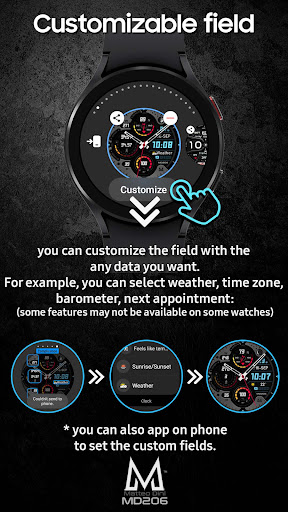
you can customize the field with the any data you want.
For example, you can select weather, time zone, sunset/sunrise, barometer, next appointment and more.
Let's keep in touch with Matteo Dini MD watch faces!
Newsletter:
Sign up to stay updated with new watch faces and promotions!
http://eepurl.com/hlRcvf
FACEBOOK:
https://www.facebook.com/matteodiniwatchfaces
INSTAGRAM:
https://www.instagram.com/mdwatchfaces/
TELEGRAM:
https://t.me/mdwatchfaces
Thank you!
The MD206 is a Hybrid Watch Face for Wear OS by Matteo Dini MD.
It contains 4 preset shortcuts, 3 customizable shortcuts, steps, Customizable field (sunset / sunrise as default), Moon phase, Daily Goals, Week and Day of Year, Heart Rate, Date, changeable colors and more.
INSTALLATION NOTES:
Please check this link for installation and troubleshooting guide:
https://www.matteodinimd.com/watchface-installation/
This watch face supports all Wear OS devices with API Level 33+ (Wear OS 4 and later versions) like Samsung Galaxy Watch 4-8, Ultra, Pixel Watch etc.
Watch face features:
- 12/24hr Digital Time based on phone settings
- Analog
- Day of year
- Step Count
- Daily goals
- Week of year
- BPM Heart Rate + Interval
- Battery %
- Customizable field with Sunset / Sunrise as default
- Moon Phase
- 3 Customizable App Shortcuts
- 4 Preset App Shortcuts
- Always ON Display supported with changeable colors.
Preset APP Shortcuts:
- Calendar
- Set Alarms
- Measure Heart Rate
- Battery status
Watch face customization:
1 - Touch and hold display
2 - Tap on customize option
Customizable complications:
you can customize the field with the any data you want.
For example, you can select weather, time zone, sunset/sunrise, barometer, next appointment and more.
Let's keep in touch with Matteo Dini MD watch faces!
Newsletter:
Sign up to stay updated with new watch faces and promotions!
http://eepurl.com/hlRcvf
FACEBOOK:
https://www.facebook.com/matteodiniwatchfaces
INSTAGRAM:
https://www.instagram.com/mdwatchfaces/
TELEGRAM:
https://t.me/mdwatchfaces
Thank you!
Developer email
support@mdwatchfaces.com
Developer website
https://www.matteodinimd.com/Released
Sep 3, 2021
Current version
VARY
Android version
VARY
Reviews & Ratings
4.6
out of 5
5
4
3
2
1
😊 Highly rated by users
51 reviewsScreenshots