JW174 jwstudio
JWstudio

This watch face supports all WearOS 5 devices with API level 34 or higher, such as Samsung Galaxy Watch 4, 5, 6, 7, 8, Pixel Watch, etc.
+++++++++++++++++++++++++++++++++++++++++++++++
[How to install]
Before pressing the payment button, make sure your watch is selected.
Select your watch by pressing the small triangle next to the payment button.
Select the menu at the top right of the Play Store app (three dots) > Share > Chrome browser > Install on other devices > Clock and proceed.
After installation, select it from the download list, register it as a favorite, and use it. You can view the download list by clicking 'Add Watch Screen' on the far right of the favorites list that appears when you press the watch screen.
+++++++++++++++++++++++++++++++++++++++++++++++
[Features]
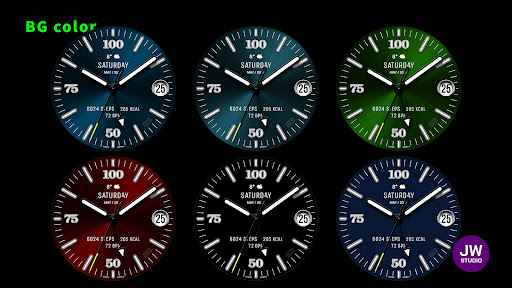
- 9 BG color
- 3 Index style
- 3 Hands style
- AOD Simple mode
[function]
- 2 preset app shortcut
- 3 customizable shortcut keys
- 1 customizable fields/information display
+++++++++++++++++++++++++++++++++++++++++++++++
[Custom]
1 - Touch and hold the display.
2 - Tap on Custom Options
For inquiries, please contact the email below.
jenniferwatches@gmail.com
+++++++++++++++++++++++++++++++++++++++++++++++
[How to install]
Before pressing the payment button, make sure your watch is selected.
Select your watch by pressing the small triangle next to the payment button.
Select the menu at the top right of the Play Store app (three dots) > Share > Chrome browser > Install on other devices > Clock and proceed.
After installation, select it from the download list, register it as a favorite, and use it. You can view the download list by clicking 'Add Watch Screen' on the far right of the favorites list that appears when you press the watch screen.
+++++++++++++++++++++++++++++++++++++++++++++++
[Features]
- 9 BG color
- 3 Index style
- 3 Hands style
- AOD Simple mode
[function]
- 2 preset app shortcut
- 3 customizable shortcut keys
- 1 customizable fields/information display
+++++++++++++++++++++++++++++++++++++++++++++++
[Custom]
1 - Touch and hold the display.
2 - Tap on Custom Options
For inquiries, please contact the email below.
jenniferwatches@gmail.com
Developer email
jenniferwatches@gmail.com
Developer website
https://www.instagram.com/jenniferwatches/Released
May 8, 2024
Current version
VARY
Android version
VARY
Screenshots