Digital Watch face D33
VG Faces

D33: Advanced Weather & Data Watch Face
Maximize your smartwatch capabilities with the D33 Digital Watch Face for Wear OS. This highly informative face is designed for data lovers, offering advanced weather tracking, unmatched display customization, and a multi-tier Always-On Display.
Key Features:
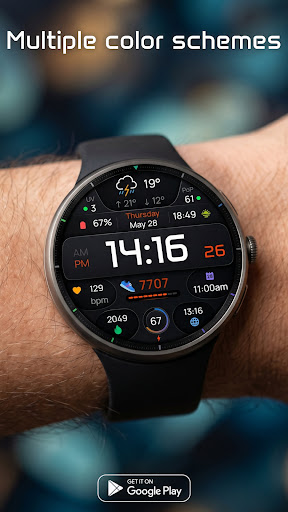
• Advanced Weather Dashboard: Get all your forecast details at a glance. The dedicated weather section displays minimum & maximum temperatures, Day & Night icons, the Ultraviolet (UV) index, and your chance of precipitation.
• 6 Customizable Complications: Tailor the layout to your exact needs. Fill the 6 available slots with your most critical daily data, such as step counts, heart rate, or calendar events.
• Multiple Color Schemes: Match your watch face to your style effortlessly with a wide selection of vibrant color combinations.
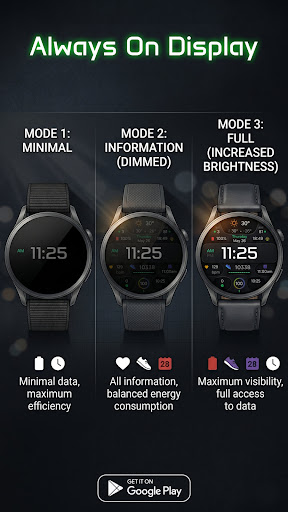
• Innovative 3-Mode AOD: Take total control over your battery life and visibility with three distinct Always-On Display modes:
- Mode 1 (Minimal): Minimal data for maximum battery efficiency.
- Mode 2 (Information - Dimmed): Shows all information with balanced energy consumption.
- Mode 3 (Full - Increased Brightness): Maximum visibility giving you full access to data at all times.
Smart Shortcut System (4 Tap Zones):
Navigate your smartwatch effortlessly with intuitive tap zones:
• Tap Time: Quick access to Alarm functions.
• Tap Date: Opens your Calendar.
• Tap Battery: Opens Battery status.
• Tap Weather Icon: Customizable App Shortcut (Set it to open your favorite weather app or any other tool).
Installation:
1. Ensure your watch is connected via Bluetooth.
2. Download D33 from the Google Play Store.
3. Long-press your watch screen, scroll to the end, and select "D33" to apply.
Compatibility:
Designed exclusively for Wear OS 5+ devices, including:
• Samsung Galaxy Watch 8 & Ultra
• Google Pixel Watch 4
• And other newer devices running Wear OS 5 or higher.
Screenshots