Ultra Watch Face
Time Studios

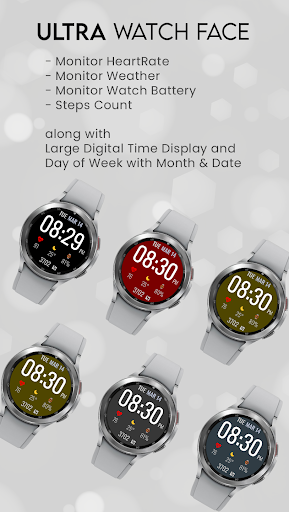
With a different color themes suites your dressing everyday. Match your dress with the color of the watch makes a complete gentle look.
NEW & Lite Version! Completely new redesigned Analog Endurance watch face!. A nice, easy, clean, and interactive real analog watch face with a premium look. Shows fitness statistics such as steps counter, weather, and battery level percentage.
BUILT-IN COMPLICATIONS:
- Heart Rate detector
- Steps counter from sensors in wear device (built-in steps)
- Shows Day & Date
- Battery Level
- Set Weather and any other complication at the bottom side.
HOW TO SELECT SHORTCUTS IN THE POSITION (COMPLICATION):
- Long tap on the watch face
- System shows the icon "gear" for the watch face settings. Tap on it
- Select the "Customize" option
- Swipe or Select the "Complications" option
- Select Position
- Select your favorite "Complication" from the list and select it
- Press the Side Button.
You are ready to go.
Wear OS integration and Fully standalone! (Android compatible)
COMPATIBLE WITH ALL Wear OS devices:
- Samsung Galaxy 4 (Watch4, Classic)
- Samsung Galaxy 5 (Watch5, Pro)
- Google Pixel Watch
- Montblanc Summit (2+, Lite)
- Fossil Gen 5 (Wear)
- Fossil Gen 6
- Moto 360
- OPPO Watch
- Hublot Big Bang e Gen 3
- Mobvoi TicWatch (Pro, C2, E2, S2)
- Suunto 7
- Casio WSD-F21HR
- Casio GSW-H1000
- TAG Heuer Connected (Calibre E4, 2020)
DISCLAIMER:
The watch face is a standalone app but the complication of phone battery requires a connection with the companion app on Android phone devices.
FAQ:
Please contact us if you have any trouble with the Watch Face App: timestudios77@gmail.com
NEW & Lite Version! Completely new redesigned Analog Endurance watch face!. A nice, easy, clean, and interactive real analog watch face with a premium look. Shows fitness statistics such as steps counter, weather, and battery level percentage.
BUILT-IN COMPLICATIONS:
- Heart Rate detector
- Steps counter from sensors in wear device (built-in steps)
- Shows Day & Date
- Battery Level
- Set Weather and any other complication at the bottom side.
HOW TO SELECT SHORTCUTS IN THE POSITION (COMPLICATION):
- Long tap on the watch face
- System shows the icon "gear" for the watch face settings. Tap on it
- Select the "Customize" option
- Swipe or Select the "Complications" option
- Select Position
- Select your favorite "Complication" from the list and select it
- Press the Side Button.
You are ready to go.
Wear OS integration and Fully standalone! (Android compatible)
COMPATIBLE WITH ALL Wear OS devices:
- Samsung Galaxy 4 (Watch4, Classic)
- Samsung Galaxy 5 (Watch5, Pro)
- Google Pixel Watch
- Montblanc Summit (2+, Lite)
- Fossil Gen 5 (Wear)
- Fossil Gen 6
- Moto 360
- OPPO Watch
- Hublot Big Bang e Gen 3
- Mobvoi TicWatch (Pro, C2, E2, S2)
- Suunto 7
- Casio WSD-F21HR
- Casio GSW-H1000
- TAG Heuer Connected (Calibre E4, 2020)
DISCLAIMER:
The watch face is a standalone app but the complication of phone battery requires a connection with the companion app on Android phone devices.
FAQ:
Please contact us if you have any trouble with the Watch Face App: timestudios77@gmail.com
Developer email
timestudios77@gmail.com
Developer website
https://sites.google.com/view/timestudios/Released
Apr 4, 2023
Current version
1.2.2
Android version
VARY
Screenshots