Wallet - cost accounting
Vovchok Vitalii

4.0 stars590 reviews50,000+Free
FinanceEveryoneVersion 1.21.0Updated 3/9/2025, 7:20:47 PM
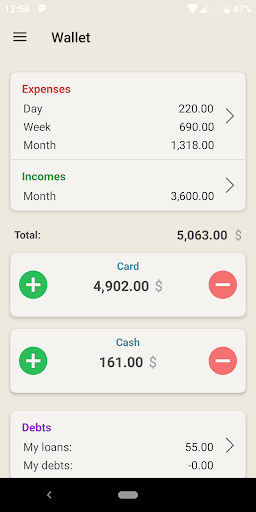
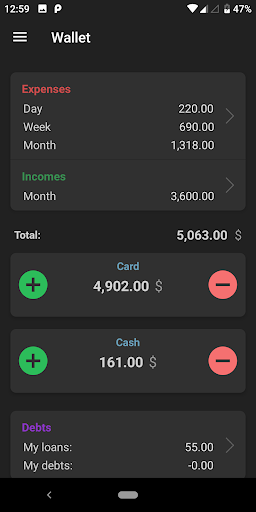
Open in StoreWant to successfully keep records of finance? A wallet will help you with this. The application will help you quickly, conveniently and efficiently add your expenses and income at the time of making a purchase or receiving money.
The application will show where your money disappears and also helps to save or save your money. Financial management will be as simple as possible.
• Expenditures and revenues in an understandable form
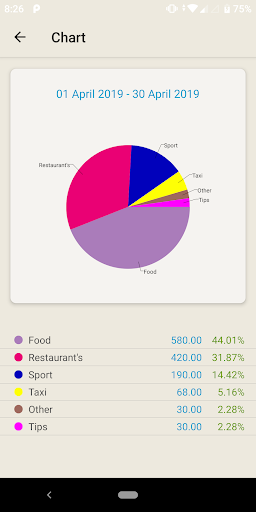
Record all expenses during the day, and the application will show you where your money went on a clear graph and chart. You can see the statistics of expenses and income for the day, week, month, year and for the specified period.
• Budget planning
You will be able to plan expenses and incomes, which will help to save, not to make random purchases and save up for long-awaited purchases.
• Accounting for debts and savings
Keep in the application information about who lent money.
• Multicurrency accounts
Support multi-currency accounts. Automatically updated exchange rates will keep your finances up to date.
Key points that make accounting effective and enjoyable:
- Intuitive and user-friendly interface. Nothing extra
- Very quick add new entries
- Ability to add, delete and edit categories
- Ability to edit and delete previously added entries
- Secure data backup to your personal Google Drive
- Calculator
- Export to csv
- Support a huge amount of currency
- Support for multiple accounts in different currencies
- Widgets for faster add transactions
The application is regulary updated and new features are being added.
Have a nice experience!
The application will show where your money disappears and also helps to save or save your money. Financial management will be as simple as possible.
• Expenditures and revenues in an understandable form
Record all expenses during the day, and the application will show you where your money went on a clear graph and chart. You can see the statistics of expenses and income for the day, week, month, year and for the specified period.
• Budget planning
You will be able to plan expenses and incomes, which will help to save, not to make random purchases and save up for long-awaited purchases.
• Accounting for debts and savings
Keep in the application information about who lent money.
• Multicurrency accounts
Support multi-currency accounts. Automatically updated exchange rates will keep your finances up to date.
Key points that make accounting effective and enjoyable:
- Intuitive and user-friendly interface. Nothing extra
- Very quick add new entries
- Ability to add, delete and edit categories
- Ability to edit and delete previously added entries
- Secure data backup to your personal Google Drive
- Calculator
- Export to csv
- Support a huge amount of currency
- Support for multiple accounts in different currencies
- Widgets for faster add transactions
The application is regulary updated and new features are being added.
Have a nice experience!
Developer email
vitaliyvovchok@gmail.com
Developer website
https://vit-vov.bitbucket.io/Released
Apr 8, 2019
Current version
1.21.0
Android version
7.0
Reviews & Ratings
4.0
out of 5
5
4
3
2
1
⚠️ Users report mixed experiences
590 reviewsScreenshots