Image Converter
Vinson Developers

Image Converter lets you convert images to JPG, PNG, WEBP, BMP or ICO. Import images from your gallery, camera, a folder or another app, then review results before saving them to Pictures/ImageConverter or sharing them.
Key Features
• Convert single images or batches to JPG, PNG, WEBP, BMP or ICO.
• Resize with presets or custom maximum dimensions; maintain aspect ratio.
• Crop images and apply aspect-ratio framing with crop, blurred-fill or colour-border options.
• Rotate or flip images; use grayscale, sepia, invert, brightness, contrast, saturation and blur controls.
• Add a text watermark and customise its position, size and opacity.
• Use document mode, a uniform-background cutout option, and a dominant-colour palette.
• Save conversion presets, set batch naming patterns, and copy an output as a Base64 data URI.
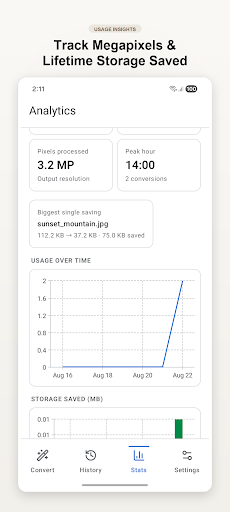
• Review conversion history and statistics for conversions, storage change and format usage.
• Choose a folder for optional automatic conversion of new supported images with your last-used settings.
• Export settings and conversion history as JSON.
• Select English, Spanish, French, German or Hindi, and choose light, dark or system theme.
Who It's For
For people who need to change image formats, dimensions, orientation or appearance on an Android device.
Permissions
• Camera: used only when you choose Camera to add an image.
• Notifications and exact alarms: used for optional scheduled reminders and conversion or folder-watch notifications.
• Storage: used on Android 8 and Android 9 when saving converted images.
• Folder access: used after you choose a folder to import images or use folder watch.
• Internet and network-state access: included for Firebase Analytics and Crashlytics in this build.
Disclaimer
Available input formats depend on Android device decoding support. The cutout tool removes pixels similar to the image corners and may not suit every image.
Key Features
• Convert single images or batches to JPG, PNG, WEBP, BMP or ICO.
• Resize with presets or custom maximum dimensions; maintain aspect ratio.
• Crop images and apply aspect-ratio framing with crop, blurred-fill or colour-border options.
• Rotate or flip images; use grayscale, sepia, invert, brightness, contrast, saturation and blur controls.
• Add a text watermark and customise its position, size and opacity.
• Use document mode, a uniform-background cutout option, and a dominant-colour palette.
• Save conversion presets, set batch naming patterns, and copy an output as a Base64 data URI.
• Review conversion history and statistics for conversions, storage change and format usage.
• Choose a folder for optional automatic conversion of new supported images with your last-used settings.
• Export settings and conversion history as JSON.
• Select English, Spanish, French, German or Hindi, and choose light, dark or system theme.
Who It's For
For people who need to change image formats, dimensions, orientation or appearance on an Android device.
Permissions
• Camera: used only when you choose Camera to add an image.
• Notifications and exact alarms: used for optional scheduled reminders and conversion or folder-watch notifications.
• Storage: used on Android 8 and Android 9 when saving converted images.
• Folder access: used after you choose a folder to import images or use folder watch.
• Internet and network-state access: included for Firebase Analytics and Crashlytics in this build.
Disclaimer
Available input formats depend on Android device decoding support. The cutout tool removes pixels similar to the image corners and may not suit every image.
Developer email
vinsondevelopers@gmail.com
Released
Mar 20, 2025
Current version
2.1
Android version
7.0
Screenshots