PIPcam TV Camera Smart Overlay
apoyo s.r.o.

PIPcam is the ultimate monitoring tool for Android TV and Media Boxes. It allows you to view your IP camera feeds, web dashboards, or important notifications in a Picture-in-Picture (PiP) window that floats above any other application. Whether you are watching a movie or playing a game, you can stay connected to your home’s security and automation.
🌟 Key Features:
•Live Camera Overlay: View RTSP, HLS, and other video streams in a customizable window.
•Smart Home Ready: Perfectly integrates with Home Assistant, Node-RED, Hubitat, and more.
•Interactive Notifications: Display alerts with text, images, and clickable buttons that can trigger webhooks (e.g., "Open Gate").
•Auto-Start: Optionally starts the background server automatically when your TV powers on.
•Customizable UI: Control the size, position, transparency, and duration of the overlay via a simple API.
🛡️ Privacy & Security (Important):
PIPcam values your privacy.
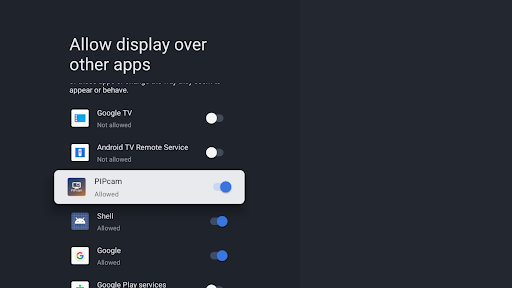
•Overlay Permission: This app requires the "Display over other apps" permission. This is used EXCLUSIVELY to render the camera/notification window over other active applications (like Netflix or YouTube).
•No Data Collection: PIPcam DOES NOT collect, record, or transmit any data from the applications you are watching. It does not "see" your screen content.
•Local Server: The app operates as a local HTTP server on your network. No cloud accounts or external servers are required, ensuring your camera feeds stay private.
🚀 Usage Guide & Integration:
PIPcam acts as a receiver. To show content, you send a JSON request via HTTP POST to your TV's IP address on port 55559.
Status Example Request URL: http://[TV_IP_ADDRESS]:55559/status
Example Request URL: http://[TV_IP_ADDRESS]:55559/apiwin
Supported JSON Parameters:
•type: Content type ("video", "rtsp", "image", "web")
•url: Direct link to your stream or image,url.
•title / message: Display text alerts.
•x / y: Position on the screen (pixels).
•width / height: Dimensions of the window.
•duration: Time in seconds before the window closes (0 for manual close).
•button: Label for an interactive button.
•url_button: The URL to be triggered when the button is clicked.
Example: web
JSON
{
"type": "web",
"url": "https://www.google.com",
"audio": true,
"user": null,
"pass": null,
"x": 0,
"y": 0,
"width": 1920,
"height": 1080,
"duration": 50,
"back_ground_Color": "#E6000000",
"title": "Test",
"title_size": 36,
"title_color": "#FFFFFFFF",
"message": "examle",
"message_size": 20,
"message_color": "#FFFFFFFF",
"button": "open the door",
"button_size": 28,
"button_text_color": "#FFFFFFFF",
"button_background_color": "#FF00004d",
"button_focus_background_color": "#FFe69500",
"url_button": "https://yourIP/examle?[test]=variable"
}
Example: RTSP Camera Alert
JSON
{
"type": "rtsp",
"url": "rtsp://192.168.1.35:554/Streaming/Channels/101",
"audio": false,
"user": "user camera",
"pass": "password camera",
"x": 0,
"y": 0,
"width": 1920,
"height": 1080,
"duration": 50,
"back_ground_Color": "#E6000000",
"title": "Test",
"title_size": 36,
"title_color": "#FFFFFFFF",
"message": "examle",
"message_size": 20,
"message_color": "#FFFFFFFF",
"button": "open the door",
"button_size": 28,
"button_text_color": "#FFFFFFFF",
"button_background_color": "#FF00004d",
"button_focus_background_color": "#FFe69500",
"url_button": "https://yourIP/examle?[test]=variable"
}
⚠️ Technical Notes:
1.
Overlay Permission: You MUST manually grant the "Display over other apps" permission upon first launch for the app to function.
2.
RTSP Audio: To prevent interference with your TV's audio, RTSP streams are played without sound (video only).
3.
Network: Your TV and your smart home controller must be on the same local network.
4.
Device Support: Optimized for Android TV 9.0 and higher.
Transform your TV into a smart home command center with PIPcam!
🌟 Key Features:
•Live Camera Overlay: View RTSP, HLS, and other video streams in a customizable window.
•Smart Home Ready: Perfectly integrates with Home Assistant, Node-RED, Hubitat, and more.
•Interactive Notifications: Display alerts with text, images, and clickable buttons that can trigger webhooks (e.g., "Open Gate").
•Auto-Start: Optionally starts the background server automatically when your TV powers on.
•Customizable UI: Control the size, position, transparency, and duration of the overlay via a simple API.
🛡️ Privacy & Security (Important):
PIPcam values your privacy.
•Overlay Permission: This app requires the "Display over other apps" permission. This is used EXCLUSIVELY to render the camera/notification window over other active applications (like Netflix or YouTube).
•No Data Collection: PIPcam DOES NOT collect, record, or transmit any data from the applications you are watching. It does not "see" your screen content.
•Local Server: The app operates as a local HTTP server on your network. No cloud accounts or external servers are required, ensuring your camera feeds stay private.
🚀 Usage Guide & Integration:
PIPcam acts as a receiver. To show content, you send a JSON request via HTTP POST to your TV's IP address on port 55559.
Status Example Request URL: http://[TV_IP_ADDRESS]:55559/status
Example Request URL: http://[TV_IP_ADDRESS]:55559/apiwin
Supported JSON Parameters:
•type: Content type ("video", "rtsp", "image", "web")
•url: Direct link to your stream or image,url.
•title / message: Display text alerts.
•x / y: Position on the screen (pixels).
•width / height: Dimensions of the window.
•duration: Time in seconds before the window closes (0 for manual close).
•button: Label for an interactive button.
•url_button: The URL to be triggered when the button is clicked.
Example: web
JSON
{
"type": "web",
"url": "https://www.google.com",
"audio": true,
"user": null,
"pass": null,
"x": 0,
"y": 0,
"width": 1920,
"height": 1080,
"duration": 50,
"back_ground_Color": "#E6000000",
"title": "Test",
"title_size": 36,
"title_color": "#FFFFFFFF",
"message": "examle",
"message_size": 20,
"message_color": "#FFFFFFFF",
"button": "open the door",
"button_size": 28,
"button_text_color": "#FFFFFFFF",
"button_background_color": "#FF00004d",
"button_focus_background_color": "#FFe69500",
"url_button": "https://yourIP/examle?[test]=variable"
}
Example: RTSP Camera Alert
JSON
{
"type": "rtsp",
"url": "rtsp://192.168.1.35:554/Streaming/Channels/101",
"audio": false,
"user": "user camera",
"pass": "password camera",
"x": 0,
"y": 0,
"width": 1920,
"height": 1080,
"duration": 50,
"back_ground_Color": "#E6000000",
"title": "Test",
"title_size": 36,
"title_color": "#FFFFFFFF",
"message": "examle",
"message_size": 20,
"message_color": "#FFFFFFFF",
"button": "open the door",
"button_size": 28,
"button_text_color": "#FFFFFFFF",
"button_background_color": "#FF00004d",
"button_focus_background_color": "#FFe69500",
"url_button": "https://yourIP/examle?[test]=variable"
}
⚠️ Technical Notes:
1.
Overlay Permission: You MUST manually grant the "Display over other apps" permission upon first launch for the app to function.
2.
RTSP Audio: To prevent interference with your TV's audio, RTSP streams are played without sound (video only).
3.
Network: Your TV and your smart home controller must be on the same local network.
4.
Device Support: Optimized for Android TV 9.0 and higher.
Transform your TV into a smart home command center with PIPcam!
Developer email
support@apoyo.tv
Developer website
https://apoyo.tv/Released
Jun 16, 2026
Current version
10.0
Android version
9
Screenshots