UsA Retro Digit - USA129
USA Design Watch Face

3.3 stars29 reviews1,000+$1.49
PersonalizationEveryoneVersion VARYUpdated 10/30/2025, 5:49:23 AM
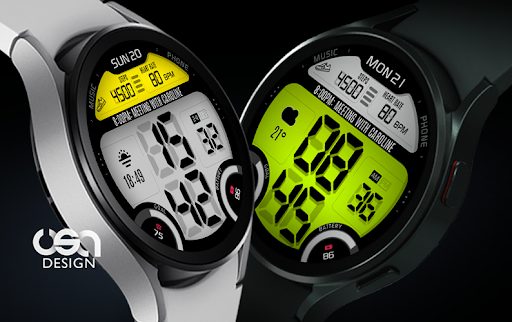
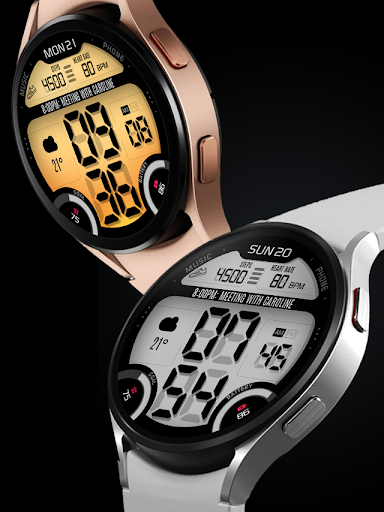
Open in StoreSpecial designed for Wear OS with minimum API 33+. a retro digital watch with customizable EL Light backlight color style. Combine the top backlight or bottom backlight and choose your best combination. Long text for events complication and also a short complication (e.g. for weather).
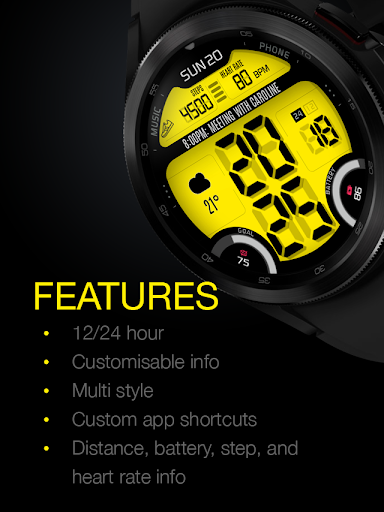
Features :
- 12/24 hour (sync with your phone settings)
- Long text complication (e.g. for events)
- Short text complication (e.g. for weather)
- Customisable top, bottom, and gradient
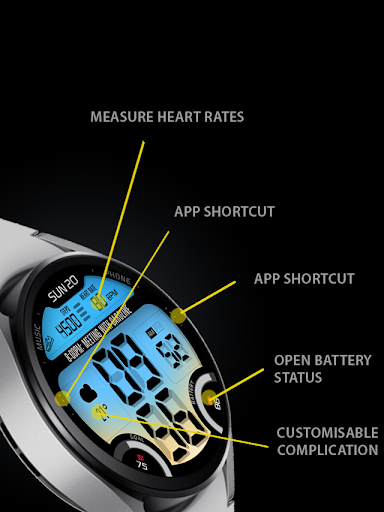
- Heart rate info (tap to measure)
- Step goal gauge (6000 steps per day)
- Custom app shortcut
- Minimal digital always-on display mode (AOD)
Data shown on the complication area may differ depend on the device and version.
his watch face requires Wear OS API 33+ (Wear OS 4 or newer). Compatible with Galaxy Watch 4/5/6/7/8 Series and newer, Pixel Watch series and other watch face with Wear OS 4 or newer.
Make sure you are purchasing using the same Google account registered on your watch. The installation should begin automatically on the watch after a few moments.
After the installation is completed on your watch, do these steps to open the watch face on your watch :
1. Open the watch face list on your watch (tap and hold the current watch face)
2. Scroll to the right and tap "add watch face"
3. Scroll down and find new installed watch face in the "downloaded" section
The heart rate is now synced with the built-in heart rate settings including the measurement interval.
Features :
- 12/24 hour (sync with your phone settings)
- Long text complication (e.g. for events)
- Short text complication (e.g. for weather)
- Customisable top, bottom, and gradient
- Heart rate info (tap to measure)
- Step goal gauge (6000 steps per day)
- Custom app shortcut
- Minimal digital always-on display mode (AOD)
Data shown on the complication area may differ depend on the device and version.
his watch face requires Wear OS API 33+ (Wear OS 4 or newer). Compatible with Galaxy Watch 4/5/6/7/8 Series and newer, Pixel Watch series and other watch face with Wear OS 4 or newer.
Make sure you are purchasing using the same Google account registered on your watch. The installation should begin automatically on the watch after a few moments.
After the installation is completed on your watch, do these steps to open the watch face on your watch :
1. Open the watch face list on your watch (tap and hold the current watch face)
2. Scroll to the right and tap "add watch face"
3. Scroll down and find new installed watch face in the "downloaded" section
The heart rate is now synced with the built-in heart rate settings including the measurement interval.
Developer email
usawatchface@gmail.com
Released
Jul 20, 2022
Current version
VARY
Android version
VARY
Reviews & Ratings
3.3
out of 5
5
4
3
2
1
😐 Reviews are mixed
29 reviewsScreenshots