Mock GPS for Devs with AI MCP
Tyler Works

Avoid slow Android device emulation. Build, test, and demo location-based app features from your desk, with built-in MCP support for AI automation.
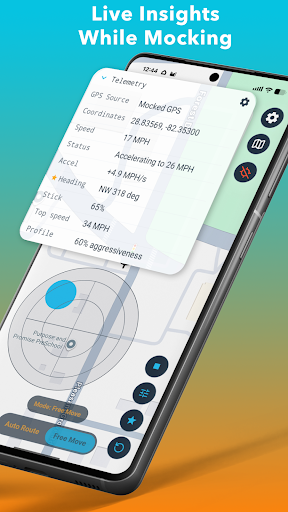
Mock Location GPS for Developers gives developers and QA teams fast, repeatable location simulation. Use the built-in MCP server to automate GPS emulation without switching apps, or start emulation manually by controlling location with a joystick, running a route you built, or automatically playing back a planned route.
Pay once and keep it. No subscription.
Use it to:
- Test geofencing, delivery flows, travel features, and map experiences
- Replay repeatable routes for QA and debugging
- Simulate movement across a neighborhood, city, or custom path
- Demo location-based features without physical travel
Key features:
- Joystick mode for direct mock GPS control
- Auto Route playback from start to destination
- Multi-stop waypoints for more realistic journeys
- Direct, drive, walk, and bike route styles
- Saved presets and saved routes for quick retesting
- Adjustable speed and acceleration profiles
- Tap or long-press the map to set a location quickly
- Place search with optional Google Places support
- Guided Android setup with mock location readiness checks
Built for real development work:
Test a pinned location, replay a full route, or fine-tune movement behavior for edge cases. Faster and more repeatable than basic mock location tools.
Mock Location GPS for Developers gives developers and QA teams fast, repeatable location simulation. Use the built-in MCP server to automate GPS emulation without switching apps, or start emulation manually by controlling location with a joystick, running a route you built, or automatically playing back a planned route.
Pay once and keep it. No subscription.
Use it to:
- Test geofencing, delivery flows, travel features, and map experiences
- Replay repeatable routes for QA and debugging
- Simulate movement across a neighborhood, city, or custom path
- Demo location-based features without physical travel
Key features:
- Joystick mode for direct mock GPS control
- Auto Route playback from start to destination
- Multi-stop waypoints for more realistic journeys
- Direct, drive, walk, and bike route styles
- Saved presets and saved routes for quick retesting
- Adjustable speed and acceleration profiles
- Tap or long-press the map to set a location quickly
- Place search with optional Google Places support
- Guided Android setup with mock location readiness checks
Built for real development work:
Test a pinned location, replay a full route, or fine-tune movement behavior for edge cases. Faster and more repeatable than basic mock location tools.
Developer email
tyler@tylermills.works
Developer website
https://fakeandroidgps.comReleased
Apr 4, 2026
Current version
1.9.2
Android version
7.0
Screenshots