PanDoc - PDF Scanner & Editor
TVGSOFT

Turn your phone into an all-powerful mobile office! PanDoc - PDF Scanner & Editor is the only app you need to digitize, edit, sign, print, and convert any document — instantly, right from your pocket.
❓ Drowning in paper receipts, IDs, and loose documents?
💡 High-Speed Scanner & OCR
• Auto-detect and scan invoices, contracts, notes, and receipts with precision.
• Specialized high-resolution scanning for Passports, ID Cards, and Driver's Licenses.
• Extract text from any image instantly with advanced OCR technology.
• Save scans as high-quality PDFs, ready for storage or sharing.
❓ Stuck with an uneditable PDF?
💡 Complete PDF Editing Suite
• Add text, change fonts, and annotate directly on any document.
• Use the freehand Brush to highlight, draw, or take free-form notes.
• Compress PDF file size without sacrificing quality — perfect for sharing.
• Advanced page management: reorder pages, merge multiple files, or split PDFs with ease.
❓ Urgent contract needs a signature — right now?
💡 E-Signature & Business Tools
• Create smooth electronic signatures (E-Sign) and fill forms on the go.
• Generate professional invoices in seconds — perfect for freelancers and small businesses.
❓ Need a physical copy but only have your phone?
💡 Direct Print — No Computer Needed
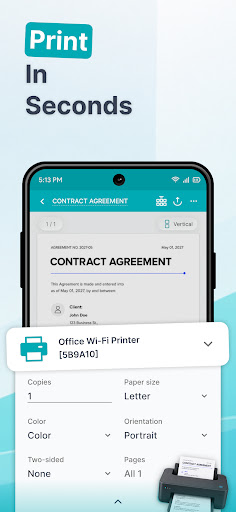
• Print any PDF or document wirelessly from your phone in seconds.
• Works with AirPrint (iOS) and any Wi-Fi enabled printer — home, office, or library.
• Print single pages or entire multi-page documents with full layout control.
• Set page size, orientation, and number of copies before you print — no surprises.
❓ File format not compatible?
💡 Universal Format Converter — 15+ Formats
• Seamless two-way conversion: PDF ↔ Word (DOC), Excel (XLS), PowerPoint (PPT).
• Convert images (JPG, IMG) and text files (TXT, HTML, MD) to PDF in seconds.
• Read and convert e-books (EPUB) and more, including CBR/CBZ comic formats.
❓ Need to share files but worried about privacy?
💡 Reliable Document Security
• Use the Hide tool to blackout or blur sensitive details — bank numbers, ID info — before sharing.
• Add personalized Watermarks to prevent unauthorized copying.
• All files processed with strict privacy measures. Zero data leaks.
🤖 PERFECT FOR AI-POWERED DOCUMENT WORK
• Lawyers & contract reviewers
• Students summarizing research
• Accountants extracting invoice data
• Freelancers rewriting proposals
• Anyone managing sensitive or complex documents
📂 Smart File Management & Sharing
• Import instantly from device storage, camera, or cloud.
• Create unlimited folders to organize documents your way.
• Share PDFs via Email, AirDrop, Messages, Google Drive, Dropbox, OneDrive, and more.
• Accidentally deleted something? Restore it from Trash anytime.
🖨️ PERFECT FOR PRINTING
• Contracts & legal documents
• Invoices & receipts
• Study notes & assignments
• Certificates & ID copies
• Meeting agendas & reports
Stop stressing over paperwork. Download the PanDoc app today and let us solve all your document problems effortlessly!
Privacy Policy: https://tvgsoft.com/privacy-policy
Terms of Service: https://tvgsoft.com/terms-of-service
❓ Drowning in paper receipts, IDs, and loose documents?
💡 High-Speed Scanner & OCR
• Auto-detect and scan invoices, contracts, notes, and receipts with precision.
• Specialized high-resolution scanning for Passports, ID Cards, and Driver's Licenses.
• Extract text from any image instantly with advanced OCR technology.
• Save scans as high-quality PDFs, ready for storage or sharing.
❓ Stuck with an uneditable PDF?
💡 Complete PDF Editing Suite
• Add text, change fonts, and annotate directly on any document.
• Use the freehand Brush to highlight, draw, or take free-form notes.
• Compress PDF file size without sacrificing quality — perfect for sharing.
• Advanced page management: reorder pages, merge multiple files, or split PDFs with ease.
❓ Urgent contract needs a signature — right now?
💡 E-Signature & Business Tools
• Create smooth electronic signatures (E-Sign) and fill forms on the go.
• Generate professional invoices in seconds — perfect for freelancers and small businesses.
❓ Need a physical copy but only have your phone?
💡 Direct Print — No Computer Needed
• Print any PDF or document wirelessly from your phone in seconds.
• Works with AirPrint (iOS) and any Wi-Fi enabled printer — home, office, or library.
• Print single pages or entire multi-page documents with full layout control.
• Set page size, orientation, and number of copies before you print — no surprises.
❓ File format not compatible?
💡 Universal Format Converter — 15+ Formats
• Seamless two-way conversion: PDF ↔ Word (DOC), Excel (XLS), PowerPoint (PPT).
• Convert images (JPG, IMG) and text files (TXT, HTML, MD) to PDF in seconds.
• Read and convert e-books (EPUB) and more, including CBR/CBZ comic formats.
❓ Need to share files but worried about privacy?
💡 Reliable Document Security
• Use the Hide tool to blackout or blur sensitive details — bank numbers, ID info — before sharing.
• Add personalized Watermarks to prevent unauthorized copying.
• All files processed with strict privacy measures. Zero data leaks.
🤖 PERFECT FOR AI-POWERED DOCUMENT WORK
• Lawyers & contract reviewers
• Students summarizing research
• Accountants extracting invoice data
• Freelancers rewriting proposals
• Anyone managing sensitive or complex documents
📂 Smart File Management & Sharing
• Import instantly from device storage, camera, or cloud.
• Create unlimited folders to organize documents your way.
• Share PDFs via Email, AirDrop, Messages, Google Drive, Dropbox, OneDrive, and more.
• Accidentally deleted something? Restore it from Trash anytime.
🖨️ PERFECT FOR PRINTING
• Contracts & legal documents
• Invoices & receipts
• Study notes & assignments
• Certificates & ID copies
• Meeting agendas & reports
Stop stressing over paperwork. Download the PanDoc app today and let us solve all your document problems effortlessly!
Privacy Policy: https://tvgsoft.com/privacy-policy
Terms of Service: https://tvgsoft.com/terms-of-service
Developer email
support@tvgsoft.com
Developer website
https://tvgsoft.comReleased
Jul 1, 2026
Current version
0.0.3
Android version
8.0
Screenshots