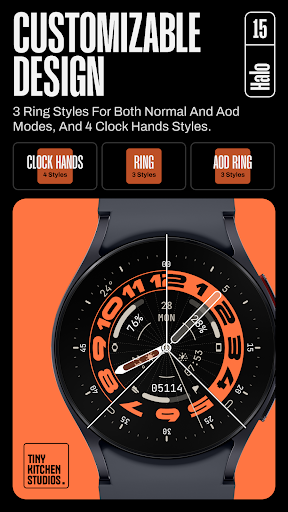
TKS 15 Halo Watch face
Tiny Kitchen Studios

4.8 stars30 reviews500+$1.49
PersonalizationEveryoneVersion VARYUpdated 8/18/2025, 9:49:35 PM
Open in Store* Not suitable for rectangular smart watches
An Informative, Customizable Analog Watch Face For Wear OS Devices
Features:
- 30 color palettes, all featuring a true black background for optimal battery life.
- Steps tracker and date built-in.
- 2 AOD modes: simple and transparent.
- Customizable Design: choose between 4 clock hands style, 4 ring styles, and 4 aod ring styles.
- 8 Customizable complications: with corner complications supporting app shortcuts for minimal look, or text complications for a more informative style.
Purchasing and Installing the watch face:
During watch face purchase and installation, keep your watch selected. You can skip installing the phone app - the watch face should work just fine on its own.
Using the watch face:
1- Tap and hold on your watch display.
2- Swipe all watch faces to the right
3- Tap "+" and find the installed watch face in this list.
Note for Pixel Watch Users:
If steps/HR counters freeze after customization, simply switch to another watch face and back to reset.
For phone battery complication setting: in order to apply a phone battery ranged complication you need to download the free “phone battery complication” app by amoledwatchfaces™.
link: https://shorturl.at/kpBES
or search the play store for “phone battery complication”.
Run into any issues or need a hand? We're happy to help! Just send us an email at dev.tinykitchenstudios@gmail.com
#WearOS #SmartWatch #WatchFace #Analog #Clean
An Informative, Customizable Analog Watch Face For Wear OS Devices
Features:
- 30 color palettes, all featuring a true black background for optimal battery life.
- Steps tracker and date built-in.
- 2 AOD modes: simple and transparent.
- Customizable Design: choose between 4 clock hands style, 4 ring styles, and 4 aod ring styles.
- 8 Customizable complications: with corner complications supporting app shortcuts for minimal look, or text complications for a more informative style.
Purchasing and Installing the watch face:
During watch face purchase and installation, keep your watch selected. You can skip installing the phone app - the watch face should work just fine on its own.
Using the watch face:
1- Tap and hold on your watch display.
2- Swipe all watch faces to the right
3- Tap "+" and find the installed watch face in this list.
Note for Pixel Watch Users:
If steps/HR counters freeze after customization, simply switch to another watch face and back to reset.
For phone battery complication setting: in order to apply a phone battery ranged complication you need to download the free “phone battery complication” app by amoledwatchfaces™.
link: https://shorturl.at/kpBES
or search the play store for “phone battery complication”.
Run into any issues or need a hand? We're happy to help! Just send us an email at dev.tinykitchenstudios@gmail.com
#WearOS #SmartWatch #WatchFace #Analog #Clean
Developer email
dev.tinykitchenstudios@gmail.com
Developer website
https://www.instagram.com/tiny.kitchen.studios/Released
Nov 26, 2024
Current version
VARY
Android version
VARY
Reviews & Ratings
4.8
out of 5
5
4
3
2
1
🌟 Loved by users
30 reviewsScreenshots