GPS Race Timer
THHA Software

4.0 stars1,706 reviews100,000+Free
Auto & VehiclesEveryoneVersion 3.5Updated 11/19/2025, 8:07:53 PM
Open in StoreMeasure acceleration like 0 - 60 mph, 60 - 120 mph and 1/4 mile (quarter mile) directly with your smartphone - accurate and no extra hardware.
The app is designed so you don’t operate it while driving; set everything up while stationary.
Measurements then start automatically when the target speed is reached or when a start is detected.
You can save results locally on your device and export or transfer them if needed.
Preset timers
60 ft, 1/8 mile, 1/4 mile, 1/2 mile, 1 mile, 0 – 60 mph (0-60), 0 – 120 mph (0-120), 50 – 75 mph (50-75), 60 – 120 mph (60-120), 0 – 100 km/h (0-100), 0 – 200 km/h (0-200), 80 – 120 km/h (80-120), 100 – 200 km/h (100-200).
All timers are fully adjustable and support both mph and km/h.
The free version measures up to two times per run.
How to use the app
Check the timer settings on the start screen. If everything looks good, place your phone securely in the car with good GPS reception, then start the acceleration test.
Adjust the timer configuration in the Settings screen (tap the relevant timer). Return to the race screen and follow the instructions above.
Optional PRO version (in-app purchase)
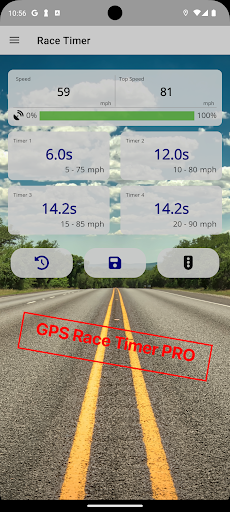
1. Up to four timers in parallel (instead of two)
2. Precise elevation-difference calculation
3. Sportsman-start simulation and reaction-time measurement
4. No ad banners
The app is designed so you don’t operate it while driving; set everything up while stationary.
Measurements then start automatically when the target speed is reached or when a start is detected.
You can save results locally on your device and export or transfer them if needed.
Preset timers
60 ft, 1/8 mile, 1/4 mile, 1/2 mile, 1 mile, 0 – 60 mph (0-60), 0 – 120 mph (0-120), 50 – 75 mph (50-75), 60 – 120 mph (60-120), 0 – 100 km/h (0-100), 0 – 200 km/h (0-200), 80 – 120 km/h (80-120), 100 – 200 km/h (100-200).
All timers are fully adjustable and support both mph and km/h.
The free version measures up to two times per run.
How to use the app
Check the timer settings on the start screen. If everything looks good, place your phone securely in the car with good GPS reception, then start the acceleration test.
Adjust the timer configuration in the Settings screen (tap the relevant timer). Return to the race screen and follow the instructions above.
Optional PRO version (in-app purchase)
1. Up to four timers in parallel (instead of two)
2. Precise elevation-difference calculation
3. Sportsman-start simulation and reaction-time measurement
4. No ad banners
Developer email
thha.software@gmail.com
Developer website
http://gpsracetimer.wordpress.com/Released
Aug 11, 2018
Current version
3.5
Android version
8.0
Reviews & Ratings
4.0
out of 5
5
4
3
2
1
⚠️ Users report mixed experiences
1,706 reviewsScreenshots