Ping Monitor
The Myth

Ping Monitor helps you check the reachability of IP addresses and hostnames directly from your Android device.
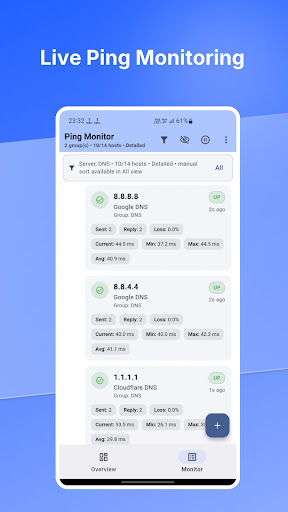
View live ping status, latency, packet loss, and availability through a clear interface designed for sysadmins, network engineers, VPS owners, homelab users, and IT operators.
MONITOR IMPORTANT HOSTS
Quickly check servers, routers, VPS instances, hostnames, and network devices without opening your laptop.
Ping Monitor provides:
• Clear UP, DEGRADED, and DOWN indicators
• Current, minimum, maximum, and average latency
• Packet-loss statistics
• Last-check information
• Start and pause controls
• Detailed and compact Host views
ORGANIZE ENVIRONMENTS WITH WORKSPACES
Keep unrelated networks separated inside one app. Create Workspaces for environments such as:
• Home networks
• Office infrastructure
• VPS and cloud servers
• Client environments
• Labs and testing systems
Each Workspace contains its own Hosts and Groups, so switching environments does not mix unrelated monitoring configurations.
Multiple Workspaces are available with the Elite plan.
FOCUS ON ACTIVE INCIDENTS
The Overview dashboard highlights Hosts that need attention.
DOWN and DEGRADED Hosts remain visible while healthy Hosts stay out of the way, helping you identify connectivity problems faster.
MANAGE AND PROTECT YOUR CONFIGURATION
• Add, edit, delete, and manually sort Hosts
• Organize Hosts into Groups
• Filter Hosts by Group
• Import existing configurations
• Export and share backups
• Choose Light, Dark, or System theme
• Store monitoring configurations locally on your device
PLANS
Free:
• Monitor up to 2 Hosts
• Create up to 2 Groups
• Basic Monitoring
Pro:
• Unlimited Hosts
• Unlimited Groups
• Fast Monitoring
Elite:
• Everything included in Pro
• Multiple Workspaces
• Overview dashboard
• Group filtering
• Incident-focused monitoring
PRIVATE AND LOCAL
Your Host, Group, Workspace, and application settings are stored locally on your device.
• No account required
• No advertising
• No mandatory cloud service
Ping availability depends on the target device and network configuration. Some servers, routers, or firewalls may block ping requests even when other services remain available.
View live ping status, latency, packet loss, and availability through a clear interface designed for sysadmins, network engineers, VPS owners, homelab users, and IT operators.
MONITOR IMPORTANT HOSTS
Quickly check servers, routers, VPS instances, hostnames, and network devices without opening your laptop.
Ping Monitor provides:
• Clear UP, DEGRADED, and DOWN indicators
• Current, minimum, maximum, and average latency
• Packet-loss statistics
• Last-check information
• Start and pause controls
• Detailed and compact Host views
ORGANIZE ENVIRONMENTS WITH WORKSPACES
Keep unrelated networks separated inside one app. Create Workspaces for environments such as:
• Home networks
• Office infrastructure
• VPS and cloud servers
• Client environments
• Labs and testing systems
Each Workspace contains its own Hosts and Groups, so switching environments does not mix unrelated monitoring configurations.
Multiple Workspaces are available with the Elite plan.
FOCUS ON ACTIVE INCIDENTS
The Overview dashboard highlights Hosts that need attention.
DOWN and DEGRADED Hosts remain visible while healthy Hosts stay out of the way, helping you identify connectivity problems faster.
MANAGE AND PROTECT YOUR CONFIGURATION
• Add, edit, delete, and manually sort Hosts
• Organize Hosts into Groups
• Filter Hosts by Group
• Import existing configurations
• Export and share backups
• Choose Light, Dark, or System theme
• Store monitoring configurations locally on your device
PLANS
Free:
• Monitor up to 2 Hosts
• Create up to 2 Groups
• Basic Monitoring
Pro:
• Unlimited Hosts
• Unlimited Groups
• Fast Monitoring
Elite:
• Everything included in Pro
• Multiple Workspaces
• Overview dashboard
• Group filtering
• Incident-focused monitoring
PRIVATE AND LOCAL
Your Host, Group, Workspace, and application settings are stored locally on your device.
• No account required
• No advertising
• No mandatory cloud service
Ping availability depends on the target device and network configuration. Some servers, routers, or firewalls may block ping requests even when other services remain available.
Developer email
themyth@tutamail.com
Released
Jul 30, 2026
Current version
1.2.1
Android version
7.0
Screenshots