소낭판매관리ㆍ유통기한관리
sonang

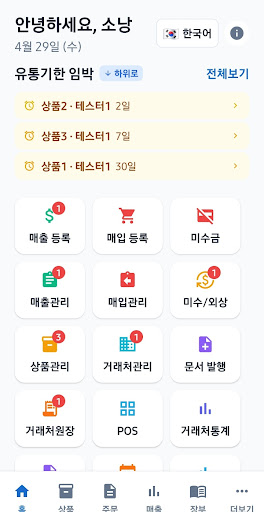
Sonang Wholesale & Retail Management is a sales management app exclusively for wholesale and retail business owners that allows you to manage "expiration dates simultaneously with the moment you create sales and purchase slips," using only a smartphone without the need for a PDA or PC. When you create a purchase slip, the expiration date of the incoming goods is automatically registered; when you issue a sales slip, inventory nearing expiration is sorted as a priority for shipment; and products approaching expiration can be checked immediately via push notifications and supplier-specific lists. As a result, waste losses are reduced, and cash flow is rationally organized by allowing you to concentrate purchases on products with high turnover rates.
From product registration to creating sales and purchase slips, supplier management, inventory management, accounts receivable management, statistical analysis, and receipt printing, all functions necessary for business operations are organically connected with expiration date management within a single app. Furthermore, all data is stored internally on the device, allowing it to operate fully without an internet connection, and receipts can be printed immediately at markets, warehouses, or delivery sites by connecting a Bluetooth printer.
1. Key Features
1-1. Expiration Date Management Automatically Linked to Sales and Purchases
When you create a purchase slip, the registered product, quantity, and entered expiration date are automatically linked directly to the expiration date management ledger. When issuing sales slips, the imminent inventory of the same product is presented first, ensuring a natural rotation where "what came in first goes out first." You can freely sort items by supplier, expiration date, or arrival date. Furthermore, you can set bulk adjustments by date or month, as well as automatic deletion criteria based on the number of days approaching, all at the supplier level. This allows you to reduce waste losses and refine purchasing decisions rationally.
1-2. All-in-One Sales Management
Integrated management of product registration, sales and purchase slip creation, supplier management, inventory management, credit management, document issuance, and statistical analysis is available in one place. You can handle all tasks with just a smartphone, without the need for separate programs or Excel work. Since sales/purchases and expiration dates/inventory operate on the same data flow, duplicate entries or numerical discrepancies do not occur.
1-3. Full Offline Support
Since all data is stored internally, you can use all functions—including creating receipts, checking inventory, viewing expiration dates, and printing receipts—even without an internet connection. It operates stably even in environments with unstable networks, such as markets, warehouses, and delivery sites, ensuring that business operations do not stop even in the event of internal store network failures or communication disruptions.
1-4. Barcode Scan Integration
With a built-in camera-based barcode scanning function, scanning a barcode during product registration automatically inputs product information, and you can quickly add products with a single scan even while creating sales or purchase receipts. In continuous scan mode, the workflow follows a sequence of Scan → Automatic Addition → Expiration Date Input → Quantity Input → Next Scan, allowing multi-item inbound and outbound operations to proceed seamlessly. Unregistered barcodes are registered on the spot, and the system returns to continuous scanning, ensuring uninterrupted workflow on-site.
1-5. Expiration Date Notifications and Batch Processing
Products with an approaching expiration date are notified via local push notifications 7 days before and on the day of expiration, and can be immediately checked on badges in the home dashboard and in the expiring list by supplier. Products nearing expiration or expiring can be organized all at once through bulk deletion or bulk extension, enabling quick and consistent decisions regarding disposal and discount sales in stores and warehouses.
1-6. Statistics and Documents to Aid Rational Operations
It provides aggregated sales and purchases by supplier and period, monthly trends, accounts receivable status, and profit margin analysis. Transaction history by supplier can be shared via PDF or Excel. Receipts, transaction statements, and tax invoice templates can all be issued, printed, and shared within a single app, allowing you to create a rational operational cycle where losses saved through expiration date management are directly verified in numerical terms.
From product registration to creating sales and purchase slips, supplier management, inventory management, accounts receivable management, statistical analysis, and receipt printing, all functions necessary for business operations are organically connected with expiration date management within a single app. Furthermore, all data is stored internally on the device, allowing it to operate fully without an internet connection, and receipts can be printed immediately at markets, warehouses, or delivery sites by connecting a Bluetooth printer.
1. Key Features
1-1. Expiration Date Management Automatically Linked to Sales and Purchases
When you create a purchase slip, the registered product, quantity, and entered expiration date are automatically linked directly to the expiration date management ledger. When issuing sales slips, the imminent inventory of the same product is presented first, ensuring a natural rotation where "what came in first goes out first." You can freely sort items by supplier, expiration date, or arrival date. Furthermore, you can set bulk adjustments by date or month, as well as automatic deletion criteria based on the number of days approaching, all at the supplier level. This allows you to reduce waste losses and refine purchasing decisions rationally.
1-2. All-in-One Sales Management
Integrated management of product registration, sales and purchase slip creation, supplier management, inventory management, credit management, document issuance, and statistical analysis is available in one place. You can handle all tasks with just a smartphone, without the need for separate programs or Excel work. Since sales/purchases and expiration dates/inventory operate on the same data flow, duplicate entries or numerical discrepancies do not occur.
1-3. Full Offline Support
Since all data is stored internally, you can use all functions—including creating receipts, checking inventory, viewing expiration dates, and printing receipts—even without an internet connection. It operates stably even in environments with unstable networks, such as markets, warehouses, and delivery sites, ensuring that business operations do not stop even in the event of internal store network failures or communication disruptions.
1-4. Barcode Scan Integration
With a built-in camera-based barcode scanning function, scanning a barcode during product registration automatically inputs product information, and you can quickly add products with a single scan even while creating sales or purchase receipts. In continuous scan mode, the workflow follows a sequence of Scan → Automatic Addition → Expiration Date Input → Quantity Input → Next Scan, allowing multi-item inbound and outbound operations to proceed seamlessly. Unregistered barcodes are registered on the spot, and the system returns to continuous scanning, ensuring uninterrupted workflow on-site.
1-5. Expiration Date Notifications and Batch Processing
Products with an approaching expiration date are notified via local push notifications 7 days before and on the day of expiration, and can be immediately checked on badges in the home dashboard and in the expiring list by supplier. Products nearing expiration or expiring can be organized all at once through bulk deletion or bulk extension, enabling quick and consistent decisions regarding disposal and discount sales in stores and warehouses.
1-6. Statistics and Documents to Aid Rational Operations
It provides aggregated sales and purchases by supplier and period, monthly trends, accounts receivable status, and profit margin analysis. Transaction history by supplier can be shared via PDF or Excel. Receipts, transaction statements, and tax invoice templates can all be issued, printed, and shared within a single app, allowing you to create a rational operational cycle where losses saved through expiration date management are directly verified in numerical terms.
Developer email
ysslkim68@gmail.com
Released
May 7, 2026
Current version
1.5.69
Android version
7.0
Screenshots