QuickScan: QR & Barcode Reader
Sharon Evans

4.2 stars2,463 reviews500,000+Free
ProductivityEveryoneVersion 1.3.6Updated 4/28/2026, 5:48:51 AM
Open in Store🔍 QuickScan: QR & Barcode Reader — Ultra-fast and Accurate QR & Barcode Scanning Tool
QuickScan is an intelligent scanning tool designed for an efficient lifestyle. Its core functionality is to quickly recognize various QR codes and barcodes, making scanning faster, more accurate, and easier.
Whether it’s for price comparison while shopping, checking food nutrition facts, tracking logistics information, digitizing documents, or sharing information, QuickScan completes tasks efficiently, making both life and work smoother.
QR Code Scanning Function
QuickScan can instantly recognize various QR codes you encounter in daily life — whether it’s a restaurant menu, event ticket, boarding pass, Wi‑Fi login, product information, or social media links.
Whether you’re dining out, traveling, shopping, or attending a show, QuickScan can provide quick and accurate results in seconds, helping you easily access information or complete actions — even in low light or from a distance.
Barcode Recognition Function
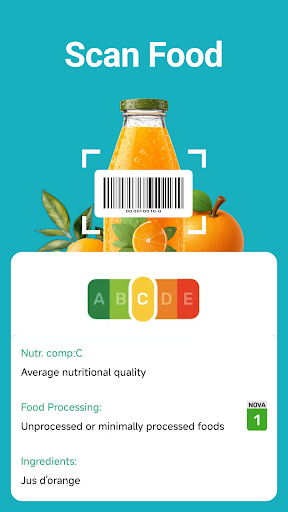
QuickScan can instantly recognize various mainstream barcode formats, allowing you to easily check product prices, compare goods, view nutrition facts, verify inventory, or track packages.
Whether you’re shopping in stores, managing inventory, or receiving deliveries, QuickScan provides fast and accurate barcode scanning even in dim lighting or at a greater distance, helping you make smarter decisions instantly.
Other Features:
-QuickScan offers a wide range of scanning capabilities to meet various needs.
-Import photos from your gallery to instantly recognize QR codes.
-Real-time barcode recognition and quick extraction of product information.
-Scan food labels to view ingredients or nutritional values.
-Recognize multiple currencies for quick verification.
-Scan paper documents to instantly generate digital copies.
-Flashlight mode allows precise scanning even in low-light or nighttime environments.
How to Use:
1.Open the app – Launch QuickScan on your device.
2.Choose a scanning method – Aim your camera at a QR code or barcode, or select a photo from your gallery.
3.Instant recognition – The app will automatically detect the content and display the relevant information immediately.
4.Use additional features – Scan food labels, recognize currencies, or scan paper documents as needed.
5.Low-light scanning – Enable flashlight mode to improve recognition accuracy when lighting is insufficient.
6.Save or share – Save scan results locally or share them via SMS, email, and more.
QuickScan: QR & Barcode Reader is not just a scanning app — it is your QR and barcode recognition assistant for both daily life and work. From shopping payments to document management, QuickScan delivers a fast, accurate, and smooth scanning experience.
Start a new era of efficient scanning with QuickScan: QR & Barcode Reader today. 🌟
QuickScan is an intelligent scanning tool designed for an efficient lifestyle. Its core functionality is to quickly recognize various QR codes and barcodes, making scanning faster, more accurate, and easier.
Whether it’s for price comparison while shopping, checking food nutrition facts, tracking logistics information, digitizing documents, or sharing information, QuickScan completes tasks efficiently, making both life and work smoother.
QR Code Scanning Function
QuickScan can instantly recognize various QR codes you encounter in daily life — whether it’s a restaurant menu, event ticket, boarding pass, Wi‑Fi login, product information, or social media links.
Whether you’re dining out, traveling, shopping, or attending a show, QuickScan can provide quick and accurate results in seconds, helping you easily access information or complete actions — even in low light or from a distance.
Barcode Recognition Function
QuickScan can instantly recognize various mainstream barcode formats, allowing you to easily check product prices, compare goods, view nutrition facts, verify inventory, or track packages.
Whether you’re shopping in stores, managing inventory, or receiving deliveries, QuickScan provides fast and accurate barcode scanning even in dim lighting or at a greater distance, helping you make smarter decisions instantly.
Other Features:
-QuickScan offers a wide range of scanning capabilities to meet various needs.
-Import photos from your gallery to instantly recognize QR codes.
-Real-time barcode recognition and quick extraction of product information.
-Scan food labels to view ingredients or nutritional values.
-Recognize multiple currencies for quick verification.
-Scan paper documents to instantly generate digital copies.
-Flashlight mode allows precise scanning even in low-light or nighttime environments.
How to Use:
1.Open the app – Launch QuickScan on your device.
2.Choose a scanning method – Aim your camera at a QR code or barcode, or select a photo from your gallery.
3.Instant recognition – The app will automatically detect the content and display the relevant information immediately.
4.Use additional features – Scan food labels, recognize currencies, or scan paper documents as needed.
5.Low-light scanning – Enable flashlight mode to improve recognition accuracy when lighting is insufficient.
6.Save or share – Save scan results locally or share them via SMS, email, and more.
QuickScan: QR & Barcode Reader is not just a scanning app — it is your QR and barcode recognition assistant for both daily life and work. From shopping payments to document management, QuickScan delivers a fast, accurate, and smooth scanning experience.
Start a new era of efficient scanning with QuickScan: QR & Barcode Reader today. 🌟
Developer email
teamore.wonton@gmail.com
Developer website
https://www.sharon-apps.com/Released
Nov 10, 2025
Current version
1.3.6
Android version
7.0
Reviews & Ratings
4.2
out of 5
5
4
3
2
1
🙂 Mostly positive reviews
2,463 reviewsScreenshots