Recover Photos – Delete Files
Hit Studio

🧭 Recover Photos – Delete Files – Restore your precious memories in seconds!
Have you accidentally deleted important photos or lost them due to a phone reset or memory card error? Don’t panic! With the Photo Recovery App, you can safely and quickly restore deleted photos — no root required.
This powerful recovery tool scans your device's internal storage and SD card to find and bring back lost images instantly.
📸 Key Features of Recover Photos – Delete Files:
🔍 Deep Scan & Quick Scan
Effortlessly search your device with two recovery modes. Deep scan ensures thorough recovery, even from formatted storage.
🗂️ Organized Recovered Files
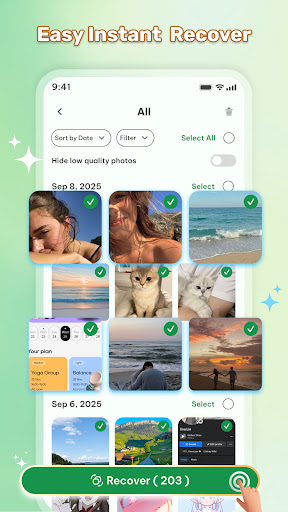
Preview and restore deleted photos grouped by folder or date for easy navigation.
⚡ Fast Recovery Process
Recover lost photos in just a few taps — no complicated steps, no waiting.
🔐 Secure & Private
Your data stays 100% safe — no uploads, no sharing.
🛠️ Smart Photo Recovery Tools
Sort, filter, and manage your restored files with built-in tools.
📤 One-Tap Restore
Bring your lost photos back with a single tap and save them to your gallery.
✨ Why Choose Recover Photos – Delete Files?
✅ Restore images after accidental deletion, formatting, or reset
✅ Works without root access
✅ User-friendly interface, no tech skills needed
✅ Supports multiple file formats: JPG, PNG & more
💡 Don’t let your deleted memories stay gone forever.
📲 Download Recover Photos – Delete Files today and recover your photos in seconds!
We’d very much appreciate if you have any recommendations or suggestions for us to improve this recovery files app. Your kind words encourage us a lot, thank you ❤️
Have you accidentally deleted important photos or lost them due to a phone reset or memory card error? Don’t panic! With the Photo Recovery App, you can safely and quickly restore deleted photos — no root required.
This powerful recovery tool scans your device's internal storage and SD card to find and bring back lost images instantly.
📸 Key Features of Recover Photos – Delete Files:
🔍 Deep Scan & Quick Scan
Effortlessly search your device with two recovery modes. Deep scan ensures thorough recovery, even from formatted storage.
🗂️ Organized Recovered Files
Preview and restore deleted photos grouped by folder or date for easy navigation.
⚡ Fast Recovery Process
Recover lost photos in just a few taps — no complicated steps, no waiting.
🔐 Secure & Private
Your data stays 100% safe — no uploads, no sharing.
🛠️ Smart Photo Recovery Tools
Sort, filter, and manage your restored files with built-in tools.
📤 One-Tap Restore
Bring your lost photos back with a single tap and save them to your gallery.
✨ Why Choose Recover Photos – Delete Files?
✅ Restore images after accidental deletion, formatting, or reset
✅ Works without root access
✅ User-friendly interface, no tech skills needed
✅ Supports multiple file formats: JPG, PNG & more
💡 Don’t let your deleted memories stay gone forever.
📲 Download Recover Photos – Delete Files today and recover your photos in seconds!
We’d very much appreciate if you have any recommendations or suggestions for us to improve this recovery files app. Your kind words encourage us a lot, thank you ❤️
Developer email
diy.hhto@gmail.com
Developer website
https://hit-studio.netlify.app/Released
Dec 17, 2025
Current version
1.0.0
Android version
7.0
Screenshots