倉頡/速成練習工具
Tung To Technology

4.5 stars3,392 reviews100,000+Free
EducationEveryoneVersion 3.2.3Updated 10/22/2024, 8:23:13 PM
Open in StoreFeatures:
•Easy to use, minimalist design
• Hint system, learn from mistakes
•Supports Cangjie Three and Five Generations Mixed Play, Cangjie Five Generations, Cangjie Three Generations and Simplified Cangjie
•3000+ commonly used Traditional Chinese characters for practice
•Practice offline, no internet required
•Timed mode, challenge your typing speed
•Classification exercises, 210 radical classifications
•Bookmark records, review the difficult words written down at any time
•Dark mode provides a comfortable practice environment in the dark
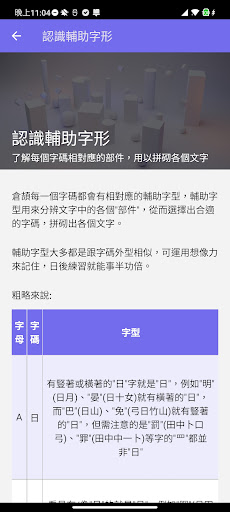
•Novice tutorials to help you get started and master Cangjie
• Comes with dictionary for free offline use
•Article exercises, custom-added article exercises
This application is independently developed by Tongtu Technology. We hope that through practice, practice makes perfect, and you can master the Cangjie/Quick Input Method.
Cangjie/Quick Practice Tool contains 3000+ commonly used traditional Chinese characters, and will be updated and added regularly. You can use the built-in Cangjie keyboard to enter the Cangjie code of the corresponding text. After completion, you can manually jump to the next one, or you can stay Or go back to the previous one, think about it and accumulate experience.
The simple design interface is easy to use, and there is no need to connect to the Internet when practicing. There is also a reminder system within the app to help you learn from your mistakes.
Note: The trial version contains 300 words, and the paid version currently has 3,000+ words and can be purchased within the app.
•Easy to use, minimalist design
• Hint system, learn from mistakes
•Supports Cangjie Three and Five Generations Mixed Play, Cangjie Five Generations, Cangjie Three Generations and Simplified Cangjie
•3000+ commonly used Traditional Chinese characters for practice
•Practice offline, no internet required
•Timed mode, challenge your typing speed
•Classification exercises, 210 radical classifications
•Bookmark records, review the difficult words written down at any time
•Dark mode provides a comfortable practice environment in the dark
•Novice tutorials to help you get started and master Cangjie
• Comes with dictionary for free offline use
•Article exercises, custom-added article exercises
This application is independently developed by Tongtu Technology. We hope that through practice, practice makes perfect, and you can master the Cangjie/Quick Input Method.
Cangjie/Quick Practice Tool contains 3000+ commonly used traditional Chinese characters, and will be updated and added regularly. You can use the built-in Cangjie keyboard to enter the Cangjie code of the corresponding text. After completion, you can manually jump to the next one, or you can stay Or go back to the previous one, think about it and accumulate experience.
The simple design interface is easy to use, and there is no need to connect to the Internet when practicing. There is also a reminder system within the app to help you learn from your mistakes.
Note: The trial version contains 300 words, and the paid version currently has 3,000+ words and can be purchased within the app.
Developer email
contact@tungto.com
Developer website
https://cangjie.appReleased
Jul 17, 2018
Current version
3.2.3
Android version
7.0
Reviews & Ratings
4.5
out of 5
5
4
3
2
1
😊 Highly rated by users
3,392 reviewsScreenshots