Gallery - Albums & Hide Photos
App Capture LLC

4.0 stars2,218 reviews100,000+Free
PhotographyEveryoneVersion 1.16Updated 10/22/2026, 10:48:54 AM
Open in StoreGallery is a simple app for the photos and videos already on your phone.
Browse everything in one place, keep albums tidy, and hide anything you don’t want sitting in your main library. No complicated setup — open it and your media is there.
What you can do
• Photos & videos
See your library in a clean grid. Switch to list view, change columns, and sort newest or oldest first.
• Albums & collections
Your folders show up as albums. You’ll also get handy collections like Screenshots, Favorites, Hidden, and Recently deleted.
• Hide private photos
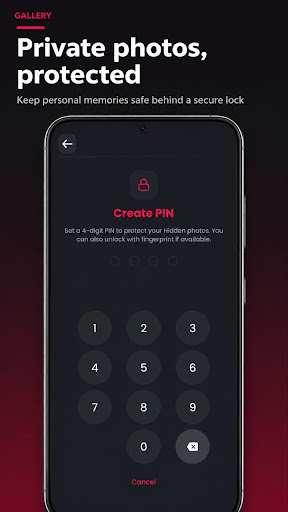
Move personal items to Hidden and lock them with a 4-digit PIN. Fingerprint or face unlock works too, if your phone supports it.
• Favorites
Heart the shots you care about and find them again fast.
• Search
Look up photos and albums by name, or browse by time, folder, and place (when location is in the photo).
• Memories
Revisit yearly highlights and stories made from what’s already on your device.
• Recently deleted
Deleted by mistake? Restore from Recently deleted before items are removed for good.
• Everyday tools
Share, copy, move, rename, view details, set a wallpaper, or open an editor you already have on your phone.
• Night mode & languages
Use a darker look at night. Switch the app language anytime (English, Hindi, Spanish, French, Arabic, Indonesian).
Your photos stay on your device. Gallery is for viewing and organizing local media — not a cloud backup service.
If something feels off or you want an improvement, send feedback from inside the app. We’re listening.
Browse everything in one place, keep albums tidy, and hide anything you don’t want sitting in your main library. No complicated setup — open it and your media is there.
What you can do
• Photos & videos
See your library in a clean grid. Switch to list view, change columns, and sort newest or oldest first.
• Albums & collections
Your folders show up as albums. You’ll also get handy collections like Screenshots, Favorites, Hidden, and Recently deleted.
• Hide private photos
Move personal items to Hidden and lock them with a 4-digit PIN. Fingerprint or face unlock works too, if your phone supports it.
• Favorites
Heart the shots you care about and find them again fast.
• Search
Look up photos and albums by name, or browse by time, folder, and place (when location is in the photo).
• Memories
Revisit yearly highlights and stories made from what’s already on your device.
• Recently deleted
Deleted by mistake? Restore from Recently deleted before items are removed for good.
• Everyday tools
Share, copy, move, rename, view details, set a wallpaper, or open an editor you already have on your phone.
• Night mode & languages
Use a darker look at night. Switch the app language anytime (English, Hindi, Spanish, French, Arabic, Indonesian).
Your photos stay on your device. Gallery is for viewing and organizing local media — not a cloud backup service.
If something feels off or you want an improvement, send feedback from inside the app. We’re listening.
Developer email
md.technolab@gmail.com
Developer website
https://onetoolsmaster.blogspot.com/Released
Oct 2, 2023
Current version
1.16
Android version
11
Reviews & Ratings
4.0
out of 5
5
4
3
2
1
⚠️ Users report mixed experiences
2,218 reviewsScreenshots