QR Code & Barcode Scanner
NimbusApps

4.5 stars4,099 reviews5,000,000+Free
ToolsEveryoneVersion 1.3.0Updated 5/15/2026, 4:49:02 AM
Open in StoreImagine connecting to Wi-Fi with a single scan, share contact info, or opening a menu in moments. This smart QR code scanner turns your phone into a powerful scanner — no typing, no switching apps. Just open the camera, scan, and get instant access.
The app functions as a QR code reader and barcode scanner designed for everyday personal and business use.
🚀 What Can You Do With This QR Scanner?
📷 Scan With Camera
• Use your phone camera to scan QR codes, barcodes, and other supported code formats.
• Supports URLs, text, contacts, emails, phone numbers, calendar events, and similar data types.
The scanner is designed to detect codes efficiently in common usage scenarios.
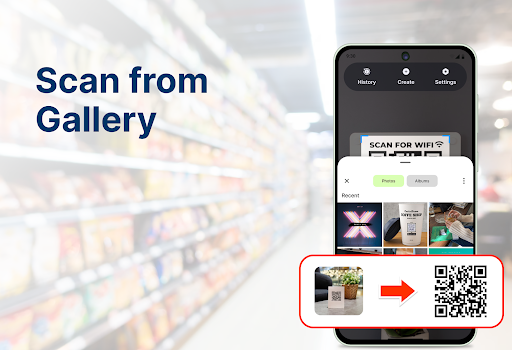
🖼️ Scan From Image Library
• Import images or screenshots from your photo library and read codes without rescanning.
• Useful when a code is received online or saved earlier.
🔍 Scan & Online Search
Scan a QR code or barcode and open a web search in your default browser to view related information, pricing, or resources.*
🛠️ Create & Share Custom QR Codes
Create QR codes for:
🔗 Websites, links, text, or messages
📇 Contacts and phone numbers
🗺️ Locations and events
📶 Wi-Fi networks (connection handled by the Android system; location permission may be required)
Custom codes can be used for events, business communication, or quick access in daily use.
📚 Scan History
• Saves scan history locally with date and time
• Bookmark important codes
• Search previous scans
All scan data remains on the device and can be cleared by the user at any time.
👥 Designed for Different Use Cases
🛍️ Shoppers – Scan product codes and open web results for reference
🎓 Students – Access shared study links and resources
💼 Business users – Share contact details and manage event access
🏠 Everyday use – Store Wi-Fi details, scan tickets, menus, or documents
🔐 Permissions & Privacy
The app may request:
• Camera – to scan QR codes and barcodes
• Photo Library – to read saved images
• Location – only when connecting to Wi-Fi via QR (system requirement)
• Internet – to open online search results
Scan history is stored locally on the device and can be deleted at any time.
📲 Download now and experience effortless scanning wherever you go — scan, connect, and share easily.
*Opens a web search in your default browser; price data and availability may vary by region. Always verify product information with official sources.
The app functions as a QR code reader and barcode scanner designed for everyday personal and business use.
🚀 What Can You Do With This QR Scanner?
📷 Scan With Camera
• Use your phone camera to scan QR codes, barcodes, and other supported code formats.
• Supports URLs, text, contacts, emails, phone numbers, calendar events, and similar data types.
The scanner is designed to detect codes efficiently in common usage scenarios.
🖼️ Scan From Image Library
• Import images or screenshots from your photo library and read codes without rescanning.
• Useful when a code is received online or saved earlier.
🔍 Scan & Online Search
Scan a QR code or barcode and open a web search in your default browser to view related information, pricing, or resources.*
🛠️ Create & Share Custom QR Codes
Create QR codes for:
🔗 Websites, links, text, or messages
📇 Contacts and phone numbers
🗺️ Locations and events
📶 Wi-Fi networks (connection handled by the Android system; location permission may be required)
Custom codes can be used for events, business communication, or quick access in daily use.
📚 Scan History
• Saves scan history locally with date and time
• Bookmark important codes
• Search previous scans
All scan data remains on the device and can be cleared by the user at any time.
👥 Designed for Different Use Cases
🛍️ Shoppers – Scan product codes and open web results for reference
🎓 Students – Access shared study links and resources
💼 Business users – Share contact details and manage event access
🏠 Everyday use – Store Wi-Fi details, scan tickets, menus, or documents
🔐 Permissions & Privacy
The app may request:
• Camera – to scan QR codes and barcodes
• Photo Library – to read saved images
• Location – only when connecting to Wi-Fi via QR (system requirement)
• Internet – to open online search results
Scan history is stored locally on the device and can be deleted at any time.
📲 Download now and experience effortless scanning wherever you go — scan, connect, and share easily.
*Opens a web search in your default browser; price data and availability may vary by region. Always verify product information with official sources.
Developer email
tasimostudiio@gmail.com
Developer website
https://qe3f6b07f.app-ads-txt.comReleased
Jun 13, 2025
Current version
1.3.0
Android version
7.0
Reviews & Ratings
4.5
out of 5
5
4
3
2
1
😊 Highly rated by users
4,099 reviewsScreenshots