Sketchwise: learn to draw
Company Of Bros

Sketchwise helps you learn to draw anything from a photo.
Choose a reference image from your gallery or camera, and Sketchwise turns it into a guided drawing lesson with clear steps, practice prompts, and feedback on your progress. It is built for beginners, hobby artists, and anyone who wants a simple way to improve sketching, painting, proportions, shading, and observation skills.
With Sketchwise, you can:
- Turn any photo into a step-by-step drawing lesson
- Follow guided sketching steps at your own pace
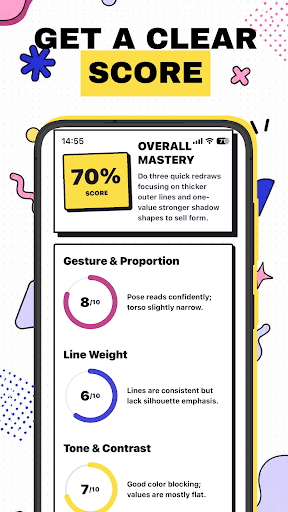
- Practice with AI-powered art feedback
- Upload your finished drawing for a final review
- Track your progress and drawing results
- Use AR to overlay current's lesson on top of your camera
- Build a consistent drawing habit with reminders
- Save your artwork and revisit past lessons
Whether you want to draw portraits, animals, objects, landscapes, or everyday photos, Sketchwise gives you a structured way to practice. Instead of staring at a blank page, you get a clear drawing path: observe the reference, break it into simple shapes, refine your sketch, add details, and review your final result.
Sketchwise is not just a photo filter or coloring app. It is a drawing coach designed to help you improve real art skills through practice.
Start with a photo. Follow the lesson. Draw better every day.
Choose a reference image from your gallery or camera, and Sketchwise turns it into a guided drawing lesson with clear steps, practice prompts, and feedback on your progress. It is built for beginners, hobby artists, and anyone who wants a simple way to improve sketching, painting, proportions, shading, and observation skills.
With Sketchwise, you can:
- Turn any photo into a step-by-step drawing lesson
- Follow guided sketching steps at your own pace
- Practice with AI-powered art feedback
- Upload your finished drawing for a final review
- Track your progress and drawing results
- Use AR to overlay current's lesson on top of your camera
- Build a consistent drawing habit with reminders
- Save your artwork and revisit past lessons
Whether you want to draw portraits, animals, objects, landscapes, or everyday photos, Sketchwise gives you a structured way to practice. Instead of staring at a blank page, you get a clear drawing path: observe the reference, break it into simple shapes, refine your sketch, add details, and review your final result.
Sketchwise is not just a photo filter or coloring app. It is a drawing coach designed to help you improve real art skills through practice.
Start with a photo. Follow the lesson. Draw better every day.
Developer email
mg.app.software@gmail.com
Released
Jun 5, 2026
Current version
1.1.1
Android version
7.0
Screenshots