Stocka – Business Manager
mr.majesty

📦 Description
Take full control of your business with Stocka, the all-in-one app for managing inventory, sales, expenses, staff, and multiple branches — all from your phone.
Whether you're in your shop or on the move, Stocka gives you real-time insights and powerful tools to run your business efficiently — even without internet access.
🚀 Key Features
📶 Offline Mode
Keep working without interruptions. Record sales, manage stock, and run your business even when you're offline.
🏪 Branch Management
Manage multiple stores from one account. Track performance and inventory across all your business locations
👥 Employee Access Control
Add team members and assign roles with specific permissions to keep your operations secure and organized.
🔍 Barcode Scanner
Scan products instantly for faster stock entry, product tagging, and checkout.
📊 Activity Tracking
Monitor employee actions and daily operations in real time for full transparency.
📈 Business Essentials
Sales & Stock Tracking
Monitor sales trends and manage inventory with ease.
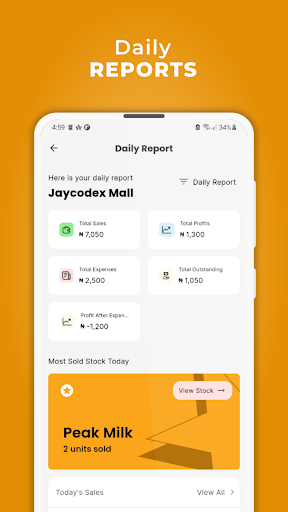
Daily Reports
Get insights into sales, profits, and top-performing products.
Customer Credit Management
Track debts and manage customer payments effortlessly.
Expense Tracking
Stay on top of your business spending in one place.
Invoicing & Printing
Generate and print invoices quickly for smooth transactions.
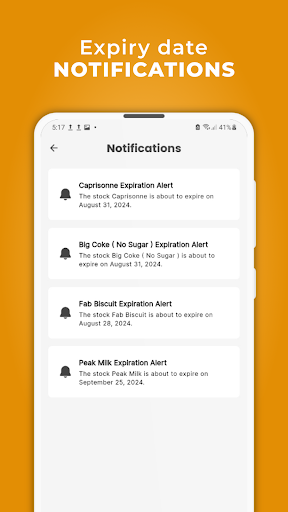
Expiry Alerts
Avoid losses with timely stock expiry notifications.
💡 Why Stocka?
Stocka is built to support growing businesses with the tools they need to stay organized, efficient, and in control — whether online or offline.
📲 Get Started
Download Stocka today and take your business to the next level.
Take full control of your business with Stocka, the all-in-one app for managing inventory, sales, expenses, staff, and multiple branches — all from your phone.
Whether you're in your shop or on the move, Stocka gives you real-time insights and powerful tools to run your business efficiently — even without internet access.
🚀 Key Features
📶 Offline Mode
Keep working without interruptions. Record sales, manage stock, and run your business even when you're offline.
🏪 Branch Management
Manage multiple stores from one account. Track performance and inventory across all your business locations
👥 Employee Access Control
Add team members and assign roles with specific permissions to keep your operations secure and organized.
🔍 Barcode Scanner
Scan products instantly for faster stock entry, product tagging, and checkout.
📊 Activity Tracking
Monitor employee actions and daily operations in real time for full transparency.
📈 Business Essentials
Sales & Stock Tracking
Monitor sales trends and manage inventory with ease.
Daily Reports
Get insights into sales, profits, and top-performing products.
Customer Credit Management
Track debts and manage customer payments effortlessly.
Expense Tracking
Stay on top of your business spending in one place.
Invoicing & Printing
Generate and print invoices quickly for smooth transactions.
Expiry Alerts
Avoid losses with timely stock expiry notifications.
💡 Why Stocka?
Stocka is built to support growing businesses with the tools they need to stay organized, efficient, and in control — whether online or offline.
📲 Get Started
Download Stocka today and take your business to the next level.
Developer email
stocka.info@gmail.com
Current version
1.0.12
Android version
7.0
Screenshots