Me4U: Mahindra eSUV for You
Mahindra & Mahindra Ltd

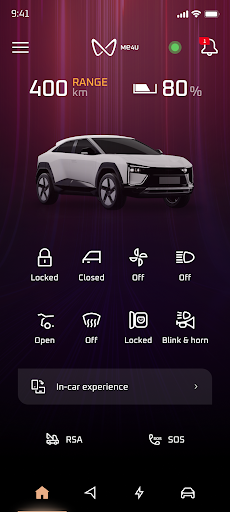
Me4U is Mahindra’s all-in-one app designed to enhance your eSUV experience. With a seamless and intuitive interface, the app keeps you connected with your vehicle at every step of your journey.
Key Features:
✅ Real-Time Vehicle Insights – Stay updated with your eSUV’s status, charge level, and other key information.
✅ Remote Commands – Control your vehicle effortlessly with remote lock/unlock, climate control, and more.
✅ Smart Navigation & Charging* – One-touch access to navigation and charging station details.
✅ Service & Assistance* – Schedule service appointments, access roadside assistance, and view detailed analytics for a smarter driving experience.
* Available only in select countries. For more details, please contact customer care.
Simply tap the menu on the top left to enter the Me4U world and unlock the full potential of your Mahindra eSUV. Download now and drive smarter!
Step to use Wear OS:
1. Download "Me4U: Mahindra eSUV for You" app in phone & login to app with given credentials.
2. Connect Smart watch to phone via "Wear OS" app.
3. Open Play Store in Smart Watch & Search for "Me4U: Mahindra eSUV for You" app.
4. Download "Me4U: Mahindra eSUV for You" app and install in Smart Watch.
5. Open "Me4U: Mahindra eSUV for You" app in smart watch after successful login from mobile app.
6. Splash, Home, Vehicle Control can be viewed on the Smart watch.
Key Features:
✅ Real-Time Vehicle Insights – Stay updated with your eSUV’s status, charge level, and other key information.
✅ Remote Commands – Control your vehicle effortlessly with remote lock/unlock, climate control, and more.
✅ Smart Navigation & Charging* – One-touch access to navigation and charging station details.
✅ Service & Assistance* – Schedule service appointments, access roadside assistance, and view detailed analytics for a smarter driving experience.
* Available only in select countries. For more details, please contact customer care.
Simply tap the menu on the top left to enter the Me4U world and unlock the full potential of your Mahindra eSUV. Download now and drive smarter!
Step to use Wear OS:
1. Download "Me4U: Mahindra eSUV for You" app in phone & login to app with given credentials.
2. Connect Smart watch to phone via "Wear OS" app.
3. Open Play Store in Smart Watch & Search for "Me4U: Mahindra eSUV for You" app.
4. Download "Me4U: Mahindra eSUV for You" app and install in Smart Watch.
5. Open "Me4U: Mahindra eSUV for You" app in smart watch after successful login from mobile app.
6. Splash, Home, Vehicle Control can be viewed on the Smart watch.
Developer email
customercare@mahindra.com
Current version
VARY
Android version
VARY
Screenshots