LB Inspect Pro
LBsoft Bilişim ve Yazılım Teknolojileri Ltd. Şti.

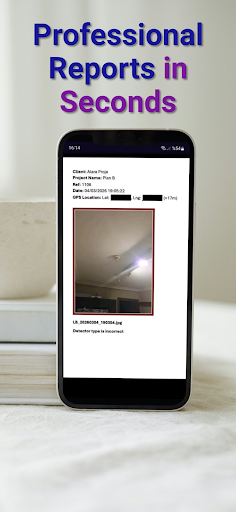
LB Inspect is a professional inspection and reporting application designed for engineers, auditors, quality inspectors, and field professionals. Capture photos, record voice notes, scan documents and QR codes, annotate images, and generate comprehensive Word, PDF, and PowerPoint reports — all from a single app.
🚀 GO PRO WITH LB INSPECT
Upgrade your workflow with our Professional plans and eliminate office paperwork.
Choose the plan that fits your needs:
Annual Plan: The best value for professionals. Includes a 30-DAY FREE TRIAL. Experience every feature with zero risk.
Monthly Plan: Flexible and easy. Includes a 7-DAY FREE TRIAL.
Pro Features Include:
✅ Unlimited Reports: No limits on your field inspections.
✅ Instant Export: Generate professional PDF and PowerPoint (PPTX) files on-site.
✅ Smart Annotations: Mark up photos with measurements and voice-to-text notes.
✅ Cloud Sync: Securely back up all your data and access it anywhere.
✅ Offline Mode: Work in remote locations without an internet connection.
Subscriptions can be managed or canceled anytime via your Google Play account settings.
All Pro Features:
Camera & Media
• Live camera preview with zoom control and flashlight
• Photo capture with automatic insertion into reports
• Video recording saved directly to your project folder
• Short voice recording (press & hold) and long voice recording (toggle)
• Front/back camera switching
Document Management
• Create, open, save, and manage Word (.docx) inspection reports
• Auto-backup with timestamped copies for crash recovery
• Save As support for creating report variants
• Project Details entry (Client, Project Name, Reference, Date, GPS Location)
• Report templates for quick-start inspections
Export & Share
• Export reports to PDF with original formatting preserved
• Export reports to PowerPoint (.pptx) with images and text grouped per slide
• Share reports via email, WhatsApp, or any installed app
• Open reports in external document viewers
Scanning & Input
• QR code and barcode scanning with auto-insertion into reports
• Document scanning powered by Google ML Kit
• Insert images from gallery
• Insert typed text notes
• Insert web links with automatic URL capture
Annotation & Measurement
• Draw and annotate on captured photos before inserting
• Measurement grid overlay on live camera view
Connectivity
• Built-in Chrome browser access
• Web link insertion into reports
• GPS location capture with map image embedding
File Management
• All reports saved under Documents/LB_Inspect/
• Organized subfolders for photos and videos
• Quick access to LB_Inspect, image, and video folders
Multi-Language
• English and Turkish language support
• Language preference remembered across sessions
Modern Interface
• Dark theme with vibrant color-coded controls
• Intuitive button layout with 7 functional levels
• Military/HUD-inspired design aesthetic
• Optimized for phones and tablets
LB Inspect keeps your last working document across sessions, so you can resume right where you left off — even after a crash.
Trusted by professionals for on-site inspections, quality audits, construction monitoring, and field documentation.
🚀 GO PRO WITH LB INSPECT
Upgrade your workflow with our Professional plans and eliminate office paperwork.
Choose the plan that fits your needs:
Annual Plan: The best value for professionals. Includes a 30-DAY FREE TRIAL. Experience every feature with zero risk.
Monthly Plan: Flexible and easy. Includes a 7-DAY FREE TRIAL.
Pro Features Include:
✅ Unlimited Reports: No limits on your field inspections.
✅ Instant Export: Generate professional PDF and PowerPoint (PPTX) files on-site.
✅ Smart Annotations: Mark up photos with measurements and voice-to-text notes.
✅ Cloud Sync: Securely back up all your data and access it anywhere.
✅ Offline Mode: Work in remote locations without an internet connection.
Subscriptions can be managed or canceled anytime via your Google Play account settings.
All Pro Features:
Camera & Media
• Live camera preview with zoom control and flashlight
• Photo capture with automatic insertion into reports
• Video recording saved directly to your project folder
• Short voice recording (press & hold) and long voice recording (toggle)
• Front/back camera switching
Document Management
• Create, open, save, and manage Word (.docx) inspection reports
• Auto-backup with timestamped copies for crash recovery
• Save As support for creating report variants
• Project Details entry (Client, Project Name, Reference, Date, GPS Location)
• Report templates for quick-start inspections
Export & Share
• Export reports to PDF with original formatting preserved
• Export reports to PowerPoint (.pptx) with images and text grouped per slide
• Share reports via email, WhatsApp, or any installed app
• Open reports in external document viewers
Scanning & Input
• QR code and barcode scanning with auto-insertion into reports
• Document scanning powered by Google ML Kit
• Insert images from gallery
• Insert typed text notes
• Insert web links with automatic URL capture
Annotation & Measurement
• Draw and annotate on captured photos before inserting
• Measurement grid overlay on live camera view
Connectivity
• Built-in Chrome browser access
• Web link insertion into reports
• GPS location capture with map image embedding
File Management
• All reports saved under Documents/LB_Inspect/
• Organized subfolders for photos and videos
• Quick access to LB_Inspect, image, and video folders
Multi-Language
• English and Turkish language support
• Language preference remembered across sessions
Modern Interface
• Dark theme with vibrant color-coded controls
• Intuitive button layout with 7 functional levels
• Military/HUD-inspired design aesthetic
• Optimized for phones and tablets
LB Inspect keeps your last working document across sessions, so you can resume right where you left off — even after a crash.
Trusted by professionals for on-site inspections, quality audits, construction monitoring, and field documentation.
Developer email
info@lbsoftist.com
Developer website
https://www.lbsoftist.comReleased
Mar 4, 2026
Current version
1.3.38
Android version
8.0
Screenshots