Feel The Wear 2 Notifications
LavaRay

3.4 stars144 reviews1,000+$4.49
ToolsEveryoneVersion 1.1.0Updated 4/21/2026, 10:29:26 AM
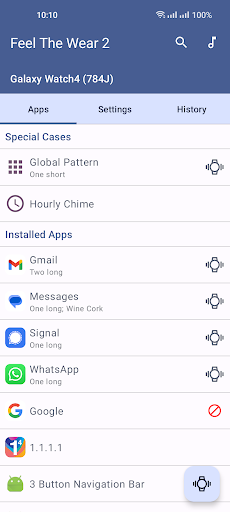
Open in StoreFeel The Wear 2 helps you notice important notifications by adding custom vibration patterns and sounds on your Wear OS watch.
What you can do:
* Set per-app vibration patterns and sounds.
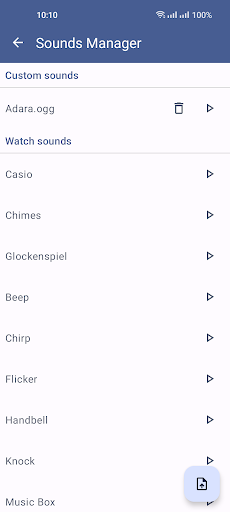
* Upload your own sounds.
* Use repeated vibrations.
* Use Hourly Chime.
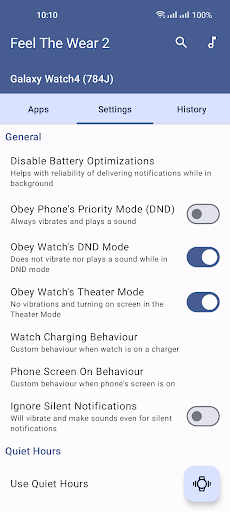
* Set quiet hours.
* Configure behavior when the watch is charging or docked.
* Configure behavior when the phone screen is on.
* Skip vibrations for ongoing/permanent/progress notifications.
* Use vibration history to investigate ignored notifications and phantom vibrations.
* Use Material You dynamic colors.
Requirements:
* Install the app on both your Android phone and your Wear OS watch.
* Grant Notification access on first launch.
* Disable battery/background optimizations for Feel The Wear 2 on your phone so background sync is not blocked.
* Wear OS 3 and newer are supported; Wear OS 2.2 support is limited/experimental.
Common problems and fixes:
* No vibration for incoming notifications: Confirm Notification access is enabled, confirm the watch app is installed, disable battery optimization for Feel The Wear 2, and run a test vibration from the phone app. On phones with aggressive app-killing, enable Force Keep Alive.
* Double vibrations: In the source app's notification settings, set sound and vibration to off so only Feel The Wear 2 handles vibration/sound.
* Sound is not working: Sound requires a watch speaker and usable watch sound output settings. Verify sound output/volume on the watch and test sounds from the phone app.
* Muting vibrations does not work for some apps: Feel The Wear 2 cannot change another app's notification settings. Disable vibration/sound in that app's own notification settings.
* Vibration happens before the notification appears on the watch: This is expected. Vibration is triggered when a notification reaches the phone; the watch UI can appear later.
* Phone calls: Wear OS limits control over default call vibration behavior. Feel The Wear 2 call handling is mainly for custom sounds.
* Hourly chime is late or does not run: This depends on watch vendor behavior and alarm permission support. Some watches restrict exact alarms or background tasks.
* Phone disconnection alerts are delayed: These alerts depend on Wear OS messaging and can be delayed. Use the watch's built-in disconnection alert when available.
* Vibration feels weak: The app cannot increase motor strength. Vibration strength is limited by watch hardware and firmware.
* Some notifications are ignored: Ongoing/permanent/progress notifications can be filtered by design. Check vibration history to see why a notification was ignored.
Feel The Wear 2 customizes vibration and sound behavior. It does not increase physical vibration power.
What you can do:
* Set per-app vibration patterns and sounds.
* Upload your own sounds.
* Use repeated vibrations.
* Use Hourly Chime.
* Set quiet hours.
* Configure behavior when the watch is charging or docked.
* Configure behavior when the phone screen is on.
* Skip vibrations for ongoing/permanent/progress notifications.
* Use vibration history to investigate ignored notifications and phantom vibrations.
* Use Material You dynamic colors.
Requirements:
* Install the app on both your Android phone and your Wear OS watch.
* Grant Notification access on first launch.
* Disable battery/background optimizations for Feel The Wear 2 on your phone so background sync is not blocked.
* Wear OS 3 and newer are supported; Wear OS 2.2 support is limited/experimental.
Common problems and fixes:
* No vibration for incoming notifications: Confirm Notification access is enabled, confirm the watch app is installed, disable battery optimization for Feel The Wear 2, and run a test vibration from the phone app. On phones with aggressive app-killing, enable Force Keep Alive.
* Double vibrations: In the source app's notification settings, set sound and vibration to off so only Feel The Wear 2 handles vibration/sound.
* Sound is not working: Sound requires a watch speaker and usable watch sound output settings. Verify sound output/volume on the watch and test sounds from the phone app.
* Muting vibrations does not work for some apps: Feel The Wear 2 cannot change another app's notification settings. Disable vibration/sound in that app's own notification settings.
* Vibration happens before the notification appears on the watch: This is expected. Vibration is triggered when a notification reaches the phone; the watch UI can appear later.
* Phone calls: Wear OS limits control over default call vibration behavior. Feel The Wear 2 call handling is mainly for custom sounds.
* Hourly chime is late or does not run: This depends on watch vendor behavior and alarm permission support. Some watches restrict exact alarms or background tasks.
* Phone disconnection alerts are delayed: These alerts depend on Wear OS messaging and can be delayed. Use the watch's built-in disconnection alert when available.
* Vibration feels weak: The app cannot increase motor strength. Vibration strength is limited by watch hardware and firmware.
* Some notifications are ignored: Ongoing/permanent/progress notifications can be filtered by design. Check vibration history to see why a notification was ignored.
Feel The Wear 2 customizes vibration and sound behavior. It does not increase physical vibration power.
Developer email
dev+feelthewear2@lavaray.com
Released
Jun 22, 2023
Current version
1.1.0
Android version
9
Reviews & Ratings
3.4
out of 5
5
4
3
2
1
😐 Reviews are mixed
144 reviewsScreenshots