Kuveyt Türk Mobile
Kuveyt Türk Katılım Bankası A.Ş.

4.5 stars118,032 reviews10,000,000+Free
FinanceEveryoneVersion 7.2.1Updated 5/22/2026, 3:36:49 PM
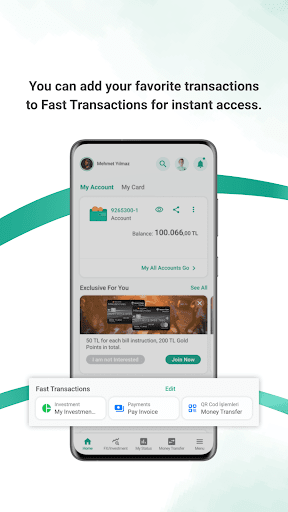
Open in StoreWe renewed the design of the Kuveyt Türk Mobile. While making this renovation, we relied on up-to-date technology and design trends; and also benefitted from you and all of our valuable customers’ experience. We aimed at making your banking transactions fast, safe and easy. We will be able to bring you more visual and personalized experiences with the new design. Providing us with your feedback about Kuveyt Türk Mobile will help us present you with latest trends and innovations.
With Kuveyt Türk Mobile, you can easily do your banking transactions without any charge.
• Money transfers • Different types of payments related to bill payments and others • Currency and precious metal buying and selling • Credit card transactions • Money deposit and withdrawal with QR code • Viewing account related transactions and activity • Directions to the nearest Kuveyt Turk • Viewing exchange rates • Currency and precious metal related calculations • Viewing IBAN information • Viewing BES • Managing notification settings • Calculating financing according to profit ratio • Making card payments through Kuveyt Türk Mobile with CebimPOS • Investment account related transactions and many more transactions can be made easily and quickly for both individual and corporate customers. In addition to the above, our corporate customers can view, approve or cancel transactions each according to their corporate user authorization type.
LOGIN WITH A SINGLE PIN
In order to use Kuveyt Türk Mobile, all you have to do is set your password. Once you have verified your device with the security steps, Kuveyt Türk Mobile recognizes you and allows you to log in quickly with a single PIN you specify.
FIRST PASSWORD
Can be obtained by calling the Kuveyt Turk Call Center at 444 0 123 or through the Instant Password menu on the Internet Branch. Our corporate customers need to contact their branches to obtain their passwords for the first time.
VERIFICATION
You will need to verify your device when logging in for the first time to Kuveyt Türk Mobile. The verification must be done by connecting to the Internet via your GSM number that is registered at our bank (If not done with your registered GSM number, you will be asked to approve your device through the Call Center). After verifying a device you can give approval for using Kuveyt Türk Mobile on other devices as well.
Secure Mobile Banking and Mobile Threat Protection:
Kuveyt Türk Mobile includes advanced mobile threat protection and device integrity verification mechanisms designed to provide secure banking sessions and protect customers against malicious mobile threats, banking trojans, fraudulent applications, and runtime attacks targeting financial transactions.
The application includes regulated banking security controls for secure transaction authorization, fraud prevention, and secure mobile banking session protection.
FOR DETAILED INFORMATION ABOUT KUVEYT TÜRK MOBILE AND INFO ABOUT REQUESTED PERMISSIONS
www.kuveytturk.com.tr/subesiz-bankacilik/mobil-sube/sikca-sorulan-sorular
With Kuveyt Türk Mobile, you can easily do your banking transactions without any charge.
• Money transfers • Different types of payments related to bill payments and others • Currency and precious metal buying and selling • Credit card transactions • Money deposit and withdrawal with QR code • Viewing account related transactions and activity • Directions to the nearest Kuveyt Turk • Viewing exchange rates • Currency and precious metal related calculations • Viewing IBAN information • Viewing BES • Managing notification settings • Calculating financing according to profit ratio • Making card payments through Kuveyt Türk Mobile with CebimPOS • Investment account related transactions and many more transactions can be made easily and quickly for both individual and corporate customers. In addition to the above, our corporate customers can view, approve or cancel transactions each according to their corporate user authorization type.
LOGIN WITH A SINGLE PIN
In order to use Kuveyt Türk Mobile, all you have to do is set your password. Once you have verified your device with the security steps, Kuveyt Türk Mobile recognizes you and allows you to log in quickly with a single PIN you specify.
FIRST PASSWORD
Can be obtained by calling the Kuveyt Turk Call Center at 444 0 123 or through the Instant Password menu on the Internet Branch. Our corporate customers need to contact their branches to obtain their passwords for the first time.
VERIFICATION
You will need to verify your device when logging in for the first time to Kuveyt Türk Mobile. The verification must be done by connecting to the Internet via your GSM number that is registered at our bank (If not done with your registered GSM number, you will be asked to approve your device through the Call Center). After verifying a device you can give approval for using Kuveyt Türk Mobile on other devices as well.
Secure Mobile Banking and Mobile Threat Protection:
Kuveyt Türk Mobile includes advanced mobile threat protection and device integrity verification mechanisms designed to provide secure banking sessions and protect customers against malicious mobile threats, banking trojans, fraudulent applications, and runtime attacks targeting financial transactions.
The application includes regulated banking security controls for secure transaction authorization, fraud prevention, and secure mobile banking session protection.
FOR DETAILED INFORMATION ABOUT KUVEYT TÜRK MOBILE AND INFO ABOUT REQUESTED PERMISSIONS
www.kuveytturk.com.tr/subesiz-bankacilik/mobil-sube/sikca-sorulan-sorular
Developer email
musterimemnuniyeti@kuveytturk.com.tr
Developer website
http://www.kuveytturk.com.trReleased
Nov 13, 2015
Current version
7.2.1
Android version
7.0
Reviews & Ratings
4.5
out of 5
5
4
3
2
1
😊 Highly rated by users
118,032 reviewsScreenshots