Business Card Scanner & CRM
KraftPixel Labs

Turn paper business cards into contacts, CRM leads, and spreadsheet rows. CardAction is a business card scanner with private offline OCR, batch scanning, contact organisation, and instant follow-up through WhatsApp, SMS, email, or call.
Scan a business card to capture names, phone numbers, emails, companies, and job titles directly on your device. Save the contact, organise the card photo, export details to Google Sheets, or send the data to your CRM through a webhook.
CardAction helps you act on every new connection instead of simply storing it.
SCAN BUSINESS CARDS
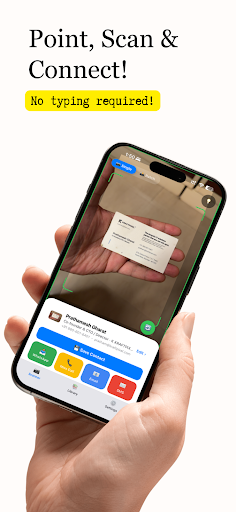
Point your phone at a business card, visiting card, namecard, or meishi. CardAction automatically detects and captures the contact information.
• Auto-Scan captures cards without a shutter button.
• Tap-to-Scan gives you control in low light.
• Review and edit every field before saving.
• Rearrange fields or assign missed text manually.
• Add international dialling codes.
SAVE AND ORGANISE CONTACTS
Save scanned details to your phone or Google Contacts.
• Keep every contact with the original card photo.
• Create custom, colour-coded folders.
• Organise contacts by client, investor, event, team, or BNI chapter.
• Detect duplicate phone numbers and emails.
• Search and manage your professional network.
FOLLOW UP INSTANTLY
Turn every scanned card into a timely conversation.
• Open WhatsApp with a personalised message.
• Send reusable SMS or email templates.
• Call the contact directly.
• Use variables such as {name}.
• Use Quick Dial & Drop to share your number through a missed call.
Create templates for sales follow-ups, introductions, meetings, recruitment, and networking events.
SYNC TO GOOGLE SHEETS AND CRM
Automatically export business-card data to Google Sheets and maintain an Excel-compatible contact database without manual entry.
CardAction can also send contact data as JSON through a webhook to:
• HubSpot or another CRM
• n8n
• Make
• Zapier
• Airtable
• Notion
• Your own application or backend
BATCH SCANNING
Collected a stack of cards after a conference, exhibition, trade show, or networking event?
Scan multiple cards first, then review and save them together. Process 20 or more cards without stopping after every scan.
PRIVATE OFFLINE OCR
CardAction processes business-card information directly on your device.
Card photos are not uploaded to a server for OCR processing. Scan quickly and privately, even when internet access is unavailable.
EXPORT AND SHARE CONTACTS
Export saved contacts as standard .vcf files with vCard 4.0 support.
Generate a vCard QR code inside CardAction to share your own contact information instantly.
CARDACTION PRO
The free version includes a small “Sent via CardAction” footer on outgoing messages.
Upgrade to CardAction Pro to unlock:
• Removal of CardAction branding
• Unlimited message-template length
• Unlimited daily batch-scanning sessions
• Automatic saving to Google Contacts or your address book
• Automatic Google Sheets export
• CRM and webhook integrations
• Selfie Feature to save a photo with your new contact
BUILT FOR
CardAction is designed for:
• Sales professionals and networkers
• Founders, investors, and teams
• Recruiters and HR professionals
• Conference and exhibition attendees
• BNI members and event organisers
• Business travellers exchanging visiting cards, namecards, or meishi
• Teams using CRM, Google Sheets, or Excel-compatible databases
• Users building workflows through n8n, Make, Zapier, Airtable, Notion, or webhooks
• Anyone replacing a physical Rolodex with an organised digital network
Turn paper business cards into contacts, spreadsheet rows, CRM leads, and real conversations.
Download CardAction and turn every new connection into an opportunity.
Start your free CardAction Pro trial today.
Scan a business card to capture names, phone numbers, emails, companies, and job titles directly on your device. Save the contact, organise the card photo, export details to Google Sheets, or send the data to your CRM through a webhook.
CardAction helps you act on every new connection instead of simply storing it.
SCAN BUSINESS CARDS
Point your phone at a business card, visiting card, namecard, or meishi. CardAction automatically detects and captures the contact information.
• Auto-Scan captures cards without a shutter button.
• Tap-to-Scan gives you control in low light.
• Review and edit every field before saving.
• Rearrange fields or assign missed text manually.
• Add international dialling codes.
SAVE AND ORGANISE CONTACTS
Save scanned details to your phone or Google Contacts.
• Keep every contact with the original card photo.
• Create custom, colour-coded folders.
• Organise contacts by client, investor, event, team, or BNI chapter.
• Detect duplicate phone numbers and emails.
• Search and manage your professional network.
FOLLOW UP INSTANTLY
Turn every scanned card into a timely conversation.
• Open WhatsApp with a personalised message.
• Send reusable SMS or email templates.
• Call the contact directly.
• Use variables such as {name}.
• Use Quick Dial & Drop to share your number through a missed call.
Create templates for sales follow-ups, introductions, meetings, recruitment, and networking events.
SYNC TO GOOGLE SHEETS AND CRM
Automatically export business-card data to Google Sheets and maintain an Excel-compatible contact database without manual entry.
CardAction can also send contact data as JSON through a webhook to:
• HubSpot or another CRM
• n8n
• Make
• Zapier
• Airtable
• Notion
• Your own application or backend
BATCH SCANNING
Collected a stack of cards after a conference, exhibition, trade show, or networking event?
Scan multiple cards first, then review and save them together. Process 20 or more cards without stopping after every scan.
PRIVATE OFFLINE OCR
CardAction processes business-card information directly on your device.
Card photos are not uploaded to a server for OCR processing. Scan quickly and privately, even when internet access is unavailable.
EXPORT AND SHARE CONTACTS
Export saved contacts as standard .vcf files with vCard 4.0 support.
Generate a vCard QR code inside CardAction to share your own contact information instantly.
CARDACTION PRO
The free version includes a small “Sent via CardAction” footer on outgoing messages.
Upgrade to CardAction Pro to unlock:
• Removal of CardAction branding
• Unlimited message-template length
• Unlimited daily batch-scanning sessions
• Automatic saving to Google Contacts or your address book
• Automatic Google Sheets export
• CRM and webhook integrations
• Selfie Feature to save a photo with your new contact
BUILT FOR
CardAction is designed for:
• Sales professionals and networkers
• Founders, investors, and teams
• Recruiters and HR professionals
• Conference and exhibition attendees
• BNI members and event organisers
• Business travellers exchanging visiting cards, namecards, or meishi
• Teams using CRM, Google Sheets, or Excel-compatible databases
• Users building workflows through n8n, Make, Zapier, Airtable, Notion, or webhooks
• Anyone replacing a physical Rolodex with an organised digital network
Turn paper business cards into contacts, spreadsheet rows, CRM leads, and real conversations.
Download CardAction and turn every new connection into an opportunity.
Start your free CardAction Pro trial today.
Developer email
labs@kraftpixel.com
Developer website
https://cardaction.appReleased
Mar 3, 2026
Current version
1.4.0
Android version
7.0
Screenshots