파스타(PASTA) - 카카오헬스케어
Kakao Healthcare

This app is a wellness product for health management and is not a medical device.
-------------------
Manage your blood sugar and weight all in one place with PASTA.
PASTA is an AI health management platform that helps you build healthy habits, ranging from real-time blood sugar management linked with Continuous Glucose Monitors (CGMs) to hyper-personalized weight management routines based on 20 digital profiles.
[What is PASTA's blood sugar management service?]
• It links with Dexcom G7 and CareSense Air Continuous Glucose Monitors to help you visually check real-time blood sugar changes.
• It supports you in understanding the relationship between your lifestyle habits—such as meals, exercise, sleep, and medication—and your blood sugar response.
• You can easily record health data using AI-powered photos (Food Shots) and voice recordings.
• You can understand your own blood sugar patterns through personalized reports.
[What is Pasta's weight management service?]
• It diagnoses the causes of weight gain by analyzing 20 digital phenotypes based on your eating habits, exercise, and mental state.
• It helps you design a sustainable, personalized weight management routine based on your phenotype results.
• You can conveniently record food photos, body shape, exercise volume, and other information necessary for weight management.
• It provides personalized reports and nudges to help you achieve your weight management goals enjoyably.
[What are Pasta's main features?]
1. Diary
• (Blood Sugar) By wearing a Dexcom G7 or CareSense Air continuous glucose monitor and recording lifestyle habits such as meals and exercise, you can check changes in your blood sugar in real time.
• (Weight) You can view recommended calorie intake and personalized weight management routines based on your phenotype and weight loss goals at a glance.
2. AI Food Recognition - Food Shot
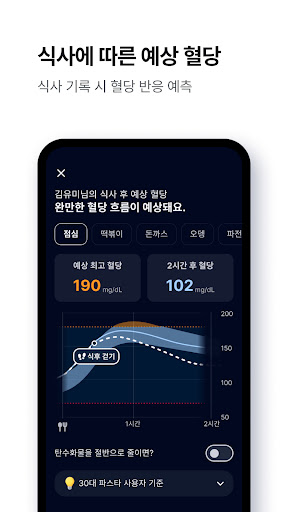
• Easily record your meals with Food Shot. • Simply take a photo, and it automatically recognizes the food, allowing you to check the food name, nutritional information, and even blood sugar response.
3. AI Image Analysis - Pasta Lens
• Record various health data quickly and easily by taking photos.
• It automatically recognizes and records images containing text useful for health, such as blood glucose meter (BGM) screens, body composition test results, smart scale screens, and more.
4. AI Voice Recording
• Record health data more easily and conveniently using voice commands.
• “I ate cereal for breakfast.”
• “I did an hour of weight training at 6 AM and ate chicken breast.”
5. AI Chatbot
• Ask the chatbot questions about health information and receive personalized answers.
• “How should I manage diabetes?”
• “Tell me a diet plan suitable for my phenotype.”
6. Reports
• (Blood Sugar) It provides a personalized report that meticulously analyzes your blood sugar data and lifestyle records. You can view and download your AGP report.
• (Weight) You can analyze your weight loss routine progress, body shape, and records of meals, exercise, and sleep daily to help you build good habits.
7. Blood Sugar Sharing
• Select and share desired health information, such as blood sugar, meals, exercise, and medication records, with family, friends, and loved ones.
• Real-time notifications are sent to family and friends when blood sugar is too high or too low, allowing you to give or receive help.
8. Community
• Share stories and experiences from people managing their blood sugar and weight in their daily lives.
• Read professional health content in the Magazine tab.
9. Benefits
• Earn Pasta Points by checking in daily on the Pasta app, walking, and recording your health.
• Use your accumulated Pasta Points like cash at Pasta Mall or exchange them for KakaoPay Points at a 1:1 ratio.
10. Pasta Connect
• A web service where you can view all data recorded in the Pasta app and track long-term blood sugar trends. • With the ‘Hospital Connection’ feature, medical staff at the hospital you attend can share your blood sugar changes and receive assistance with diagnosis.
• Medical staff can use Pasta Connect Pro to monitor and diagnose your patients' blood sugar changes and lifestyle habits outside the hospital.
11. Wear OS
• Connecting the Pasta app with your smartwatch allows you to easily check blood sugar information and trend graphs directly in the watch app.
• Setting up complications on your watch face allows you to quickly check blood sugar information and access the app.
✔︎ Want to learn more about the service? https://pastahealth.com/
✔︎ For inquiries, please contact us below.
• KakaoTalk Pasta Customer Center Channel: http://pf.kakao.com/_zxgZxhG/chat
• Customer Center Email: pastacs@kakaohealthcare.com
• Customer Center Phone: 031-629-1156
⛔︎ Please make sure to check this! • Blood glucose testing using the sensor (Continuous Glucose Monitor) and the Pasta app cannot replace medical consultation at a healthcare facility and is not intended for the patient's own diagnosis or treatment of diabetes. However, by providing blood glucose information to the patient, it can assist in self-managing and maintaining blood glucose levels, as well as aid in diagnosis and treatment through consultation with a doctor.
• Users must not make treatment decisions based on blood glucose information from the Pasta app or Pasta Connect. Consultation with a medical professional is mandatory for making treatment decisions.
• The Continuous Glucose Monitor (CGM) is not included in the package. You can purchase it at the Pasta Mall below.
https://pastahealth.com/
• Pasta can be connected with the Dexcom G7 and CareSense Air Continuous Glucose Monitors, but it cannot be connected with other Continuous Glucose Monitors.
[Required Access Permissions]
• Notification Settings: A feature to receive real-time notifications of sensor data.
[Optional Access Permissions]
• Camera/Photo Album: Used to record food or scan the sensor.
• Bluetooth & Nearby Devices: Used to connect the sensor. • Location: Used to connect sensors. The location function is used whenever Bluetooth is turned on in the background, and it is not used to determine actual location.
• Background Location: Location permission is required when connecting sensors via Bluetooth in the background. It is not used to determine or collect actual location.
• Access to Physical Activity Data: Used to measure the number of steps.
• Exclude from Battery Optimization: Used to smoothly receive blood glucose data or to reliably measure sleep.
• Access to Health Connect: Used to retrieve weight, exercise (type, time, calories burned), step count, sleep, and heart rate data. The retrieved data is utilized for analyzing blood glucose change patterns, generating personalized feedback from the AI coach, and providing daily and weekly health reports; it is not used for any purpose other than providing app services.
• Microphone: Used for recording Pasta Voice audio and measuring sleep.
-------------------
Manage your blood sugar and weight all in one place with PASTA.
PASTA is an AI health management platform that helps you build healthy habits, ranging from real-time blood sugar management linked with Continuous Glucose Monitors (CGMs) to hyper-personalized weight management routines based on 20 digital profiles.
[What is PASTA's blood sugar management service?]
• It links with Dexcom G7 and CareSense Air Continuous Glucose Monitors to help you visually check real-time blood sugar changes.
• It supports you in understanding the relationship between your lifestyle habits—such as meals, exercise, sleep, and medication—and your blood sugar response.
• You can easily record health data using AI-powered photos (Food Shots) and voice recordings.
• You can understand your own blood sugar patterns through personalized reports.
[What is Pasta's weight management service?]
• It diagnoses the causes of weight gain by analyzing 20 digital phenotypes based on your eating habits, exercise, and mental state.
• It helps you design a sustainable, personalized weight management routine based on your phenotype results.
• You can conveniently record food photos, body shape, exercise volume, and other information necessary for weight management.
• It provides personalized reports and nudges to help you achieve your weight management goals enjoyably.
[What are Pasta's main features?]
1. Diary
• (Blood Sugar) By wearing a Dexcom G7 or CareSense Air continuous glucose monitor and recording lifestyle habits such as meals and exercise, you can check changes in your blood sugar in real time.
• (Weight) You can view recommended calorie intake and personalized weight management routines based on your phenotype and weight loss goals at a glance.
2. AI Food Recognition - Food Shot
• Easily record your meals with Food Shot. • Simply take a photo, and it automatically recognizes the food, allowing you to check the food name, nutritional information, and even blood sugar response.
3. AI Image Analysis - Pasta Lens
• Record various health data quickly and easily by taking photos.
• It automatically recognizes and records images containing text useful for health, such as blood glucose meter (BGM) screens, body composition test results, smart scale screens, and more.
4. AI Voice Recording
• Record health data more easily and conveniently using voice commands.
• “I ate cereal for breakfast.”
• “I did an hour of weight training at 6 AM and ate chicken breast.”
5. AI Chatbot
• Ask the chatbot questions about health information and receive personalized answers.
• “How should I manage diabetes?”
• “Tell me a diet plan suitable for my phenotype.”
6. Reports
• (Blood Sugar) It provides a personalized report that meticulously analyzes your blood sugar data and lifestyle records. You can view and download your AGP report.
• (Weight) You can analyze your weight loss routine progress, body shape, and records of meals, exercise, and sleep daily to help you build good habits.
7. Blood Sugar Sharing
• Select and share desired health information, such as blood sugar, meals, exercise, and medication records, with family, friends, and loved ones.
• Real-time notifications are sent to family and friends when blood sugar is too high or too low, allowing you to give or receive help.
8. Community
• Share stories and experiences from people managing their blood sugar and weight in their daily lives.
• Read professional health content in the Magazine tab.
9. Benefits
• Earn Pasta Points by checking in daily on the Pasta app, walking, and recording your health.
• Use your accumulated Pasta Points like cash at Pasta Mall or exchange them for KakaoPay Points at a 1:1 ratio.
10. Pasta Connect
• A web service where you can view all data recorded in the Pasta app and track long-term blood sugar trends. • With the ‘Hospital Connection’ feature, medical staff at the hospital you attend can share your blood sugar changes and receive assistance with diagnosis.
• Medical staff can use Pasta Connect Pro to monitor and diagnose your patients' blood sugar changes and lifestyle habits outside the hospital.
11. Wear OS
• Connecting the Pasta app with your smartwatch allows you to easily check blood sugar information and trend graphs directly in the watch app.
• Setting up complications on your watch face allows you to quickly check blood sugar information and access the app.
✔︎ Want to learn more about the service? https://pastahealth.com/
✔︎ For inquiries, please contact us below.
• KakaoTalk Pasta Customer Center Channel: http://pf.kakao.com/_zxgZxhG/chat
• Customer Center Email: pastacs@kakaohealthcare.com
• Customer Center Phone: 031-629-1156
⛔︎ Please make sure to check this! • Blood glucose testing using the sensor (Continuous Glucose Monitor) and the Pasta app cannot replace medical consultation at a healthcare facility and is not intended for the patient's own diagnosis or treatment of diabetes. However, by providing blood glucose information to the patient, it can assist in self-managing and maintaining blood glucose levels, as well as aid in diagnosis and treatment through consultation with a doctor.
• Users must not make treatment decisions based on blood glucose information from the Pasta app or Pasta Connect. Consultation with a medical professional is mandatory for making treatment decisions.
• The Continuous Glucose Monitor (CGM) is not included in the package. You can purchase it at the Pasta Mall below.
https://pastahealth.com/
• Pasta can be connected with the Dexcom G7 and CareSense Air Continuous Glucose Monitors, but it cannot be connected with other Continuous Glucose Monitors.
[Required Access Permissions]
• Notification Settings: A feature to receive real-time notifications of sensor data.
[Optional Access Permissions]
• Camera/Photo Album: Used to record food or scan the sensor.
• Bluetooth & Nearby Devices: Used to connect the sensor. • Location: Used to connect sensors. The location function is used whenever Bluetooth is turned on in the background, and it is not used to determine actual location.
• Background Location: Location permission is required when connecting sensors via Bluetooth in the background. It is not used to determine or collect actual location.
• Access to Physical Activity Data: Used to measure the number of steps.
• Exclude from Battery Optimization: Used to smoothly receive blood glucose data or to reliably measure sleep.
• Access to Health Connect: Used to retrieve weight, exercise (type, time, calories burned), step count, sleep, and heart rate data. The retrieved data is utilized for analyzing blood glucose change patterns, generating personalized feedback from the AI coach, and providing daily and weekly health reports; it is not used for any purpose other than providing app services.
• Microphone: Used for recording Pasta Voice audio and measuring sleep.
Developer email
khc_android@kakaohealthcare.com
Developer website
https://pastahealth.comCurrent version
VARY
Android version
VARY
Screenshots