Breadsheet: Expense Tracker
Irtiqa Labs

Breadsheet is a budget app and expense tracker that helps you keep daily spending up to date. Add an expense by voice, scan a receipt, enter it manually, or write a short message to the assistant.
Voice and receipt results are saved to your local ledger after processing, then opened for review so you can correct or remove them. Transactions suggested inside the assistant remain drafts until you choose to save them.
ADD EXPENSES YOUR WAY
Manual entry is the core of the app. Tap in an amount, pick a category, and the transaction is logged in a few seconds. Every field stays editable.
Use voice entry to record a purchase in a normal sentence. Say what you bought and how much it cost, then review the transaction Breadsheet recorded.
Scan a receipt with the camera or choose a photo from your gallery. Breadsheet reads the merchant, total, date, and available line items.
The assistant can also prepare a draft transaction from a short message such as "I spent 18 on lunch today."
ASK ABOUT YOUR SPENDING
Ask how much you spent on groceries, which subscriptions were paid recently, or how a category is tracking against its budget. Breadsheet uses a limited set of relevant spending information to prepare the answer.
SET MONTHLY BUDGETS
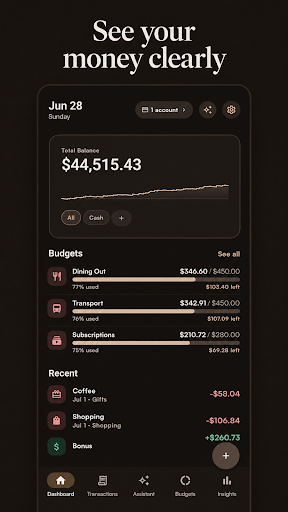
Create budgets for the categories you care about. Progress bars show the amount spent and the amount remaining during the month. Give every category its own monthly limit, whether you budget by category or by cash envelope.
REVIEW CLEAR INSIGHTS
See income, expenses, account balances, monthly totals, and spending by category. Search recent activity and review each transaction from a single history.
MANAGE MULTIPLE ACCOUNTS
Track cash, checking, savings, credit cards, and other accounts. Breadsheet also supports transfers, recurring transactions, custom categories, and notes.
IMPORT AND EXPORT CSV FILES
Import transactions from Mint, YNAB, or another CSV export. Export your Breadsheet transactions whenever you want a separate copy.
Voice and receipt results are saved to your local ledger after processing, then opened for review so you can correct or remove them. Transactions suggested inside the assistant remain drafts until you choose to save them.
ADD EXPENSES YOUR WAY
Manual entry is the core of the app. Tap in an amount, pick a category, and the transaction is logged in a few seconds. Every field stays editable.
Use voice entry to record a purchase in a normal sentence. Say what you bought and how much it cost, then review the transaction Breadsheet recorded.
Scan a receipt with the camera or choose a photo from your gallery. Breadsheet reads the merchant, total, date, and available line items.
The assistant can also prepare a draft transaction from a short message such as "I spent 18 on lunch today."
ASK ABOUT YOUR SPENDING
Ask how much you spent on groceries, which subscriptions were paid recently, or how a category is tracking against its budget. Breadsheet uses a limited set of relevant spending information to prepare the answer.
SET MONTHLY BUDGETS
Create budgets for the categories you care about. Progress bars show the amount spent and the amount remaining during the month. Give every category its own monthly limit, whether you budget by category or by cash envelope.
REVIEW CLEAR INSIGHTS
See income, expenses, account balances, monthly totals, and spending by category. Search recent activity and review each transaction from a single history.
MANAGE MULTIPLE ACCOUNTS
Track cash, checking, savings, credit cards, and other accounts. Breadsheet also supports transfers, recurring transactions, custom categories, and notes.
IMPORT AND EXPORT CSV FILES
Import transactions from Mint, YNAB, or another CSV export. Export your Breadsheet transactions whenever you want a separate copy.
Developer email
support@trybreadsheet.com
Developer website
https://trybreadsheet.comReleased
Apr 9, 2026
Current version
1.1.4
Android version
9
Screenshots