IGLOW- Add text on photo Fonts
BitDance AI Studio - Fun, Creative & Smart Tools

4.5 stars2,344 reviews50,000+Free
PhotographyEveryoneVersion 2.1.1Updated 10/22/2025, 11:12:13 AM
Open in StoreIGLOW - Stunning Chinese Fonts & Creative Assets for Instagram Stories ✨📸
Struggling to find the perfect Chinese fonts for your Instagram Stories? IGLOW is your ultimate solution!🌟 With dozens of exquisite Chinese fonts and thousands of exclusive assets, make your stories stand out and showcase your unique style!💖
Create captivating stories in 3 easy steps:
Open the Instagram Stories editor 📱
Choose your favorite font or asset in IGLOW and copy ✂️
Go back to Instagram, paste, and finalize your design 🎨
No complicated steps—IGLOW lets you complete all designs within Instagram!🚀 Key features:
Diverse Fonts 🖌️: Handwritten, serif, sans-serif, retro, calligraphy, and more to match any mood or occasion
Preset Templates 🎀: Over 100 designer-curated text sets, apply with one tap for effortless styling
Text Editing ✍️: Adjust line spacing, letter spacing, outlines, shadows, and backgrounds for a custom look
Creative Effects 🌈: Curved text, 3D, shadows, frames to add visual depth
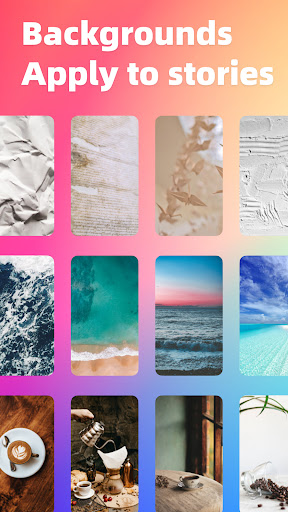
Background Design 🖼️: Add images, gradients, or solid colors to enhance your story’s appeal
Photo Editing 📷: Crop, apply filters, adjust brightness/contrast, resize, add text, stickers, doodles, filter colors, and masks to unleash your creativity
Download IGLOW now and turn your Instagram Stories into a masterpiece!🔥 Questions? Reach us at: bitdancetech@gmail.com 💌
Struggling to find the perfect Chinese fonts for your Instagram Stories? IGLOW is your ultimate solution!🌟 With dozens of exquisite Chinese fonts and thousands of exclusive assets, make your stories stand out and showcase your unique style!💖
Create captivating stories in 3 easy steps:
Open the Instagram Stories editor 📱
Choose your favorite font or asset in IGLOW and copy ✂️
Go back to Instagram, paste, and finalize your design 🎨
No complicated steps—IGLOW lets you complete all designs within Instagram!🚀 Key features:
Diverse Fonts 🖌️: Handwritten, serif, sans-serif, retro, calligraphy, and more to match any mood or occasion
Preset Templates 🎀: Over 100 designer-curated text sets, apply with one tap for effortless styling
Text Editing ✍️: Adjust line spacing, letter spacing, outlines, shadows, and backgrounds for a custom look
Creative Effects 🌈: Curved text, 3D, shadows, frames to add visual depth
Background Design 🖼️: Add images, gradients, or solid colors to enhance your story’s appeal
Photo Editing 📷: Crop, apply filters, adjust brightness/contrast, resize, add text, stickers, doodles, filter colors, and masks to unleash your creativity
Download IGLOW now and turn your Instagram Stories into a masterpiece!🔥 Questions? Reach us at: bitdancetech@gmail.com 💌
Developer email
bitdancetech@gmail.com
Developer website
https://iglowapp.comReleased
Aug 1, 2023
Current version
2.1.1
Android version
7.0
Reviews & Ratings
4.5
out of 5
5
4
3
2
1
😊 Highly rated by users
2,344 reviewsScreenshots