Imprivata ID
Imprivata, Inc

3.1 stars494 reviews500,000+Free
MedicalEveryoneVersion 2026.1.0.143Updated 5/12/2026, 6:55:55 PM
Open in StoreImprivata ID is a secure authentication application that helps improve clinical workflows for medical professionals for electronic prescribing of controlled substances (EPCS), remote network access, and others.
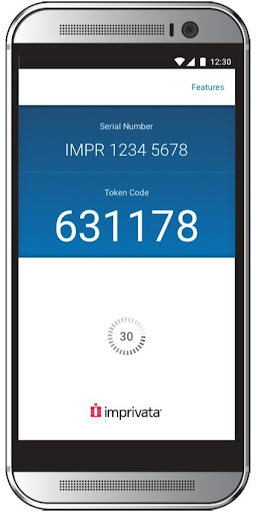
For EPCS, Imprivata ID enables Hands Free Authentication, a breakthrough solution that delivers exceptional speed, security, and convenience for providers while meeting DEA two-factor authentication requirements for EPCS. Instead of typing a manual token code, Hands Free Authentication wirelessly retrieves and verifies a one-time password from the Imprivata ID application on the user’s mobile device, even if it is locked and/or in the user’s pocket, which delivers unparalleled speed and convenience with minimal impact to clinical workflows.
For remote network access, Imprivata ID enables fast, convenient push notifications. Users receive a notification on their mobile phone asking them to verify their identity. The user simply swipes the notification from the lock screen of their device and taps “Approve,” and the second factor of authentication is complete.
Imprivata ID uses Foreground Service for communication between the app and a Bluetooth dongle connected to a Windows PC, as Imprivata ID acts as a key for user authentications in Windows applications when the Android device is in close proximity to the PC.
Please note: To use Imprivata ID, the healthcare provider organization needs to purchase a license for Imprivata Confirm ID (as well as a license for Hands Free Authentication if using that feature). Visit https://www.imprivata.com/imprivata-confirm-id for more information.
For EPCS, Imprivata ID enables Hands Free Authentication, a breakthrough solution that delivers exceptional speed, security, and convenience for providers while meeting DEA two-factor authentication requirements for EPCS. Instead of typing a manual token code, Hands Free Authentication wirelessly retrieves and verifies a one-time password from the Imprivata ID application on the user’s mobile device, even if it is locked and/or in the user’s pocket, which delivers unparalleled speed and convenience with minimal impact to clinical workflows.
For remote network access, Imprivata ID enables fast, convenient push notifications. Users receive a notification on their mobile phone asking them to verify their identity. The user simply swipes the notification from the lock screen of their device and taps “Approve,” and the second factor of authentication is complete.
Imprivata ID uses Foreground Service for communication between the app and a Bluetooth dongle connected to a Windows PC, as Imprivata ID acts as a key for user authentications in Windows applications when the Android device is in close proximity to the PC.
Please note: To use Imprivata ID, the healthcare provider organization needs to purchase a license for Imprivata Confirm ID (as well as a license for Hands Free Authentication if using that feature). Visit https://www.imprivata.com/imprivata-confirm-id for more information.
Developer email
mobileapp@imprivata.com
Developer website
http://www.imprivata.com/imprivata-confirm-idReleased
May 27, 2016
Current version
2026.1.0.143
Android version
6.0
Reviews & Ratings
3.1
out of 5
5
4
3
2
1
😕 Lower user ratings overall
494 reviewsScreenshots