Image & PDF to CAD Converter
Super Brain

[Image2CAD] - Professional Image to CAD & PDF to CAD Converter
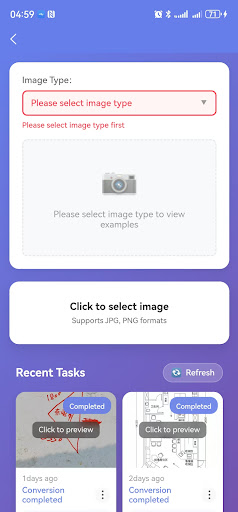
Turn your phone into a mobile CAD workstation. [Image2CAD] is a powerful professional tool built for engineers, designers, students, and anyone who works with technical drawings. With just a few taps, you can quickly and accurately transform regular images (JPG, PNG, BMP) or PDF files (including scanned documents) into fully editable CAD files (DWG or DXF format), enabling you to capture ideas and make edits anytime, anywhere.
Core Features Explained:
📸 Smart Image to CAD
• Import design sketches, hand-drawn blueprints, or object photos from your gallery or by taking a picture directly.
• Advanced image processing algorithms intelligently recognize and vectorize lines, shapes, and contours.
• Precisely extracts boundaries, converting raster images into clean vector graphics—perfect for CAD editing.
📄 High-Fidelity PDF to CAD
• Import engineering drawings, architectural plans, or mechanical diagrams directly from PDF format.
• Flawlessly converts native vector PDFs, preserving original lines, text, and layer structure.
• Powerful OCR and graphic recognition technology effectively processes scanned PDFs, turning them into editable vector data.
What You Get:
• Multiple Output Formats: Convert to industry-standard DWG or DXF files for easy opening and editing in professional software like AutoCAD or SolidWorks.
• High-Accuracy Conversion: Utilizes optimized curve-fitting algorithms to ensure smooth lines, accurate scale, and maximum fidelity to the original design.
• Layer Retention (for vector PDFs): Intelligently separates elements, preserving basic layer information for easier subsequent layer-by-layer management.
• Essential Editing Tools: Built-in viewer and basic editing functions allow you to measure dimensions, add notes, or make quick adjustments immediately after conversion.
Perfect for Professional Scenarios:
🏗 Architects & Civil Engineers: Convert on-site building photos or PDF plans into CAD drawings for detailed design work.
⚙ Mechanical & Product Designers: Transform hand-drawn sketches or product photos into standard part drawings to accelerate the development process.
🏠 Interior Designers & Contractors: Change floor plan photos or PDF layouts into CAD files for easy space planning and drawing.
🎓 Students & Educators: The perfect study aid for learning CAD; easily convert textbook diagrams into practice DWG files.
Why Choose [Image2CAD]?
Professional & Precise: Conversion engine optimized for technical drawings—far beyond a simple image converter.
Fast & Easy to Use: Convert in just three steps. No complicated setup required.
Fully Offline: Core conversion happens locally on your device, protecting your design privacy and data security.
Cloud Sync: Securely save converted files to the cloud and seamlessly access your work across different devices.
Download [Image2CAD] now and unlock your phone's productivity. Capture inspiration and handle design conversions efficiently, wherever you are. Turning any image or PDF into a modifiable CAD drawing has never been this simple.
Turn your phone into a mobile CAD workstation. [Image2CAD] is a powerful professional tool built for engineers, designers, students, and anyone who works with technical drawings. With just a few taps, you can quickly and accurately transform regular images (JPG, PNG, BMP) or PDF files (including scanned documents) into fully editable CAD files (DWG or DXF format), enabling you to capture ideas and make edits anytime, anywhere.
Core Features Explained:
📸 Smart Image to CAD
• Import design sketches, hand-drawn blueprints, or object photos from your gallery or by taking a picture directly.
• Advanced image processing algorithms intelligently recognize and vectorize lines, shapes, and contours.
• Precisely extracts boundaries, converting raster images into clean vector graphics—perfect for CAD editing.
📄 High-Fidelity PDF to CAD
• Import engineering drawings, architectural plans, or mechanical diagrams directly from PDF format.
• Flawlessly converts native vector PDFs, preserving original lines, text, and layer structure.
• Powerful OCR and graphic recognition technology effectively processes scanned PDFs, turning them into editable vector data.
What You Get:
• Multiple Output Formats: Convert to industry-standard DWG or DXF files for easy opening and editing in professional software like AutoCAD or SolidWorks.
• High-Accuracy Conversion: Utilizes optimized curve-fitting algorithms to ensure smooth lines, accurate scale, and maximum fidelity to the original design.
• Layer Retention (for vector PDFs): Intelligently separates elements, preserving basic layer information for easier subsequent layer-by-layer management.
• Essential Editing Tools: Built-in viewer and basic editing functions allow you to measure dimensions, add notes, or make quick adjustments immediately after conversion.
Perfect for Professional Scenarios:
🏗 Architects & Civil Engineers: Convert on-site building photos or PDF plans into CAD drawings for detailed design work.
⚙ Mechanical & Product Designers: Transform hand-drawn sketches or product photos into standard part drawings to accelerate the development process.
🏠 Interior Designers & Contractors: Change floor plan photos or PDF layouts into CAD files for easy space planning and drawing.
🎓 Students & Educators: The perfect study aid for learning CAD; easily convert textbook diagrams into practice DWG files.
Why Choose [Image2CAD]?
Professional & Precise: Conversion engine optimized for technical drawings—far beyond a simple image converter.
Fast & Easy to Use: Convert in just three steps. No complicated setup required.
Fully Offline: Core conversion happens locally on your device, protecting your design privacy and data security.
Cloud Sync: Securely save converted files to the cloud and seamlessly access your work across different devices.
Download [Image2CAD] now and unlock your phone's productivity. Capture inspiration and handle design conversions efficiently, wherever you are. Turning any image or PDF into a modifiable CAD drawing has never been this simple.
Developer email
ylf.ttt@gmail.com
Developer website
https://imagetocad.comReleased
Jan 30, 2026
Current version
1.0.0
Android version
6.0
Screenshots