GrainFlick: EXIF Camera Filter
QuietBrush

Turn your phone photos into film-look shots — right from your camera roll.
GrainFlick adds film simulation color grades, camera-style shot info, and clean no-crop borders to your photos. No cropping to fit a square, no guessing which filter looks "film-y" — just tap, pick a look, and share.
FILM SIMULATION
Choose from a growing set of film-inspired color grades — from warm golden tones to punchy contrast and classic black & white, each with its own distinct character for that analog, vintage look. Fine-tune exposure, contrast, and saturation to match your eye.
SHOT INFO OVERLAY
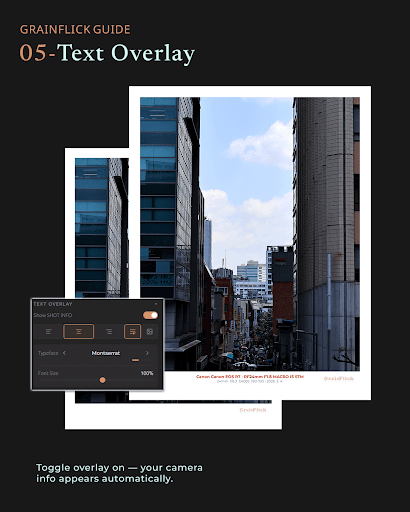
Show your camera, lens, aperture, shutter speed, ISO, and focal length right on the photo — pulled automatically from your photo's EXIF data, or entered manually. A small touch that makes any photo look intentional.
NO-CROP FRAMES
Add a clean matte border in your choice of color and width. Your original photo keeps its full frame — nothing gets cut off.
MAKE IT YOURS (PRO)
Add your signature or a custom logo in place of the camera brand name, turn off the GrainFlick watermark, unlock more film looks and border styles, and edit up to 12 photos at once.
Your photos stay on your device — GrainFlick doesn't upload or store your images anywhere.
Free to start. Upgrade to PRO anytime for the full look book.
GrainFlick adds film simulation color grades, camera-style shot info, and clean no-crop borders to your photos. No cropping to fit a square, no guessing which filter looks "film-y" — just tap, pick a look, and share.
FILM SIMULATION
Choose from a growing set of film-inspired color grades — from warm golden tones to punchy contrast and classic black & white, each with its own distinct character for that analog, vintage look. Fine-tune exposure, contrast, and saturation to match your eye.
SHOT INFO OVERLAY
Show your camera, lens, aperture, shutter speed, ISO, and focal length right on the photo — pulled automatically from your photo's EXIF data, or entered manually. A small touch that makes any photo look intentional.
NO-CROP FRAMES
Add a clean matte border in your choice of color and width. Your original photo keeps its full frame — nothing gets cut off.
MAKE IT YOURS (PRO)
Add your signature or a custom logo in place of the camera brand name, turn off the GrainFlick watermark, unlock more film looks and border styles, and edit up to 12 photos at once.
Your photos stay on your device — GrainFlick doesn't upload or store your images anywhere.
Free to start. Upgrade to PRO anytime for the full look book.
Developer email
hello@grainflick.com
Developer website
https://grainflick.comReleased
Aug 8, 2026
Current version
1.0.7
Android version
7.0
Screenshots