GPS Camera: Geotag Photos, Map
PinShot Apps.

4.0 stars200 reviews100,000+Free
PhotographyEveryoneVersion 1.8Updated 4/27/2026, 10:25:17 AM
Open in StoreGPS Camera: Geotag Photos, Map is the perfect app to capture your travel memories with complete details. Add live GPS location, map view, latitude, longitude, date, time, weather, and altitude directly to your photos and videos instantly and accurately.
Whether you’re traveling, documenting fieldwork, visiting client sites, or simply keeping location-based records, this app makes every photo more meaningful and trustworthy.
🌍 Key Features
📍 Live Location
- Set your current location or choose any place manually on the map.
- Instantly view accurate place details while capturing photos.
📸 Capture Photos & Videos
- Take photos and videos with automatic location, map, date, and time stamps.
- Choose from multiple professional stamp templates and card styles.
🗂️ My Library
- All your GPS-tagged photos and videos are safely stored in one place.
- Quickly access, view, or share your stamped media anytime.
🖼️ Import & Stamp
- Import existing photos from your gallery.
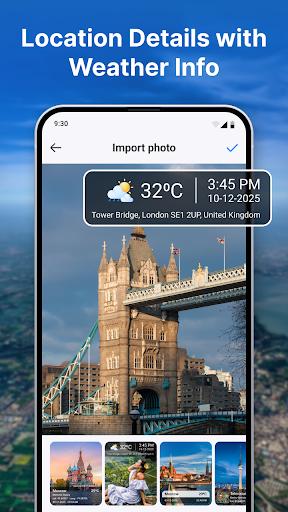
- Add custom location stamps, map stamps, date/time, and weather details.
🗺️ Location-wise Images
- Easily browse photos grouped by location.
- Review your travel memories based on where they were captured.
🎛️ Customization Options
- Change map type (Normal, Satellite, Terrain, Hybrid)
- Change date & time
- Set date/time formats
- Choose Celsius or Fahrenheit for temperature
- Select from multiple stamp templates & styles
🔒 Permissions Used
- Camera: Capture photos & videos
- Location: Add GPS coordinates, address, and map details
- Storage / Media: Access and display your media files stored on the device.
- Record Audio: Needed for video recording
- Notifications: Notify users about saved media or updates
GPS Map Camera: With Location is the ultimate tool for travelers, photographers, surveyors, delivery staff, field workers, and anyone who needs proof of location with visual evidence.
Capture the moment. Keep the details. Relive your memories with accuracy.
Whether you’re traveling, documenting fieldwork, visiting client sites, or simply keeping location-based records, this app makes every photo more meaningful and trustworthy.
🌍 Key Features
📍 Live Location
- Set your current location or choose any place manually on the map.
- Instantly view accurate place details while capturing photos.
📸 Capture Photos & Videos
- Take photos and videos with automatic location, map, date, and time stamps.
- Choose from multiple professional stamp templates and card styles.
🗂️ My Library
- All your GPS-tagged photos and videos are safely stored in one place.
- Quickly access, view, or share your stamped media anytime.
🖼️ Import & Stamp
- Import existing photos from your gallery.
- Add custom location stamps, map stamps, date/time, and weather details.
🗺️ Location-wise Images
- Easily browse photos grouped by location.
- Review your travel memories based on where they were captured.
🎛️ Customization Options
- Change map type (Normal, Satellite, Terrain, Hybrid)
- Change date & time
- Set date/time formats
- Choose Celsius or Fahrenheit for temperature
- Select from multiple stamp templates & styles
🔒 Permissions Used
- Camera: Capture photos & videos
- Location: Add GPS coordinates, address, and map details
- Storage / Media: Access and display your media files stored on the device.
- Record Audio: Needed for video recording
- Notifications: Notify users about saved media or updates
GPS Map Camera: With Location is the ultimate tool for travelers, photographers, surveyors, delivery staff, field workers, and anyone who needs proof of location with visual evidence.
Capture the moment. Keep the details. Relive your memories with accuracy.
Developer email
office.editorapp@gmail.com
Developer website
https://infinitytoolsllc.comReleased
Dec 13, 2025
Current version
1.8
Android version
7.0
Reviews & Ratings
4.0
out of 5
5
4
3
2
1
⚠️ Users report mixed experiences
200 reviewsScreenshots