Glextor App Folder Organizer
Glextor UA

4.6 stars1,239 reviews10,000+$7.99
ToolsEveryoneVersion 6.9.0.704Updated 5/20/2026, 11:43:28 AM
Open in StoreLooking for a better app drawer? Need to organize hundreds of apps into folders, hide apps from prying eyes, or back up APKs and settings to Google Drive? Try Glextor App Folder Organizer — a full-featured app manager and app organizer for Android.
App folder organizer
Organize and categorize your apps with auto-grouping to folders based on Google Play categories. Newly installed apps are sorted into folders automatically. Want a more personalized structure? Create your own folders or rename predefined ones. Each app can be assigned to several folders at once. Use system folders for one-tap access to most used, last used, or last installed apps.
Group shortcuts & widgets
No more dozens of shortcuts cluttering your home screen. Use group home-screen shortcuts and group widgets to put every folder one tap away.
APK backups & Application Repository
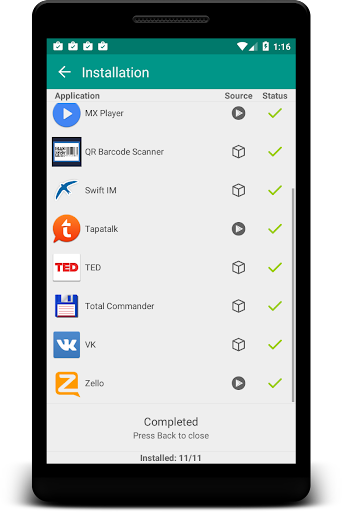
Keep your own repository of apps — save them as Play Store bookmarks or back up APK packages to restore later. To install packages from backup, accept the install-packages permission for Glextor App Manager. Share APKs through any Android app, or add apps to your repository directly from Google Play (use Share → Glextor App Folder Organizer).
Cloud backup with Google Drive
Sync your folder structure, settings, and customizations to Google Drive and restore them on any device in seconds. Switch phones without losing your setup.
Rooted devices support
Use root tools for batch uninstall and batch install of apps, and to uninstall system applications.
Favorites
Mark apps as favorites for easy access. Favorite apps appear first when the app list is sorted by name. Filter by favorites, or open the Favorites system folder to see them all in one place.
...and more
• App folder organizer with auto-categorization
• Hide apps from the drawer
• Icon packs support
• Tags for apps
• Interface customization
• Configuration export
• Manage installed apps
• Share apps with friends instantly (Facebook, Twitter, SMS, email, etc.)
• Search and filters to find apps fast
Full version features:
★ Subfolders inside top folders
★ Root tools (batch install/uninstall, uninstall system apps)
★ Backup history (multiple backups per app)
★ Automatic update of app backups when a new version is installed
★ Google Drive cloud sync for backups and settings
★ Hide as many apps as you need (Free version allows up to 3)
★ Hide social panel from drawer
★ System folders customization (Free version shows up to 5 items inside System folder)
★ Context menu customization
★ Popup transparency customization
★ Automatic icon pack apply to all apps
★ Widget reconfiguration
★ No ads
Note: This app uses Accessibility services.
If you'd like to help translate Glextor App Manager into your language, please let us know — thank you!
More screenshots and release notes: http://glextor.com/products/appmanager/
Stay connected!
Facebook: http://www.facebook.com/glextor
Twitter: http://twitter.com/GlextorInc
Email: glextor@gmail.com
App folder organizer
Organize and categorize your apps with auto-grouping to folders based on Google Play categories. Newly installed apps are sorted into folders automatically. Want a more personalized structure? Create your own folders or rename predefined ones. Each app can be assigned to several folders at once. Use system folders for one-tap access to most used, last used, or last installed apps.
Group shortcuts & widgets
No more dozens of shortcuts cluttering your home screen. Use group home-screen shortcuts and group widgets to put every folder one tap away.
APK backups & Application Repository
Keep your own repository of apps — save them as Play Store bookmarks or back up APK packages to restore later. To install packages from backup, accept the install-packages permission for Glextor App Manager. Share APKs through any Android app, or add apps to your repository directly from Google Play (use Share → Glextor App Folder Organizer).
Cloud backup with Google Drive
Sync your folder structure, settings, and customizations to Google Drive and restore them on any device in seconds. Switch phones without losing your setup.
Rooted devices support
Use root tools for batch uninstall and batch install of apps, and to uninstall system applications.
Favorites
Mark apps as favorites for easy access. Favorite apps appear first when the app list is sorted by name. Filter by favorites, or open the Favorites system folder to see them all in one place.
...and more
• App folder organizer with auto-categorization
• Hide apps from the drawer
• Icon packs support
• Tags for apps
• Interface customization
• Configuration export
• Manage installed apps
• Share apps with friends instantly (Facebook, Twitter, SMS, email, etc.)
• Search and filters to find apps fast
Full version features:
★ Subfolders inside top folders
★ Root tools (batch install/uninstall, uninstall system apps)
★ Backup history (multiple backups per app)
★ Automatic update of app backups when a new version is installed
★ Google Drive cloud sync for backups and settings
★ Hide as many apps as you need (Free version allows up to 3)
★ Hide social panel from drawer
★ System folders customization (Free version shows up to 5 items inside System folder)
★ Context menu customization
★ Popup transparency customization
★ Automatic icon pack apply to all apps
★ Widget reconfiguration
★ No ads
Note: This app uses Accessibility services.
If you'd like to help translate Glextor App Manager into your language, please let us know — thank you!
More screenshots and release notes: http://glextor.com/products/appmanager/
Stay connected!
Facebook: http://www.facebook.com/glextor
Twitter: http://twitter.com/GlextorInc
Email: glextor@gmail.com
Developer email
glextor@gmail.com
Developer website
http://glextor.comReleased
Jul 10, 2013
Current version
6.9.0.704
Android version
6.0
Reviews & Ratings
4.6
out of 5
5
4
3
2
1
😊 Highly rated by users
1,239 reviewsScreenshots