Gallery - Photo, Video & Home
Ignia LLC

4.3 stars58 reviews1,000+Free
PhotographyEveryoneVersion 10.0Updated 8/26/2026, 5:40:37 AM
Open in StoreGallery - Photo, Video & Story is a modern media organiser with an integrated Android Home experience. Browse your library, rediscover memories, organise albums, play videos and edit favourite photos from one responsive app.
A COMPLETE GALLERY
• Browse photos and videos together in All
• Switch between Photos, Videos and Favourites
• Use smooth date-grouped grids designed for large libraries
• Search your library without scrolling through everything
• Choose a comfortable grid density
• Open media in a distraction-free viewer
• Swipe down or use Back to return to your previous position
• View details, favourite items and share with other apps
PHOTO VIEWING AND EDITING
• Zoom and move through photos smoothly
• Use Enhance and creative effects
• Undo editing changes before saving
• Save edited results to your media library
• Set a photo as wallpaper
• Create collages, GIFs and highlight creations
VIDEO EXPERIENCE
• Videos open paused and begin only when you tap Play
• Videos start muted for a quieter experience
• Use Play, Pause, Seek, Forward, Back and Mute controls
• Browse surrounding media without leaving the viewer
ALBUMS THAT STAY ORGANISED
• Browse device albums with clear covers and item counts
• Create custom albums with your own names
• Sort albums and media in the order that works for you
• Switch album grid density for comfortable browsing
• Add photos and videos to albums
• Delete with confirmation and recover supported items from Bin
FOR YOU
For You helps you return to meaningful moments instead of showing another basic folder grid.
• Highlights presented as immersive stories
• Memories arranged from older moments to newer moments
• People & Faces groups processed on your device
• Incremental face discovery in manageable batches
• Places and trips based on available media location details
• People-together collections and personal discoveries
• Daily, monthly and yearly memory ideas when matching media is available
• Suggestions for collages, GIFs, wallpapers and highlights
• Hide memories, faces, dates or locations you do not want featured
Tap or swipe through stories with smooth horizontal navigation. Like, share or delete from the viewer, follow progress indicators and enjoy highlights refreshed from media on your device.
PRIVATE, ON-DEVICE DISCOVERY
Your photos and videos remain on your device. Gallery reads permitted media through Android's media library and does not upload your personal media. Face groups, places, albums, memories and suggestions are generated from local media and available metadata. An optional face model may be downloaded for on-device face discovery. You control photo/video access, selected-media access, media location, notifications and wallpaper permissions.
INTEGRATED ANDROID HOME EXPERIENCE
Gallery also includes an Android Home screen and app drawer. During setup, you can choose Gallery as your default Home app.
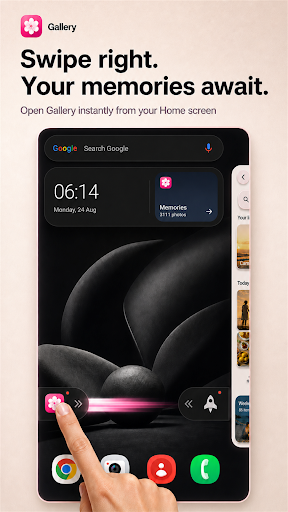
• Swipe from Home to open Gallery quickly
• Use the Cleaner shortcut from the opposite side
• Find installed apps through responsive app drawer search
• Keep frequently used apps close with Home shortcuts
• Use the clock and gallery widget for quick memory access
DESIGNED FOR DAILY USE
• Light and dark appearance support
• Transparent, theme-aware system bars
• Responsive layouts for different phone sizes
• Smooth transitions between Gallery, Albums, For You, viewers and stories
• Efficient incremental media loading for large libraries
• No account, registration or sign-in required
PERMISSIONS AND SERVICES
Photo and video permission is needed because library browsing, albums, stories, editing, faces and places are core features. Media location is used only when available for place collections. Notification permission enables optional memory notifications. Internet access supports ads, consent, analytics, remote configuration and the optional face-model download. The app uses Google services for ads, consent and analytics and is labelled as containing ads.
A COMPLETE GALLERY
• Browse photos and videos together in All
• Switch between Photos, Videos and Favourites
• Use smooth date-grouped grids designed for large libraries
• Search your library without scrolling through everything
• Choose a comfortable grid density
• Open media in a distraction-free viewer
• Swipe down or use Back to return to your previous position
• View details, favourite items and share with other apps
PHOTO VIEWING AND EDITING
• Zoom and move through photos smoothly
• Use Enhance and creative effects
• Undo editing changes before saving
• Save edited results to your media library
• Set a photo as wallpaper
• Create collages, GIFs and highlight creations
VIDEO EXPERIENCE
• Videos open paused and begin only when you tap Play
• Videos start muted for a quieter experience
• Use Play, Pause, Seek, Forward, Back and Mute controls
• Browse surrounding media without leaving the viewer
ALBUMS THAT STAY ORGANISED
• Browse device albums with clear covers and item counts
• Create custom albums with your own names
• Sort albums and media in the order that works for you
• Switch album grid density for comfortable browsing
• Add photos and videos to albums
• Delete with confirmation and recover supported items from Bin
FOR YOU
For You helps you return to meaningful moments instead of showing another basic folder grid.
• Highlights presented as immersive stories
• Memories arranged from older moments to newer moments
• People & Faces groups processed on your device
• Incremental face discovery in manageable batches
• Places and trips based on available media location details
• People-together collections and personal discoveries
• Daily, monthly and yearly memory ideas when matching media is available
• Suggestions for collages, GIFs, wallpapers and highlights
• Hide memories, faces, dates or locations you do not want featured
Tap or swipe through stories with smooth horizontal navigation. Like, share or delete from the viewer, follow progress indicators and enjoy highlights refreshed from media on your device.
PRIVATE, ON-DEVICE DISCOVERY
Your photos and videos remain on your device. Gallery reads permitted media through Android's media library and does not upload your personal media. Face groups, places, albums, memories and suggestions are generated from local media and available metadata. An optional face model may be downloaded for on-device face discovery. You control photo/video access, selected-media access, media location, notifications and wallpaper permissions.
INTEGRATED ANDROID HOME EXPERIENCE
Gallery also includes an Android Home screen and app drawer. During setup, you can choose Gallery as your default Home app.
• Swipe from Home to open Gallery quickly
• Use the Cleaner shortcut from the opposite side
• Find installed apps through responsive app drawer search
• Keep frequently used apps close with Home shortcuts
• Use the clock and gallery widget for quick memory access
DESIGNED FOR DAILY USE
• Light and dark appearance support
• Transparent, theme-aware system bars
• Responsive layouts for different phone sizes
• Smooth transitions between Gallery, Albums, For You, viewers and stories
• Efficient incremental media loading for large libraries
• No account, registration or sign-in required
PERMISSIONS AND SERVICES
Photo and video permission is needed because library browsing, albums, stories, editing, faces and places are core features. Media location is used only when available for place collections. Notification permission enables optional memory notifications. Internet access supports ads, consent, analytics, remote configuration and the optional face-model download. The app uses Google services for ads, consent and analytics and is labelled as containing ads.
Developer email
adesh@ignia.cc
Developer website
https://ignia.cc/Released
Mar 5, 2026
Current version
10.0
Android version
7.0
Reviews & Ratings
4.3
out of 5
5
4
3
2
1
⚠️ Users report mixed experiences
58 reviewsScreenshots