Gallery
Galeria Clara

Gallery – Photo Gallery & Video Gallery
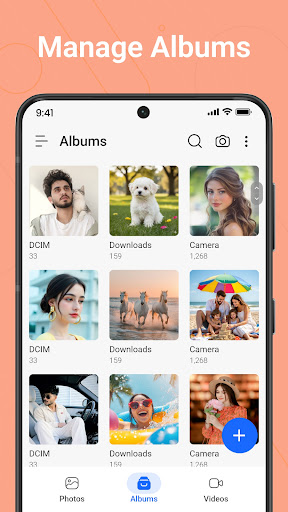
Gallery is a simple and easy-to-use gallery app for viewing, organizing, and managing your photo gallery and video gallery. Browse albums with a clean interface designed for everyday use.
Gallery’s After-Call feature lets you quickly access photos, send instant replies, and set reminders right from the after-call screen.
Whether you want to manage family photos, travel pictures, screenshots, or videos, Gallery helps keep your media organized. View images in full screen, browse albums, and quickly find your favorite memories.
Photo Gallery & Video Gallery
Gallery lets you manage your photo gallery and video gallery in one place. Browse photos and videos stored on your device, switch between albums, and organize media files with ease.
Organize Your Gallery
Keep your gallery organized by sorting photos, videos, and albums by:
Name
Date
Size
Find your media faster and keep your gallery clean and organized.
Create & Manage Albums
Create custom albums to organize photos and videos your way. Move, rename, copy, or delete media files with simple controls.
Full Screen Gallery Viewer
Enjoy a smooth viewing experience with:
Full-screen photo viewer
Zoom photos with gestures
Slideshow mode
Trash & Favorites
Deleted photos and videos are moved to Trash, allowing you to restore them later if needed.
Mark important photos as Favorites so they are always easy to find
Dark Mode & Light Mode
Choose between Dark Mode and Light Mode for a comfortable gallery experience any time of day.
Multiple Selection
Select multiple photos and videos to:
Delete
Share
Copy
Move
Manage large collections in just a few taps.
Gallery Features
• Photo gallery and video gallery • Organize photos and videos • Create and manage albums • Sort by name, date, and size • Full-screen image viewer • Slideshow support • Favorites collection • Trash and restore photos • Multiple photo selection • Share photos and videos • Dark Mode & Light Mode • Clean and easy gallery interface
Gallery is designed to make viewing, organizing, and managing your photos and videos simple.
Gallery is a simple and easy-to-use gallery app for viewing, organizing, and managing your photo gallery and video gallery. Browse albums with a clean interface designed for everyday use.
Gallery’s After-Call feature lets you quickly access photos, send instant replies, and set reminders right from the after-call screen.
Whether you want to manage family photos, travel pictures, screenshots, or videos, Gallery helps keep your media organized. View images in full screen, browse albums, and quickly find your favorite memories.
Photo Gallery & Video Gallery
Gallery lets you manage your photo gallery and video gallery in one place. Browse photos and videos stored on your device, switch between albums, and organize media files with ease.
Organize Your Gallery
Keep your gallery organized by sorting photos, videos, and albums by:
Name
Date
Size
Find your media faster and keep your gallery clean and organized.
Create & Manage Albums
Create custom albums to organize photos and videos your way. Move, rename, copy, or delete media files with simple controls.
Full Screen Gallery Viewer
Enjoy a smooth viewing experience with:
Full-screen photo viewer
Zoom photos with gestures
Slideshow mode
Trash & Favorites
Deleted photos and videos are moved to Trash, allowing you to restore them later if needed.
Mark important photos as Favorites so they are always easy to find
Dark Mode & Light Mode
Choose between Dark Mode and Light Mode for a comfortable gallery experience any time of day.
Multiple Selection
Select multiple photos and videos to:
Delete
Share
Copy
Move
Manage large collections in just a few taps.
Gallery Features
• Photo gallery and video gallery • Organize photos and videos • Create and manage albums • Sort by name, date, and size • Full-screen image viewer • Slideshow support • Favorites collection • Trash and restore photos • Multiple photo selection • Share photos and videos • Dark Mode & Light Mode • Clean and easy gallery interface
Gallery is designed to make viewing, organizing, and managing your photos and videos simple.
Developer email
console.galeriaclara@gmail.com
Developer website
http://galeriaclara.blogspot.comReleased
Jul 30, 2026
Current version
1.5
Android version
11
Screenshots