Space Weather Watch Face
Gadget Liv

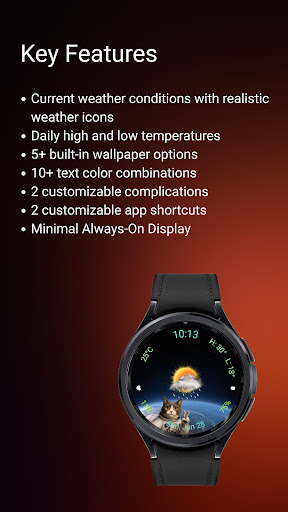
Space Weather is a space-themed Wear OS watch face built around weather information and a minimal layout. The design combines a starry background, realistic weather icons, and customizable accents while keeping the display easy to read throughout the day.
✨ Key Features
- Space-inspired watch face design
- Current weather conditions with realistic weather icons
- Current temperature display
- Daily high and low temperatures
- 5+ built-in wallpaper options
- 10+ text color combinations
- 2 customizable complications
- 2 customizable app shortcuts
- Support for both 12-hour and 24-hour time formats
- Battery-friendly analog Always-On Display
☀️ IMPORTANT: If the weather doesn't update:
1. Try switching between watch faces
2. Open the default 'Weather' app on your watch and enable location permission.
3. Ensure location access is set to "Always Allow" for both the watch face and the weather provider.
4. Check that Location (GPS) is toggled ON in both the watch and the paired smartphone settings.
5. Turn off battery Power Saving mode to allow background data sync.
⚠️ Compatibility
This is a Wear OS watch face app for smartwatches running Wear OS 5 or higher, built with the new Watch Face Format required on modern devices.
Compatible devices include:
- Samsung Galaxy Watch Series (including Classic and Ultra models)
- Google Pixel Watch Series
- Other smartwatch brands running Wear OS 5 or newer
Contact Us
If you have questions or feedback, feel free to contact me at gadgetliv@gmail.com for support.
✨ Key Features
- Space-inspired watch face design
- Current weather conditions with realistic weather icons
- Current temperature display
- Daily high and low temperatures
- 5+ built-in wallpaper options
- 10+ text color combinations
- 2 customizable complications
- 2 customizable app shortcuts
- Support for both 12-hour and 24-hour time formats
- Battery-friendly analog Always-On Display
☀️ IMPORTANT: If the weather doesn't update:
1. Try switching between watch faces
2. Open the default 'Weather' app on your watch and enable location permission.
3. Ensure location access is set to "Always Allow" for both the watch face and the weather provider.
4. Check that Location (GPS) is toggled ON in both the watch and the paired smartphone settings.
5. Turn off battery Power Saving mode to allow background data sync.
⚠️ Compatibility
This is a Wear OS watch face app for smartwatches running Wear OS 5 or higher, built with the new Watch Face Format required on modern devices.
Compatible devices include:
- Samsung Galaxy Watch Series (including Classic and Ultra models)
- Google Pixel Watch Series
- Other smartwatch brands running Wear OS 5 or newer
Contact Us
If you have questions or feedback, feel free to contact me at gadgetliv@gmail.com for support.
Developer email
gadgetliv@gmail.com
Developer website
https://gadgetliv.comReleased
Jul 13, 2026
Current version
VARY
Android version
VARY
Screenshots