Foap - sell photos & videos
Foap Poland SP Z. O O.

2.3 stars38,409 reviews5,000,000+Free
PhotographyEveryoneVersion 3.32.0.1025Updated 5/17/2026, 1:48:28 PM
Open in StoreTurn your photos and videos into money! Collaborate with well-known brands and sell user-generated content. Brands from all around the world are here and hungry for your content!
* Collaborate with brands you know and love and start developing long-term relationships.
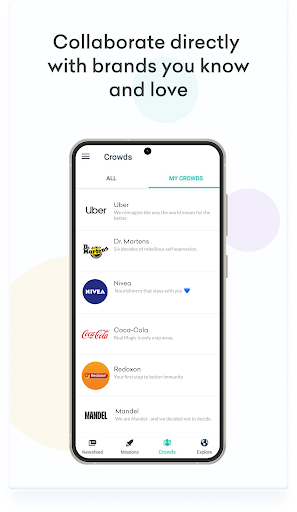
* Collaborate with brands directly through Crowds and get first-hand feedback from brand teams.
* Sell photos and videos (UGC) through Foap Missions
* Take your creator career to the next level with direct recognition of your work. Become an official brand ambassador on Foap.
* Show up your creativity. Inspire and be inspired.
* Meet & interact with like-minded creators, exchange feedback, give appreciation and get to know each other.
* Discover the creative world of Global Brands. See and learn from the best in the industry.
* Sell your photos through Foap Market at Foap.com
* Create your UGC portfolio for brands to see your photos and videos
* Explore beautiful content from all around the world
* Get feedback on your photos from other Foapers
* Be part of an amazing and growing international community of content creators
* Upload photos and videos straight from your phone
* Enjoy unlimited uploads
* Easy cashouts thanks to PayPal integration
* The best way to make money from what you love doing
Foap is free! Every Mission is rewarded with a prize starting with $50.
* Collaborate with brands you know and love and start developing long-term relationships.
* Collaborate with brands directly through Crowds and get first-hand feedback from brand teams.
* Sell photos and videos (UGC) through Foap Missions
* Take your creator career to the next level with direct recognition of your work. Become an official brand ambassador on Foap.
* Show up your creativity. Inspire and be inspired.
* Meet & interact with like-minded creators, exchange feedback, give appreciation and get to know each other.
* Discover the creative world of Global Brands. See and learn from the best in the industry.
* Sell your photos through Foap Market at Foap.com
* Create your UGC portfolio for brands to see your photos and videos
* Explore beautiful content from all around the world
* Get feedback on your photos from other Foapers
* Be part of an amazing and growing international community of content creators
* Upload photos and videos straight from your phone
* Enjoy unlimited uploads
* Easy cashouts thanks to PayPal integration
* The best way to make money from what you love doing
Foap is free! Every Mission is rewarded with a prize starting with $50.
Developer email
support@foap.com
Developer website
http://www.foap.comReleased
Sep 16, 2013
Current version
3.32.0.1025
Android version
8.1
Reviews & Ratings
2.3
out of 5
5
4
3
2
1
🚫 Very low user satisfaction
38,409 reviewsScreenshots