Electrical Schematics: Canvas
Ángel Martínez

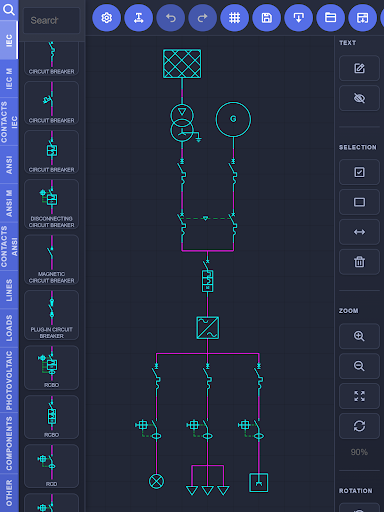
Design electrical schematics (single-line diagrams, multi-line diagrams, circuits, etc.) quickly and easily with an intuitive drag-and-drop editor. Whether you're an electrician, electrical engineer, technician, student, or hobbyist, this app lets you create accurate circuit diagrams without the complexity of traditional CAD software.
You just need to select a symbol from the built-in library, drag it to the workspace, and place it wherever you need it. In a few minutes, you can create easy-to-read diagrams for your projects, documentation, or training, with the flexibility to adapt the app to whatever workload you require ."
✅ WHAT’S INCLUDED WITH YOUR PURCHASE (Standard License)
✅ Full Editor: Access all library symbols with no restrictions and customize line colors
✅ Ad-Free: Enjoy a clean, uninterrupted workflow
✅ Unlimited Export: Export and share your designs in high quality as a file, image, or PDF
✅ Project Management: Keep up to 2 editable diagrams on your device at the same time (simply export your project to PDF and start a new one whenever you need)
⚡PRO MODULE (In-App Purchase)
⚡Unlimited Storage: Save as many diagrams on your device as your storage space allows
⚡Advanced Features: Import one diagram into another to build complex schematics
⚡Multi-Device: Open and edit projects created on other devices
⭐ WHY YOU'LL LOVE IT
• Intuitive drag-and-drop editor
• More than 400 industry-standard electrical symbols
• Create single-line diagrams and electrical installation layouts
• Move, align, and organize components with ease
• Produce clean, easy-to-read designs ready to share
• Perfect for planning, documentation, education, and troubleshooting
• Lightweight, fast, and easy to use
👥 IDEAL FOR
• Electricians
• Electrical engineers
• Technicians
• Students and teachers
• Electrical contractors
• Training centers
📐EXTENSIVE SYMBOL LIBRARY
Includes over 400 symbols compliant with IEC and ANSI standards:
• Switches, disconnectors, circuit breakers, RCBOs, and RCDs
• Contactors, relays, overload protection, and interlocks
• Push buttons, limit switches, sensors, and control devices
• Transformers, autotransformers, converters, and power inverters
• Motors, generators, batteries, and power supplies
• Resistors, capacitors, inductors, reactors, and potentiometers
• Diodes, TRIACs, transistors, photovoltaic components, and LEDs
• Meters, timers, lamps, connectors, socket outlets, and terminals
• Grounding, conductors, junctions, wiring configurations, and much more
Whether you're planning an electrical installation, documenting a project, creating educational material, or sketching a circuit, this app provides a fast and reliable way to produce accurate, high-quality drawings.
Download ElectricalCanvas today and start creating electrical schematics with speed, precision, and confidence.
You just need to select a symbol from the built-in library, drag it to the workspace, and place it wherever you need it. In a few minutes, you can create easy-to-read diagrams for your projects, documentation, or training, with the flexibility to adapt the app to whatever workload you require ."
✅ WHAT’S INCLUDED WITH YOUR PURCHASE (Standard License)
✅ Full Editor: Access all library symbols with no restrictions and customize line colors
✅ Ad-Free: Enjoy a clean, uninterrupted workflow
✅ Unlimited Export: Export and share your designs in high quality as a file, image, or PDF
✅ Project Management: Keep up to 2 editable diagrams on your device at the same time (simply export your project to PDF and start a new one whenever you need)
⚡PRO MODULE (In-App Purchase)
⚡Unlimited Storage: Save as many diagrams on your device as your storage space allows
⚡Advanced Features: Import one diagram into another to build complex schematics
⚡Multi-Device: Open and edit projects created on other devices
⭐ WHY YOU'LL LOVE IT
• Intuitive drag-and-drop editor
• More than 400 industry-standard electrical symbols
• Create single-line diagrams and electrical installation layouts
• Move, align, and organize components with ease
• Produce clean, easy-to-read designs ready to share
• Perfect for planning, documentation, education, and troubleshooting
• Lightweight, fast, and easy to use
👥 IDEAL FOR
• Electricians
• Electrical engineers
• Technicians
• Students and teachers
• Electrical contractors
• Training centers
📐EXTENSIVE SYMBOL LIBRARY
Includes over 400 symbols compliant with IEC and ANSI standards:
• Switches, disconnectors, circuit breakers, RCBOs, and RCDs
• Contactors, relays, overload protection, and interlocks
• Push buttons, limit switches, sensors, and control devices
• Transformers, autotransformers, converters, and power inverters
• Motors, generators, batteries, and power supplies
• Resistors, capacitors, inductors, reactors, and potentiometers
• Diodes, TRIACs, transistors, photovoltaic components, and LEDs
• Meters, timers, lamps, connectors, socket outlets, and terminals
• Grounding, conductors, junctions, wiring configurations, and much more
Whether you're planning an electrical installation, documenting a project, creating educational material, or sketching a circuit, this app provides a fast and reliable way to produce accurate, high-quality drawings.
Download ElectricalCanvas today and start creating electrical schematics with speed, precision, and confidence.
Developer email
xl.ingenieria@gmail.com
Released
Jul 27, 2026
Current version
1.1.31
Android version
5.0
Screenshots